


Windows Reference Guide
160+ computer abbreviations, explained in plain English for Windows users, IT pros, and anyone studying for CompTIA or Azure certifications.
Whether you are studying for a CompTIA A+, AZ-900, or Security+ exam, starting out in IT support, or just tired of Googling the same terms at work, this is the reference page to bookmark. Seven categories, 160+ terms, no filler.
How to use this guide
Use Ctrl+F to search for any abbreviation on this page. Each table is grouped by category so you can scan by topic. If you want a printable version to keep at your desk or share with your team, grab the PDF below.
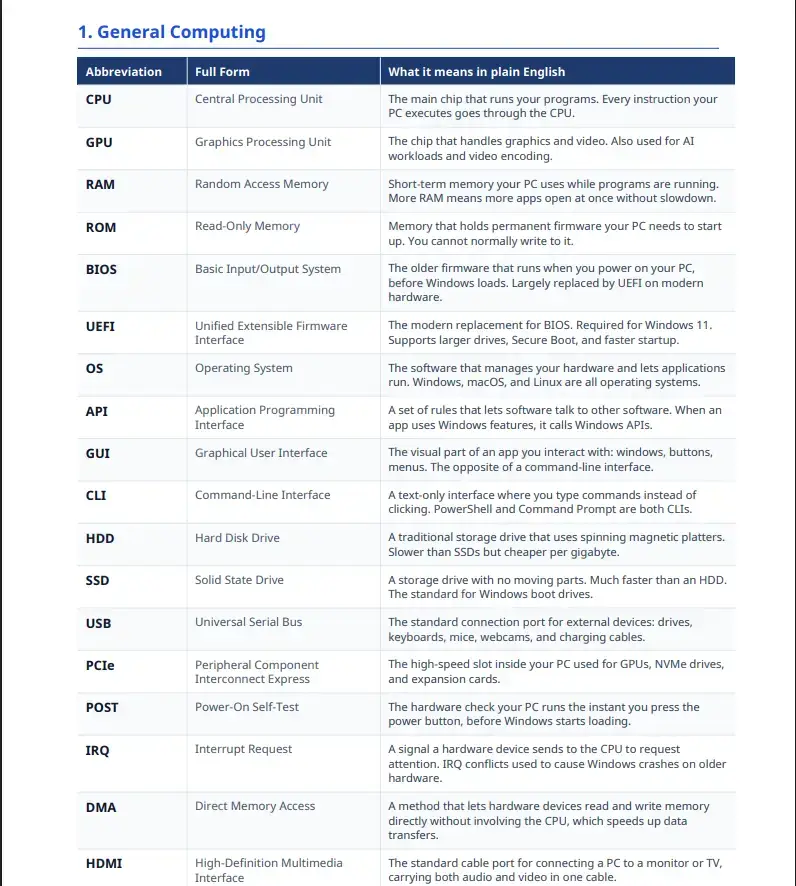
1. General Computing
| Abbreviation | Full Form | What it means in plain English |
|---|---|---|
| CPU | Central Processing Unit | The main chip that runs your programs. Every instruction your PC executes goes through the CPU. |
| GPU | Graphics Processing Unit | The chip that handles graphics and video. Also used for AI workloads and video encoding. |
| RAM | Random Access Memory | Short-term memory your PC uses while programs are running. More RAM means more apps open at once without slowdown. |
| ROM | Read-Only Memory | Memory that holds permanent firmware your PC needs to start up. You cannot normally write to it. |
| BIOS | Basic Input/Output System | The older firmware that runs when you power on your PC, before Windows loads. Largely replaced by UEFI on modern hardware. |
| UEFI | Unified Extensible Firmware Interface | The modern replacement for BIOS. Required for Windows 11. Supports larger drives, Secure Boot, and faster startup. |
| OS | Operating System | The software that manages your hardware and lets applications run. Windows, macOS, and Linux are all operating systems. |
| API | Application Programming Interface | A set of rules that lets software talk to other software. When an app uses Windows features, it calls Windows APIs. |
| GUI | Graphical User Interface | The visual part of an app you interact with: windows, buttons, menus. The opposite of a command-line interface. |
| CLI | Command-Line Interface | A text-only interface where you type commands instead of clicking. PowerShell and Command Prompt are both CLIs. |
| HDD | Hard Disk Drive | A traditional storage drive that uses spinning magnetic platters. Slower than SSDs but cheaper per gigabyte. |
| SSD | Solid State Drive | A storage drive with no moving parts. Much faster than an HDD. The standard for Windows boot drives. |
| USB | Universal Serial Bus | The standard connection port for external devices: drives, keyboards, mice, webcams, and charging cables. |
| PCIe | Peripheral Component Interconnect Express | The high-speed slot inside your PC used for GPUs, NVMe drives, and expansion cards. |
| POST | Power-On Self-Test | The hardware check your PC runs the instant you press the power button, before Windows starts loading. |
| IRQ | Interrupt Request | A signal a hardware device sends to the CPU to request attention. IRQ conflicts used to cause Windows crashes on older hardware. |
| DMA | Direct Memory Access | A method that lets hardware devices read and write memory directly without involving the CPU, which speeds up data transfers. |
| HDMI | High-Definition Multimedia Interface | The standard cable port for connecting a PC to a monitor or TV, carrying both audio and video in one cable. |
| DP | DisplayPort | A video connection standard common on PC monitors and GPUs. Supports higher refresh rates than HDMI at the same resolution. |
| IoT | Internet of Things | Connected physical devices like smart thermostats, cameras, and sensors. Windows IoT is a version of Windows designed to run on embedded IoT hardware. |
2. Windows OS
| Abbreviation | Full Form | What it means in plain English |
|---|---|---|
| UAC | User Account Control | The prompt that asks “Do you want to allow this app to make changes to your device?” It blocks software from quietly getting admin rights. |
| WMI | Windows Management Instrumentation | A Windows system that lets scripts and tools query and manage hardware, software, and OS settings. Used heavily in PowerShell and IT automation. |
| WER | Windows Error Reporting | The service that collects crash data and sends it to Microsoft. You can disable it via Group Policy or the Services console. |
| NTFS | New Technology File System | The default file system for Windows drives. Supports file permissions, encryption, large files, and journaling (recovery after a crash). |
| GPO | Group Policy Object | A set of rules an IT admin applies to users or computers in an Active Directory domain. Controls everything from desktop wallpaper to software installation. |
| HKLM | HKEY_LOCAL_MACHINE | A top-level registry hive that stores settings applying to the whole computer, not just one user. Common in Group Policy and software installs. |
| HKCU | HKEY_CURRENT_USER | A registry hive that stores settings for the currently logged-in user only. Changes here do not affect other accounts on the same machine. |
| SAM | Security Accounts Manager | The Windows database that stores local user account credentials. It is locked while Windows is running and a common target in security audits. |
| LSASS | Local Security Authority Subsystem Service | The Windows process that handles login, password changes, and access tokens. It holds credentials in memory, which is why attackers often target it. |
| ETW | Event Tracing for Windows | A Windows logging system used by performance monitoring and security tools to trace what is happening inside the OS in real time. |
| WSL | Windows Subsystem for Linux | A feature that lets you run Linux command-line tools and distros directly inside Windows 10 and 11 without a virtual machine. |
| WinPE | Windows Preinstallation Environment | A lightweight version of Windows used for installing, repairing, or imaging a PC before the full OS loads. Runs from a USB drive or network. |
| HAL | Hardware Abstraction Layer | A layer in the Windows kernel that sits between the OS and your hardware. It means Windows does not need to know the exact details of every piece of hardware it runs on. |
| DISM | Deployment Image Servicing and Management | A command-line tool for repairing Windows installations, managing Windows images, and preparing deployment media. Run with SFC when diagnosing a broken Windows install. |
| SFC | System File Checker | A built-in Windows tool (run with sfc /scannow in an admin command prompt) that scans for corrupted system files and replaces them. |
| WinRM | Windows Remote Management | The Windows service that powers remote PowerShell sessions. Must be enabled on a machine before you can connect to it with Enter-PSSession. |
| WDF | Windows Driver Framework | The framework Microsoft requires device driver authors to use. Makes drivers more stable and reduces the chance they can crash Windows. |
| MSRT | Malicious Software Removal Tool | A free Microsoft tool delivered through Windows Update each month that scans for and removes specific widespread malware families. |
| TPM | Trusted Platform Module | A security chip on your motherboard that stores encryption keys. Required for Windows 11 and used by BitLocker to protect your drive. |
| VDI | Virtual Desktop Infrastructure | A setup where Windows desktops run on a server and users connect to them remotely. Common in enterprise environments and the basis for Azure Virtual Desktop. |
3. Networking
| Abbreviation | Full Form | What it means in plain English |
|---|---|---|
| DNS | Domain Name System | Translates domain names like windowsmode.com into IP addresses. When you type a URL, DNS figures out which server to connect to. |
| DHCP | Dynamic Host Configuration Protocol | Automatically assigns an IP address to your device when it connects to a network. Your router runs a DHCP server for your home network. |
| TCP | Transmission Control Protocol | A network protocol that guarantees data arrives in order and without errors. Used for web browsing, email, and file transfers where accuracy matters. |
| UDP | User Datagram Protocol | A faster network protocol that sends data without checking if it arrived. Used in gaming, video streaming, and voice calls where speed matters more than perfection. |
| IP | Internet Protocol | The system that assigns addresses to devices on a network and routes data between them. IPv4 uses four numbers (192.168.1.1). IPv6 uses a longer format. |
| NAT | Network Address Translation | Lets all devices on your home network share one public IP address. Your router translates between your private addresses and the internet. |
| VPN | Virtual Private Network | An encrypted tunnel between your device and a server. Used to secure traffic on public Wi-Fi or to connect remotely to a company network. |
| MAC | Media Access Control | A unique hardware address burned into every network adapter. Used to identify devices on a local network before IP addresses are assigned. |
| MTU | Maximum Transmission Unit | The largest chunk of data that can be sent in one network packet. Mismatched MTU settings cause slow connections and random dropouts. |
| VLAN | Virtual Local Area Network | A way to split a physical network into isolated logical segments. Used in offices to separate guest Wi-Fi from internal systems. |
| QoS | Quality of Service | A system for prioritizing network traffic. Gives video calls and gaming packets priority over background downloads so your connection feels smooth. |
| BGP | Border Gateway Protocol | The routing protocol that directs internet traffic between large networks. It is how data finds its path from one country to another across the internet. |
| HTTP | Hypertext Transfer Protocol | The protocol web browsers use to request and receive web pages. HTTPS is the encrypted version and the standard for all modern websites. |
| FTP | File Transfer Protocol | An older protocol for transferring files between computers. Still used in some hosting environments. SFTP (the secure version) is preferred today. |
| SMTP | Simple Mail Transfer Protocol | The protocol used to send email between servers. When your email client sends a message, it uses SMTP to deliver it. |
| IMAP | Internet Message Access Protocol | A protocol for receiving email that keeps messages on the server so you can access them from multiple devices. Preferred over POP3 for most users today. |
| SSH | Secure Shell | An encrypted protocol for connecting to remote computers via a command line. Built into Windows 10 and 11. Used for managing Linux servers from a Windows PC. |
| SNMP | Simple Network Management Protocol | A protocol IT teams use to monitor and manage network devices like routers, switches, and printers from a central management console. |
| RDP | Remote Desktop Protocol | Microsoft’s protocol for connecting to another Windows PC and controlling it remotely. Built into Windows Pro and Enterprise editions. |
| LAN | Local Area Network | A network that connects devices in a limited area like your home or office. Your router, PCs, phones, and printers are all on your LAN. |
| WAN | Wide Area Network | A network that spans large distances, connecting multiple LANs together. The internet is the largest WAN in existence. |
4. Microsoft and Azure
| Abbreviation | Full Form | What it means in plain English |
|---|---|---|
| AAD | Azure Active Directory (now Entra ID) | Microsoft’s cloud identity service. Handles logins, single sign-on, and access control for Microsoft 365 and Azure. Rebranded to Microsoft Entra ID in 2023. |
| ARM | Azure Resource Manager | The deployment and management layer for Azure. Every resource you create in Azure (VMs, storage, databases) goes through ARM. Powers Infrastructure as Code templates. |
| RBAC | Role-Based Access Control | A system for controlling who can do what in Azure. You assign roles (Reader, Contributor, Owner) to users or groups at the subscription, resource group, or resource level. |
| AVD | Azure Virtual Desktop | Microsoft’s cloud service for running Windows desktops and apps hosted in Azure. Users connect remotely from any device. Formerly called Windows Virtual Desktop. |
| SLA | Service Level Agreement | Microsoft’s uptime guarantee for a given Azure service. For example, a 99.9% SLA means the service can be down no more than about 8.7 hours per year. |
| IaaS | Infrastructure as a Service | A cloud model where you rent virtual machines and storage. You manage the OS and software. Azure VMs are IaaS. You control the machine; Microsoft manages the hardware. |
| PaaS | Platform as a Service | A cloud model where the provider manages the OS and runtime. You just deploy your code. Azure App Service is PaaS. Less control, less maintenance work. |
| SaaS | Software as a Service | Software you access via a browser or app with no installation. Microsoft 365 is SaaS. The provider manages everything; you just use the software. |
| AD | Active Directory | Microsoft’s on-premises directory service. Manages users, computers, and policies across a corporate Windows network. The on-prem counterpart to Entra ID. |
| AD DS | Active Directory Domain Services | The specific Windows Server role that runs Active Directory. The domain controller that authenticates users and enforces Group Policy in a corporate environment. |
| MFA | Multi-Factor Authentication | Requiring more than just a password to sign in. Usually a password plus a code from an app or SMS. Required by most Microsoft 365 and Azure security policies. |
| SSO | Single Sign-On | Lets users sign in once and access multiple apps without logging in again. Entra ID provides SSO across Microsoft 365 apps and thousands of third-party services. |
| MEM | Microsoft Endpoint Manager | Microsoft’s unified device management platform. Combines Intune and Configuration Manager. Used to deploy software, enforce policies, and manage Windows PCs at scale. |
| MDM | Mobile Device Management | A system for managing and securing mobile devices and modern Windows PCs remotely. Microsoft Intune is Microsoft’s MDM solution. |
| CDN | Content Delivery Network | A network of servers spread across the world that caches your website files close to visitors. Azure CDN reduces load times by serving content from a nearby location. |
| NSG | Network Security Group | An Azure firewall-like feature that filters network traffic to and from Azure resources. You define inbound and outbound rules to control what traffic is allowed. |
| WAF | Web Application Firewall | A security layer that protects web applications from common attacks like SQL injection and cross-site scripting. Available as part of Azure Application Gateway. |
| KV | Key Vault (Azure Key Vault) | An Azure service for storing secrets, API keys, certificates, and encryption keys securely. Apps retrieve secrets from Key Vault instead of hardcoding them in code. |
| AKS | Azure Kubernetes Service | Microsoft’s managed container orchestration service. Lets you run and scale containerized applications in Azure without managing the underlying cluster infrastructure yourself. |
| DevOps | Development and Operations | A practice of combining software development and IT operations. Azure DevOps is Microsoft’s platform for managing code, pipelines, testing, and releases in one place. |
5. PowerShell and CLI
| Abbreviation | Full Form | What it means in plain English |
|---|---|---|
| PS | PowerShell | Microsoft’s scripting language and command-line shell. Built into Windows and cross-platform via PowerShell 7. The main automation tool for Windows admins. |
| ISE | Integrated Scripting Environment | The built-in PowerShell editor in Windows. It is being phased out in favor of VS Code with the PowerShell extension, but still included in Windows for now. |
| CIM | Common Information Model | The modern standard for querying system information via PowerShell. CIM cmdlets (like Get-CimInstance) replace the older WMI cmdlets and work across platforms. |
| DSC | Desired State Configuration | A PowerShell feature for defining how a machine should be configured. You write a config and Windows enforces it automatically, correcting any drift from the desired state. |
| PSRemoting | PowerShell Remoting | Lets you run PowerShell commands on remote machines over the network. Requires WinRM to be enabled on the target. Used heavily in enterprise automation. |
| PSWA | PowerShell Web Access | A Windows Server feature that gives you a PowerShell session through a web browser. Lets admins run commands on servers without installing a remote desktop client. |
| CMD | Command Prompt | The older Windows command-line interface. Still widely used for basic tasks. PowerShell has more capabilities but CMD is simpler for quick one-liners and batch scripts. |
| WSH | Windows Script Host | A Windows tool for running VBScript and JScript scripts outside a browser. Used in older automation setups before PowerShell became the standard. |
| WQL | WMI Query Language | An SQL-like language for querying Windows system data via WMI. You can use WQL to ask Windows questions like “what processes are running” or “what is the disk space.” |
| PSDrive | PowerShell Drive | A virtual drive in PowerShell that lets you navigate data stores (registry, file system, certificates) the same way you navigate folders. The registry appears as a drive you can cd into. |
| WDAC | Windows Defender Application Control | A Windows security feature that controls which applications and scripts are allowed to run. Configurable via PowerShell and Group Policy. Replaces the older AppLocker in modern Windows. |
| WT | Windows Terminal | The modern terminal app from Microsoft that lets you run PowerShell, CMD, WSL, and Azure Cloud Shell in tabs. Built into Windows 11 and available free on the Microsoft Store. |
| winget | Windows Package Manager | Microsoft’s command-line tool for installing and updating software. Run winget install [app] in PowerShell or CMD to install apps without opening a browser. |
6. Storage
| Abbreviation | Full Form | What it means in plain English |
|---|---|---|
| NVMe | Non-Volatile Memory Express | The fastest type of SSD. Connects directly to the PCIe slot instead of via a SATA cable. Significantly faster than SATA SSDs and the standard in modern Windows PCs. |
| SATA | Serial ATA | The cable and port standard used by most HDDs and older SSDs. Slower than NVMe but still widely used for secondary storage drives. |
| RAID | Redundant Array of Independent Disks | A way of combining multiple drives for speed, redundancy, or both. RAID 1 mirrors data across two drives. RAID 0 splits data for speed. RAID 5 balances both with a minimum of three drives. |
| MBR | Master Boot Record | The older disk partition format. Supports drives up to 2 TB and a maximum of four primary partitions. Required for legacy BIOS boot. Replaced by GPT on modern systems. |
| GPT | GUID Partition Table | The modern disk partition format. Supports drives larger than 2 TB and up to 128 partitions. Required for UEFI boot and Windows 11. |
| LVM | Logical Volume Manager | A Linux disk management system. Less relevant on Windows directly, but comes up when working with WSL or managing Linux VMs in Azure or Hyper-V. |
| NAS | Network-Attached Storage | A dedicated storage device connected to your network that multiple PCs can read from and write to. Common for home media libraries and small business file sharing. |
| SAN | Storage Area Network | A high-speed network dedicated to connecting servers to storage arrays. Used in enterprise data centers where many servers need fast access to large amounts of storage. |
| iSCSI | Internet Small Computer Systems Interface | A protocol for connecting to remote storage over a standard TCP/IP network. Windows Server and Azure both support iSCSI for connecting to SANs and virtual disks. |
| VHD | Virtual Hard Disk | A file that acts as a hard drive for a virtual machine. Used by Hyper-V and Windows Disk Management. VHDX is the newer format with support for larger sizes and better resilience. |
| ReFS | Resilient File System | Microsoft’s modern file system designed for large-scale storage in Windows Server and Azure. More resistant to corruption than NTFS but not used as a Windows boot drive. |
| exFAT | Extended File Allocation Table | A file system designed for USB drives and SD cards. Supports large files (over 4 GB) and is compatible with both Windows and macOS without extra software. |
| TRIM | Tell Reduced Information Media | A command Windows sends to an SSD to mark deleted blocks as available. Keeps SSD performance consistent over time. Enabled by default in Windows for NTFS drives. |
7. Security
| Abbreviation | Full Form | What it means in plain English |
|---|---|---|
| ACL | Access Control List | A list attached to a file, folder, or network resource that defines who can read, write, or execute it. NTFS uses ACLs to control file permissions on Windows. |
| PKI | Public Key Infrastructure | The system of certificates and certificate authorities that makes encrypted connections trustworthy. When you see the padlock in your browser, PKI is what verified the site’s identity. |
| SSL | Secure Sockets Layer | The older encryption standard for internet connections. Now deprecated and replaced by TLS. When people say “SSL certificate” today, they mean a TLS certificate. |
| TLS | Transport Layer Security | The current encryption standard for HTTPS, VPNs, and email. TLS 1.3 is the latest version. Windows and Azure enforce minimum TLS versions in their security policies. |
| AES | Advanced Encryption Standard | The encryption algorithm used to protect data at rest and in transit. BitLocker uses AES-256 to encrypt your Windows drive. AES-128 and AES-256 are both considered secure. |
| RSA | Rivest-Shamir-Adleman | An encryption algorithm that uses two keys: a public key to encrypt data and a private key to decrypt it. Used in HTTPS certificates and secure email signing. |
| 2FA | Two-Factor Authentication | A specific type of MFA using exactly two factors: typically your password plus a one-time code. Used interchangeably with MFA in most everyday contexts. |
| IDS | Intrusion Detection System | A system that monitors network traffic or system activity and alerts you when it detects suspicious behavior. It detects but does not automatically block threats. |
| IPS | Intrusion Prevention System | Like an IDS but it also blocks threats automatically when it detects them, not just alert on them. Azure Firewall and many enterprise firewalls include IPS functionality. |
| SIEM | Security Information and Event Management | A system that collects and analyzes security logs from across your environment to detect patterns and threats. Microsoft Sentinel is Microsoft’s cloud-based SIEM. |
| SOC | Security Operations Center | A team (or a managed service) that monitors, detects, and responds to security threats around the clock. Microsoft offers managed SOC services through Azure Sentinel. |
| EDR | Endpoint Detection and Response | Security software that monitors endpoints (PCs, servers) for threats and lets security teams investigate and respond. Microsoft Defender for Endpoint is Microsoft’s EDR product. |
| CVE | Common Vulnerabilities and Exposures | A public database entry for a known security flaw. When Microsoft releases a Patch Tuesday update that fixes CVE-2025-XXXXX, that number refers to a specific documented vulnerability. |
| CVSS | Common Vulnerability Scoring System | A score from 0 to 10 that rates how severe a vulnerability is. A CVSS score of 9 or above is critical and should be patched immediately. |
| DLP | Data Loss Prevention | Policies and tools that stop sensitive data from leaving your organization. Microsoft Purview includes DLP features that scan emails and files for credit card numbers, passwords, and other sensitive content. |
| ZTA | Zero Trust Architecture | A security model that assumes no user or device is trusted by default, even if they are already inside your network. Microsoft’s security products are built around Zero Trust principles. |
| PAM | Privileged Access Management | A security practice of tightly controlling and auditing who has admin-level access to systems. Microsoft Entra Privileged Identity Management is Microsoft’s PAM tool for Azure. |
| OTP | One-Time Password | A single-use code generated for one login attempt. Used in MFA alongside your regular password. The code expires in 30 to 60 seconds so it cannot be reused if intercepted. |
| TOTP | Time-Based One-Time Password | The type of OTP generated by authenticator apps like Microsoft Authenticator. The code changes every 30 seconds based on the current time and a shared secret. |
Get the PDF version
Download Computer Abbreviations Cheat Sheet (PDF)
Want to keep this at your desk? The PDF has everything on this page, formatted for print.
☀️ Light version; clean white background, print-friendly. 🌙 Dark version; easy on the eyes for screen reading. Both included for just $1.

Frequently Asked Questions
What does UAC stand for in Windows?
UAC stands for User Account Control. It is a Windows security feature that asks for your permission before a program can make changes to your system. It stops malware from installing software or changing settings without you knowing.
What is the difference between MBR and GPT?
MBR stands for Master Boot Record and GPT stands for GUID Partition Table. MBR is the older disk format and only supports drives up to 2 TB with up to four primary partitions. GPT is the modern standard, supports drives larger than 2 TB, and is required if you want to boot Windows using UEFI instead of legacy BIOS.
What does DNS stand for and what does it do?
DNS stands for Domain Name System. It translates human-readable website addresses like windowsmode.com into the numeric IP addresses that computers use to route traffic. Without DNS you would need to type a string of numbers to visit any website.
What is the difference between SSL and TLS?
SSL stands for Secure Sockets Layer and TLS stands for Transport Layer Security. TLS replaced SSL and is the encryption standard used today in HTTPS connections, VPNs, and email. SSL is deprecated and no longer considered secure. When people say SSL today they usually mean TLS.
What does AAD mean in Microsoft documentation?
AAD stands for Azure Active Directory. Microsoft has rebranded this service as Microsoft Entra ID. You will still see AAD in older documentation and scripts, but new Microsoft docs use Entra ID. The service handles identity, sign-in, and access management for Microsoft 365 and Azure resources.
What is the difference between WMI and CIM in PowerShell?
WMI stands for Windows Management Instrumentation and CIM stands for Common Information Model. WMI is the older Windows-specific implementation. CIM is the modern standard that works across platforms and is the basis for current PowerShell cmdlets. Microsoft recommends using CIM cmdlets instead of the older WMI cmdlets in new scripts.
What does RAID stand for and do I need it?
RAID stands for Redundant Array of Independent Disks. It is a way of combining multiple physical drives to improve speed, add redundancy, or both. RAID 1 mirrors your data across two drives so you have a backup if one fails. RAID 0 splits data across drives for speed but offers no protection. Most home users do not need RAID, but it is common in servers and NAS devices.