

Readers like you help support this site. When you make a purchase using links on our site, we may earn an affiliate commission. All opinions remain our own.
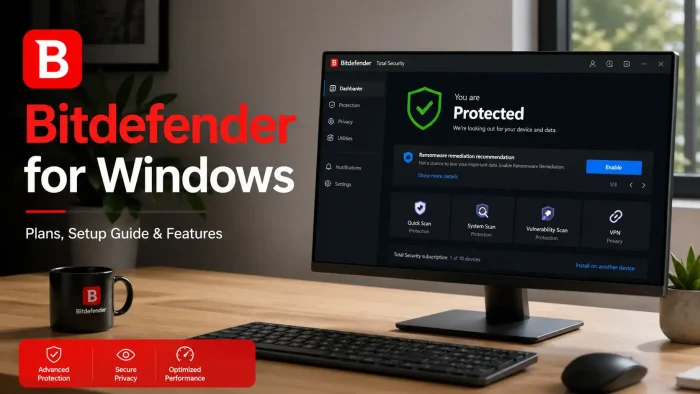

Bitdefender is an award-winning antivirus suite for Windows, Mac, Android, and iOS, available directly from bitdefender.com. It blocks viruses, ransomware, spyware, and phishing attacks in real time. Multiple independent labs have ranked it at the top of their protection scores for over a decade.
What makes Bitdefender stand out from most antivirus tools is how light it runs. AV-TEST scored Bitdefender 5.86 out of 6 for performance impact, meaning it causes less slowdown than almost any other major antivirus on the market. You get full-time protection without your PC feeling sluggish.
Bitdefender is made by Bitdefender SRL, a Romanian cybersecurity company founded in 2001. The company protects over 500 million devices worldwide. Consumer plans start with a free antivirus option and go up to full security suites that include an unlimited VPN, identity protection, and parental controls. This page covers every consumer plan, how to install on Windows, and what to know before buying.
Already running Bitdefender? Drop your setup or questions in the comments. Not sure which plan fits? Reach out to us directly.
What You Need to Know
- Plans start at $12.99 for the first year. All plans renew at a higher rate after year one. Check the renewal price before you buy.
- A 30-day free trial is available on Antivirus Plus with no credit card required.
- Bitdefender turns off Windows Defender when installed. This is normal and intentional. One real-time antivirus at a time prevents conflicts.
500M+
Devices Protected
5.95/6
AV-TEST Protection
4.9★
User Rating (280K reviews)
23 yrs
In Business
From $12.99
First Year Price

| Developer | Bitdefender SRL |
| Founded | 2001, Bucharest, Romania |
| Platforms | Windows, macOS, Android, iOS |
| Starting Price | $12.99/yr (first year), renews $49.99/yr |
| Free Option | Free Antivirus available (basic, Windows only) |
| Free Trial | 30 days, no credit card required |
Who Should Use Bitdefender?
- Use it if you want proven, low-impact antivirus protection for Windows without managing settings or running manual scans. Bitdefender handles everything automatically in the background.
- Skip it if you only browse trusted sites on a locked-down Windows 11 PC and already use Microsoft Defender. For very light users, Defender is free and sufficient.
- Be careful if you plan to renew. First-year prices are heavily discounted. The renewal rate is two to four times higher. Check what you will pay after year one before committing.
How to Get Bitdefender on Windows
Bitdefender is downloaded directly from bitdefender.com. There is no Microsoft Store version for the full paid plans. The install process takes under five minutes on most PCs.
Start with the free trial: You can try Antivirus Plus free for 30 days with no credit card. Click the trial link from the consumer page, create a Bitdefender Central account, and the installer downloads automatically.
- Step 1. Click the Get Bitdefender button above and choose your plan or start the free trial on the Bitdefender site.
- Step 2. Create a free Bitdefender Central account using your email address. This account manages all your devices and licenses.
- Step 3. Download the Windows installer from your Bitdefender Central dashboard. The file is around 5 MB and downloads quickly.
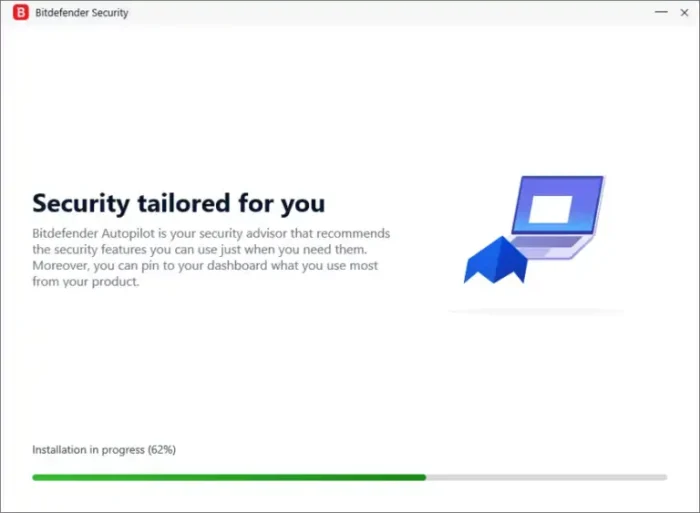
- Step 4. Run the installer. It downloads the rest of the protection files during setup. The full install takes 3 to 5 minutes depending on your internet speed.
- Step 5. Log in to your Bitdefender Central account inside the app. Bitdefender activates your license and runs its first full scan automatically.
- Step 6. If your antivirus prompts you about Windows Defender being disabled, that is normal. Bitdefender takes over real-time protection from this point.
💡 Already have another antivirus installed? Uninstall it first. Running two real-time antivirus programs at the same time causes slowdowns and conflicts on any Windows PC.

Is Bitdefender Safe?
Bitdefender does not patch system files, inject code into your browser, or collect and sell your personal data. It scans files, monitors network traffic, and blocks threats. The Bitdefender Central account stores your license and device list. If you use the VPN, that traffic goes through Bitdefender’s own servers, but the company publishes a no-logs policy for the VPN service.
The honest caveat: like all security software, Bitdefender requires deep system access to do its job. This means it can conflict with other security tools, some VPNs, or system utilities that also hook into the Windows network stack. If you run specialized software for work, test Bitdefender during the free trial before committing. Most users see no issues. Power users with complex setups should verify compatibility first.
What Is Bitdefender?
Bitdefender is a cybersecurity company founded in 2001 in Bucharest, Romania. It started as a local antivirus brand and grew into one of the largest cybersecurity companies in the world. Today it protects over 500 million devices across consumers, businesses, and governments.
The core of what Bitdefender does is behavioral threat detection. Instead of only comparing files against a list of known threats, it watches how programs behave. If something starts acting like ransomware, Bitdefender blocks it even if it has never seen that specific threat before. This approach is why independent lab scores consistently rank Bitdefender at or near the top. AV-TEST gave it a protection score of 5.95 out of 6 across results from July 2011 to February 2025, higher than Norton (5.89) and McAfee (5.45) over the same period.
Bitdefender Consumer covers home users with five plan tiers: Free Antivirus, Antivirus Plus Multiplatform, Total Security, Premium Security, and Ultimate Security. Each tier adds more features. The company also sells business products under a separate line called GravityZone, but this guide covers consumer plans only.
Key Features
Real-Time Threat Detection
Scans files as they open, download, or run. Uses behavioral analysis to catch threats that have never been seen before. Stops ransomware before it can encrypt your files, even if it is a brand-new strain with no signature in any database.
Scam and Phishing Protection
Blocks fake websites designed to steal passwords and card numbers. Detects phishing links in real time, including links sent by SMS or social media that have not yet been added to any block list. Works across browsers on Windows without needing a browser extension install.
Multi-Layer Ransomware Protection
Monitors which programs are allowed to change files in protected folders. If ransomware tries to encrypt your documents, photos, or other sensitive files, Bitdefender blocks it and can roll back changes that were already made before it was caught.
Safepay Protected Browser
A separate browser environment built for online banking and shopping. Safepay runs in an isolated session where keyloggers and screen-capture tools cannot read what you type. Nothing you do inside Safepay is visible to other programs running on your PC at the same time.
VPN (Standard and Unlimited)
All paid plans include a VPN that encrypts your internet traffic. Antivirus Plus and Total Security cap it at 200 MB per day per device, which covers light use. Premium Security and Ultimate Security include an unlimited VPN with 4,000+ servers across 50+ countries and no daily traffic limit.
Parental Controls
Available on Total Security and above. Set screen time limits, block categories of websites, and see what your child is searching for or which apps they use. Managed from the Bitdefender Central dashboard on any device. Works across Windows, Mac, Android, and iOS devices on the same plan.
What You Get With Each Plan
| Feature | Free | Antivirus Plus | Total Security | Premium Security |
|---|---|---|---|---|
| Platforms | Windows only | Win, Mac, Android, iOS | Win, Mac, Android, iOS | Win, Mac, Android, iOS |
| Devices Covered | 1 (Windows) | 1 or 3 | 5 | 5 |
| Real-Time Antivirus | Yes | Yes | Yes | Yes |
| Ransomware Protection | No | Yes | Yes | Yes |
| VPN | No | 200 MB/day | 200 MB/day | Unlimited |
| Parental Controls | No | No | Yes | Yes |
| Password Manager | No | No | Yes | Yes |
| Ad Blocker + Anti-Tracker | No | No | No | Yes |
| Email Protection | No | No | Yes | 2 mailboxes |
| Safepay Banking Browser | No | Yes | Yes | Yes |
System Requirements
| Requirement | Minimum |
|---|---|
| Operating System | Windows 7 SP1, Windows 10, or Windows 11 (see note) |
| RAM | 2 GB |
| Free Disk Space | 2.5 GB |
| Internet Connection | Required for install, activation, and updates |
| Browser Support | Chrome, Firefox, Edge, Internet Explorer (web protection features) |
OS note: Antivirus Plus Multiplatform supports Windows 7 SP1 and later. Total Security and Premium Security require Windows 10 or Windows 11. Check the product page before purchasing if you are on an older Windows version.
Plans and Pricing
Free
$0
Windows only, 1 device
- Basic antivirus and malware scanning
- No ransomware protection
- No VPN
- No parental controls
Antivirus Plus
From $12.99/yr
1 or 3 devices, all platforms
- Ransomware + multi-layer protection
- Scam and phishing detection
- Safepay banking browser
- 200 MB/day VPN
- 30-day free trial
MOST POPULAR
Total Security
From $19.99/yr
5 devices, all platforms
- Everything in Antivirus Plus
- Parental controls
- Password manager
- Email protection
- Device optimizer
Premium Security
$79.99/yr
5 devices, all platforms
- Everything in Total Security
- Unlimited VPN (4,000+ servers, 50+ countries)
- Ad Blocker and Anti-Tracker
- Email protection for 2 mailboxes
Renewal pricing note: The prices above are first-year promotional rates. Antivirus Plus renews at $49.99/yr and Total Security renews at $89.99/yr after year one. Premium Security renews at $129.99/yr. Set a reminder before renewal if you want to look for a new deal.
How Bitdefender Compares to Avast and Malwarebytes
| Feature | Bitdefender Total Security | Avast Premium Security | Malwarebytes Premium |
|---|---|---|---|
| AV-TEST Protection Score | 5.95 / 6 | Available | Not lab-tested |
| VPN Included | 200 MB/day (unlimited on Premium) | Unlimited (SecureLine) | No |
| Parental Controls | Yes | Yes | No |
| Banking Browser | Yes (Safepay) | No | No |
| Devices (main plan) | 5 | Up to 10 | 3 or 5 |
| Starting Price | From $19.99/yr | From $35.88/yr | From $44.99/yr |
See our full Avast Premium Security guide and Malwarebytes Premium guide for full breakdowns of those tools.
Tips for Getting Started with Bitdefender
Run the initial full scan right after install
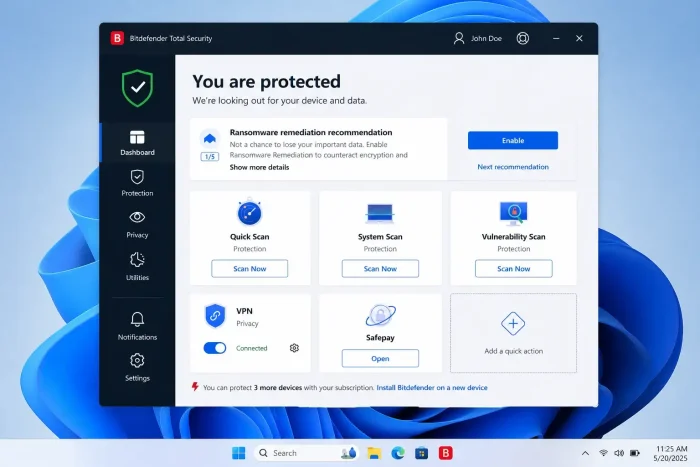
Bitdefender will suggest a quick scan on first launch. Accept it. After that, go to Protection and run a full system scan. This builds a baseline of your clean files and makes future scans faster. The first full scan takes longer but you only need to do it once.
Enable Autopilot mode for hands-off protection
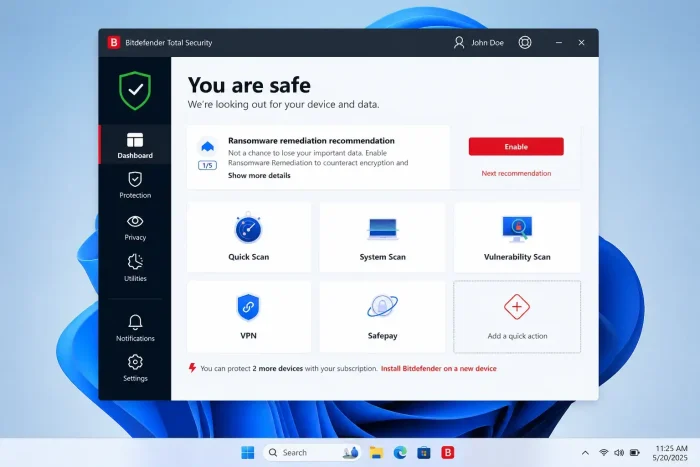
Autopilot is a mode where Bitdefender makes security decisions automatically without asking you. It blocks threats, handles alerts, and manages scans on its own. For most users this is the right setting. Turn it on from the dashboard if it is not already active after install.
Use Safepay for all banking and card purchases
Safepay is a separate browser built just for financial sites. It blocks keyloggers and screen capture tools that your regular browser does not stop. Open it from the Bitdefender dashboard before you log in to your bank or buy anything with a card. Bookmark your banking sites inside Safepay so you remember to use it.
Set up Ransomware Remediation immediately
Go to Protection, then Ransomware Remediation, and make sure it is turned on. Add your most important folders like Documents, Pictures, and your desktop to the protected list. This tells Bitdefender to watch those folders and block any program from changing files inside them unless you say so.
Check the renewal price before your year is up
Bitdefender’s first-year price is heavily discounted. When your renewal reminder arrives, compare the renewal rate to any current new-subscriber deal on the site. You can sometimes cancel, create a new account, and subscribe at the lower rate. Put a calendar reminder 30 days before your renewal date so you are not caught off guard.
Frequently Asked Questions
What are the system requirements for Bitdefender on Windows?
Bitdefender requires Windows 7 SP1, Windows 10, or Windows 11, at least 2 GB of RAM, and 2.5 GB of free disk space. An active internet connection is needed for the initial install, license activation, and threat database updates. Antivirus Plus Multiplatform supports Windows 7 and later. Total Security and Premium Security require Windows 10 or Windows 11.
Can I move my Bitdefender license to a new PC?
Yes. Log in to your Bitdefender Central account, go to My Devices, and remove the old PC from your subscription. Then install Bitdefender on the new PC and activate it using the same account. Your subscription and device count carry over. You do not need to buy a new plan.
Does Bitdefender work alongside Windows Defender?
Bitdefender automatically disables Windows Defender when installed, since running two real-time antivirus engines at the same time causes conflicts and performance problems. Windows will prompt you that Defender has been turned off. This is expected and intentional. If you uninstall Bitdefender later, Windows Defender re-enables itself automatically.
What happens to my files if Bitdefender quarantines something?
Quarantined files are moved to a secure folder and cannot run. They are not deleted right away. You can review quarantined items in the Bitdefender dashboard, restore them if you believe they were flagged by mistake, or delete them permanently. Bitdefender keeps a log of what was quarantined and why.
Does the 30-day free trial require a credit card?
No. The Antivirus Plus free trial does not ask for payment details upfront. You download and install the software, and it runs with full protection for 30 days. To continue after the trial, you enter your payment details and choose a plan. Nothing is charged automatically during the trial period.
Can I use one Bitdefender subscription on both Windows and Mac?
Yes, on plans that cover multiple devices. Antivirus Plus Multiplatform lets you use your subscription across Windows, macOS, Android, and iOS. Total Security and Premium Security work the same way. You manage all devices from one Bitdefender Central account. Antivirus Plus for 3 devices, for example, could cover 1 Windows PC, 1 Mac, and 1 Android phone.
Is Bitdefender VPN unlimited or capped?
It depends on your plan. Antivirus Plus and Total Security include a VPN limited to 200 MB per day per device. That is enough for checking email or light browsing but not for streaming or torrenting. Premium Security and Ultimate Security include an unlimited VPN with access to 4,000+ servers across 50+ countries. If you need the VPN daily, Premium Security is the plan to choose.
Support and Community
- r/bitdefender on Reddit: community discussion, setup help, and real user experiences
- Bitdefender Expert Community: official forum for troubleshooting, product feedback, and feature requests
- Bitdefender Support Center: knowledge base, how-to guides, and live chat support
More Windows software guides: Avast Premium Security · Malwarebytes Premium · SentryPC · Best Antivirus Software for Windows