Azure Front Door now supports post-quantum resilient hybrid TLS 1.3 by default for client connections to the edge. Microsoft announced the change on November 6, 2026: Front Door can negotiate TLS groups that combine classical elliptic-curve exchange with NIST-standardized ML-KEM, while still falling back to approved classical groups when a client does not support hybrid post-quantum TLS.
That matters because many apps already terminate public TLS at Front Door. Hardening that edge connection reduces long-term "harvest now, decrypt later" risk without forcing every backend service to change on day one.
What is protected today
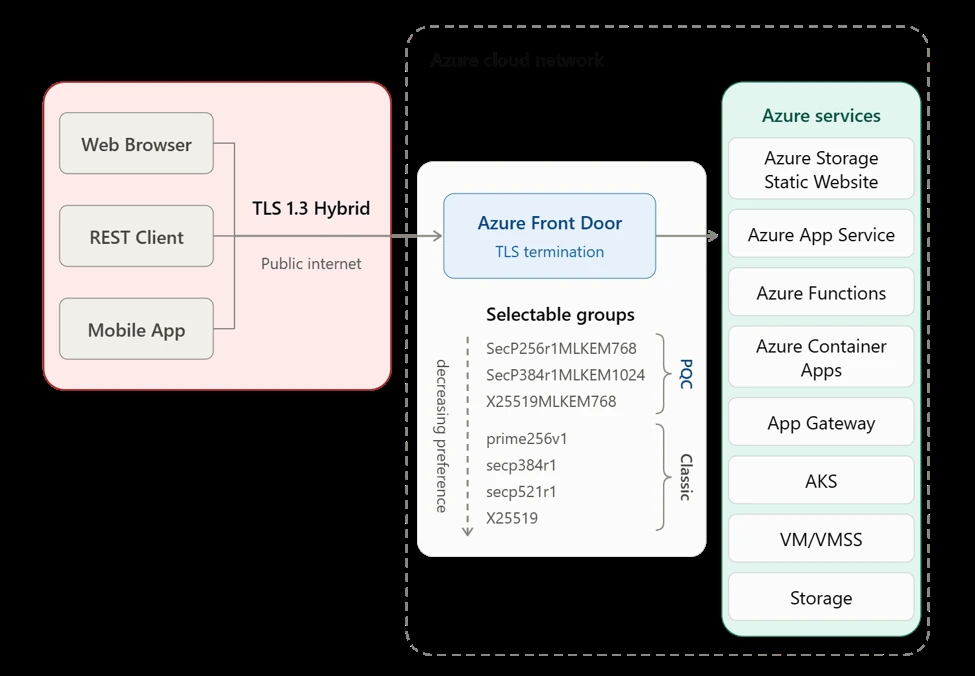
Azure Front Door terminates client-facing TLS at a nearby point of presence, then uses a separate connection toward Azure services. Microsoft says post-quantum hybrid key establishment currently protects the client-to-Front Door TLS 1.3 segment. Extending the same protection from Front Door to Azure services is the next engineering phase.
For that client-facing segment, Front Door supports hybrid groups such as SecP256r1MLKEM768 and X25519MLKEM768, and keeps classical ECDHE groups for compatibility. The default order prefers a mutually supported hybrid group, then falls back to approved classical groups.
| Preference | Examples Microsoft calls out | Role |
|---|---|---|
| Preferred | SecP256r1MLKEM768, X25519MLKEM768 (and related hybrid groups) | Hybrid classical + ML-KEM key establishment |
| Fallback | Approved classical ECDHE groups (for example X25519, P-256 family curves) | Compatibility when the client cannot do hybrid PQC |
Why it matters
"The immediate risk is harvest now, decrypt later (HNDL): adversaries can retain traffic captured today until a cryptographically relevant quantum computer can break its key establishment."
Michael Howard, Microsoft, on the Tech Community post
Do Azure customers need to do anything?
No action is required for the default path. Microsoft says TLS 1.3 hybrid PQC is enabled by default. Customers who want tighter control can still configure Front Door TLS policies, including protocol versions, groups and cipher suites, through managed Standard and Enhanced policies, or a Custom policy that can favor only PQC groups, only classical groups, or both.
Admin tip
If you terminate TLS at Azure Front Door today, review your TLS policy in the Azure portal. The new UI lets you choose a custom policy so you can support only PQC groups, only classic groups, or both, depending on security versus compatibility needs.
Performance and validation
Microsoft validated the change with compatibility testing, synthetic load testing and matched production A/B testing. Synthetic tests showed low CPU overhead (less than 1%) for the primary ML-KEM-768 groups. Matched production testing found no measurable CPU regression for X25519MLKEM768 against an X25519 control.
Hybrid key establishment keeps the session protected if either the classical or the ML-KEM component remains secure. That is the migration story Microsoft is selling: start protecting edge ingress now, without abandoning classical cryptography overnight.
Quick FAQ
Does this protect traffic all the way to my app backend?
Not yet. Microsoft says PQC currently covers client-to-Front Door TLS 1.3. Extending hybrid PQC from Front Door to Azure services is planned as a later phase.
Will older clients break?
No, according to Microsoft. If a client cannot do hybrid post-quantum TLS, Front Door falls back to approved classical groups when your policy allows it.
Is there a cost or separate SKU?
The announcement describes a default capability on Azure Front Door TLS 1.3, not a separate paid add-on. Check your existing Front Door SKU and TLS policy in the portal for what you can configure.
Source: Microsoft.
Discover more from Windows Mode
Subscribe to get the latest posts sent to your email.












Add your first comment to this post