Readers like you help support this site. When you make a purchase using links on our site, we may earn an affiliate commission. All opinions remain our own.
 Tor browser anime cover from Tor Browser for Windows – The Official Dark Web Browser
Tor Browser is unlike any other web browser on the market. While Chrome and Edge rely on “Incognito Modes” that only hide your history from your physical PC, Tor hides your identity from the entire internet.
Created by the non-profit Tor Project, it routes your traffic through a decentralized network of volunteer relays, encrypting your data multiple times to mask your IP address.
For Windows users in 2026, Tor remains the absolute gold standard for true privacy, bypassing extreme censorship, and accessing the .onion “Dark Web.”
Here is everything you need to know about the latest version and how to install it safely. Don’t be shy to leave a comment below or contact us if you have feedback or need help.
The Dark Web
Access .onion sites
Triple Encryption
Total traffic masking
Anti-Fingerprinting
You look like everyone else
Censorship Bypass
Defeat ISP blocking
📋 System Requirements
| Requirement | Details |
|---|---|
| Operating System | Windows 10 or Windows 11 (64-bit) |
| Processor | Intel Pentium 4 or later |
| RAM | 2 GB minimum |
| Storage | ~250 MB available space |
| Network | An accurate system clock is required to connect |
What Makes Tor Browser Different
Tor is built on a modified version of Firefox ESR. While it looks familiar on the surface, its underlying mechanics are entirely unique.
🧅 Access the .onion Network
Standard browsers can only access indexed websites. The Tor Browser allows you to navigate to hidden .onion addresses where both the website publisher and you (the reader) remain entirely anonymous.
🔒 The Onion Router (Relays)
When you click a link, your request does not go straight to the website. It bounces through three randomized, encrypted volunteer relays across the globe. By the time it exits the network, tracking your original IP address is virtually impossible.
🌉 Connection Assist and Bridges
If you live in a region where the government or internet provider actively blocks Tor, the browser features “Connection Assist.” This tool automatically configures “Bridges” (unlisted relays) to disguise your traffic and bypass the censorship wall.
🕵️ Ultimate Anti-Fingerprinting
Companies track you based on your unique screen size, installed fonts, and hardware. Tor is engineered so that every user’s browser fingerprint looks exactly identical, making you blend perfectly into a crowd.
How to Download and Install Tor Browser on Windows
Tor is a portable application. This means it does not dig its roots deep into the Windows Registry; it simply creates a self-contained folder that you can place anywhere (even on a USB drive).
1
Navigate to the official Tor Project website and download the Windows
.exe file.2
Run the downloaded file. It will ask where you want to extract it (the Desktop is the default). Click Install. This simply unpacks a “Tor Browser” folder.
3
Open the folder and click “Start Tor Browser.” You will see a connection screen. Click “Connect.” It may take up to 60 seconds to establish your encrypted circuit to the network.
Screenshot of Tor Browser
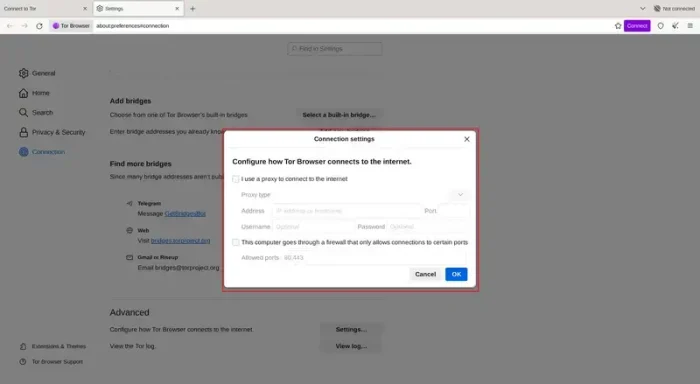 Tor with proxy connection settings
Video of Tor Browser in action
Common Issues and Fixes
Because Tor operates heavily around encryption and rigid security metrics, it is prone to connection failures if your Windows 11 environment isn’t perfectly configured.
Tor fails to connect (Stuck on connection screen)
The #1 reason Tor fails to connect on Windows is an incorrect system clock. Tor’s encryption certificates require exact time matching. Right-click the time on your Windows taskbar, select “Adjust date and time,” and ensure “Set time automatically” is completely synced. Additionally, ensure Windows Defender or your Antivirus is not outright blocking the application.
Why is this browser so incredibly slow?
This is normal. Your traffic is bouncing between three nodes globally before reaching the website. You should never use Tor for streaming high-def video or playing games; it is strictly intended for reading and private text communication. If a page stalls entirely, click the broom icon (New Identity) near the address bar to force the browser to build a fresh, potentially faster circuit.
How do I completely uninstall Tor?
Tor is a portable app, so you will not find it in the “Add or Remove Programs” list in Windows Settings. To uninstall it, simply locate the “Tor Browser” folder (usually on your Desktop or Downloads folder) and delete the entire folder. Empty your recycle bin, and the browser is completely gone.
Frequently Asked Questions
Is the Tor Browser illegal?
No, using the Tor Browser is completely legal in most countries. It enforces privacy and allows access to restricted information. However, using it to participate in illegal activities remains a crime.
Can I access the Dark Web with Chrome or Edge?
No. Standard browsers cannot route traffic through the onion network. You must use the Tor Browser to access sites ending in the .onion extension.
Why is the Tor Browser so slow?
Tor provides extreme anonymity by routing your connection through three randomized, encrypted volunteer relays completely around the world before reaching the destination. This long physical distance and triple encryption inherently cause slower load times than a standard browser.
Should I use a VPN with Tor?
Generally, no. The Tor Project strongly advises against using a VPN alongside Tor unless you are an advanced user who understands how conflicting network routing works. Using a VPN can actually compromise your anonymity or break the Tor connection entirely.
Does Tor work on Windows 11?
Yes, the 2026 releases (v15.0 and newer) are fully compatible with both Windows 10 and Windows 11 (64-bit).
 Official tor browser logo
Community Poll: Share Your Thoughts
Helpful Resources and Community
Need help configuring bridges or finding safe onion services? Check these hubs.
📚 The Tor Support Portal
The official knowledge base, covering everything from basic connections to requesting custom bridges in heavily censored areas.
💬 Tor Project Forum
The official discussion boards where developers and privacy advocates discuss network status and updates.
🗨️ r/Tor
The main subreddit for troubleshooting, news, and discussing operational security (OpSec) while using the browser.
Get the Tor Browser for Windows
The ultimate browser for anonymity. Defeat trackers, circumvent censorship, and access the .onion Dark Web.
Compatible with Windows 11 and Windows 10 (32/64-bit)
Related Browsers: Vivaldi for PC, DuckDuckGo for PC, UC Browser for Windows, Yandex Browser for Windows.
Discover more from Windows Mode
Subscribe to get the latest posts sent to your email.