What is changing in Windows
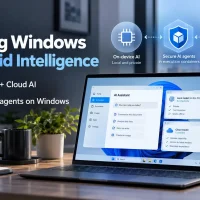
Microsoft is positioning Windows as the primary operating system for hybrid intelligence. Under this architecture, AI agents run workloads directly on local PC silicon whenever possible, pinging cloud infrastructure only when complex tasks demand higher computing power. This setup reduces token latency, preserves bandwidth, and controls enterprise costs while retaining access to frontier-class reasoning.
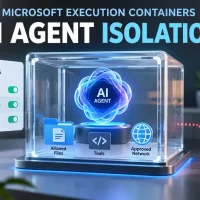
Microsoft Execution Containers (MXC) are now generally available to address enterprise security concerns. Instead of allowing AI background processes unchecked operating system access, MXC enforces isolated boundaries at runtime. IT administrators can define which directories, sensitive registries, and network domains an agent may access. Tooling ecosystems including GitHub Copilot, Codex, and LM Studio already support MXC, with Meta’s Muse for Windows arriving soon.
On the architecture side, Microsoft is deploying smaller, highly compressed models directly to personal systems. This includes MAI Code 1.1 Flash (137 billion total parameters, with 6.8 billion active parameters during inference), optimized with 3-bit quantization to shrink storage requirements by nearly 80 percent without sacrificing its 256K context window. Windows ML has also added direct support for llama.cpp, streamlining the setup process for running open-source local LLMs.
Why hybrid intelligence matters
This update gives developers and system administrators the management controls they have requested since generative tools entered the enterprise. MXC establishes clear audit trails showing which agent completed a specific file write or network transmission. System administrators can centrally define and push agent governance policies across fleet devices using Microsoft Intune and Agent 365.
For daily users on Copilot+ PCs, the upgrade translates into practical local desktop management. Instead of simple search responses, Copilot can parse local folders, run diagnostic troubleshooting, manage desktop layout arrangements, and process requests offline using on-device models. All local actions require clear permission prompts, preventing silent background adjustments.
The full hybrid experience relies on newer, specialized hardware. RTX Spark laptops and the Surface Laptop Ultra (configurable up to 128GB of unified memory) begin shipping on October 16, followed by dedicated DGX Station deskside systems later in the year. Fast OS interaction testing is underway as Windows Search actions (such as toggling dark mode or sending text messages directly from the taskbar) arrive for Windows Insiders in the experimental channel.
Have you started configuring local AI models or testing MXC permissions with your current developer workflows? Let us know your results in the comments below.
Discover more from Windows Mode
Subscribe to get the latest posts sent to your email.















Add your first comment to this post