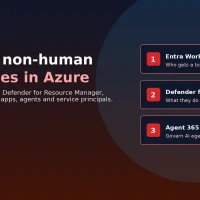
Apps, service principals, managed identities, CI/CD runners and AI agents often outnumber employees, and they cannot finish an MFA prompt. Microsoft’s November 8, 2026 guidance on securing the non-human identity (NHI) attack surface lays out a three-layer approach built around Microsoft Entra Workload ID, Defender for Resource Manager and Microsoft Agent 365.
The post also ties the advice to recent threat intelligence on Storm-3168, which describes agentic-driven cloud attacks that abuse compromised service principals. The risk is machine-speed execution: once an attacker has a workload credential, there is no push notification standing in the way.

Why non-human identities are a high-value target
Security teams still spend most of their energy on people: MFA, phishing defense and joiner-mover-leaver processes. Workload identities power the rest of the environment. They run deployment pipelines, provision resources and call cloud APIs.
Microsoft’s point is that organizations often hold humans to strict standards while letting service principals keep broad, lightly reviewed permissions. A leaked secret or compromised pipeline then becomes lasting, high-impact access. With AI agents proliferating, that blast radius grows because agents can invoke tools and act without a person approving every step.
Core asymmetry
Unlike a person, a service principal cannot complete MFA. If an attacker obtains its credentials, authentication friction disappears. That is why Microsoft treats high-privilege workload identities like privileged accounts: inventory them, review them and respond quickly.
Microsoft’s three-layer defense
Layer 1: Entra Workload ID controls who gets a token
Microsoft Entra Workload ID is built for non-human identities. Microsoft highlights:
- Conditional Access for workload identities – restrict token issuance to specific public IP ranges and block risky requests.
- Identity Protection for workloads – detect risky service principals, including leaked credentials, then investigate, confirm compromise or disable the identity.
- App Health Recommendations – flag stale or inactive service principals and expiring secrets.
- Access reviews – force scheduled recertification for service principals with privileged directory roles.
Layer 2: Defender for Resource Manager watches what they do next
Even a legitimate secret can be abused. Microsoft Defender for Resource Manager analyzes Azure Resource Manager operations for suspicious activity after authentication. Microsoft says dedicated service-principal behavioral detections span the attack lifecycle, from initial access and credential access through persistence, privilege escalation, lateral movement and impact.
Alerts can also include surrounding signals such as suspicious IPs or TOR infrastructure, unusual role changes, abnormal resource creation and known Azure exploitation techniques. The goal is to move from "Was this identity allowed to sign in?" to "Is it behaving like the expected workload or like an attacker?"
Layer 3: Agent 365 governs AI agents as first-class identities
Microsoft Agent 365 is the control plane for discovering, governing and securing agents. Microsoft calls out an agent registry, Entra Agent ID, human sponsorship and ownership, lifecycle governance, access packages, agent-specific Conditional Access, and integration with Defender and Purview for investigation and data controls.
| Layer | Product | Main job |
|---|---|---|
| 1 | Entra Workload ID | Decide who gets a token, and under what conditions |
| 2 | Defender for Resource Manager | Detect suspicious ARM activity after authentication |
| 3 | Agent 365 | Inventory, own and govern AI agents as distinct identities |
Practical steps admins can take now
Microsoft’s hardening principles are straightforward, and they map well to Windows and Azure shops that already use Entra:
- Prefer secretless authentication – managed identities in Azure, and workload identity federation (OIDC) for short-lived tokens instead of static secrets.
- Apply least privilege – give service principals only the roles and scopes they need. Avoid broad Owner or Contributor assignments.
- Assign owners and review them – treat privileged workload identities like admin accounts, with scheduled access reviews.
- Watch risk signals – Entra Workload ID Identity Protection for leaked credentials, plus Defender monitoring of Azure resource operations.
- Rotate exposed credentials immediately – treat anything that appeared in a public repo, issue or log as compromised, even if the original post was later edited.
Storm-3168 takeaway
For agentic attacks that abuse compromised service principals, Microsoft also recommends enabling relevant Defender for Cloud plans (including Defender for Resource Manager), protecting backup and recovery infrastructure, and using agentic defender tooling such as Project Perception where available. Strengthen AI app posture with Microsoft Defender for AI Security (MDASH) where that fits your estate.
Quick FAQ
What counts as a non-human identity?
Microsoft includes applications, service principals, managed identities, CI/CD runners and automated AI agents.
Do I need all three products on day one?
Start with inventory and secretless auth, then add Conditional Access / Identity Protection for workloads, Defender for Resource Manager detections and Agent 365 controls as your agent footprint grows.
Where should Windows admins begin?
List privileged service principals in Entra, remove unused apps and secrets, switch Azure workloads to managed identities where possible, and turn on workload Conditional Access for the highest-risk apps first.
Source: Microsoft.
Discover more from Windows Mode
Subscribe to get the latest posts sent to your email.














Add your first comment to this post