
Microsoft Foundry now has a built-in way to make AI agents better over time. It records how each agent handles real requests, lets your experts mark good and bad answers, suggests fixes, and tests those fixes before anything goes live. Your team still decides what ships.
Microsoft announced the feature set, which it calls continuous improvement, at Ignite 2026 on November 17. Foundry is Microsoft’s Azure platform for building and running AI agents. Most of the new pieces are still in preview, which means they can change and are usually not meant for production yet. Here is what each one does and how ready it is.
Key takeaways
- Ready now: Insights, which groups an agent’s repeat failures, and tracing for agents built outside Foundry with LangGraph, LangChain or CrewAI.
- In preview: expert annotations, golden datasets, skill and cost optimization, and sending Insights straight to agent optimizer.
- You stay in charge: agent optimizer recommends changes and tests them, but nothing changes in production until you apply it.
How the improvement loop works
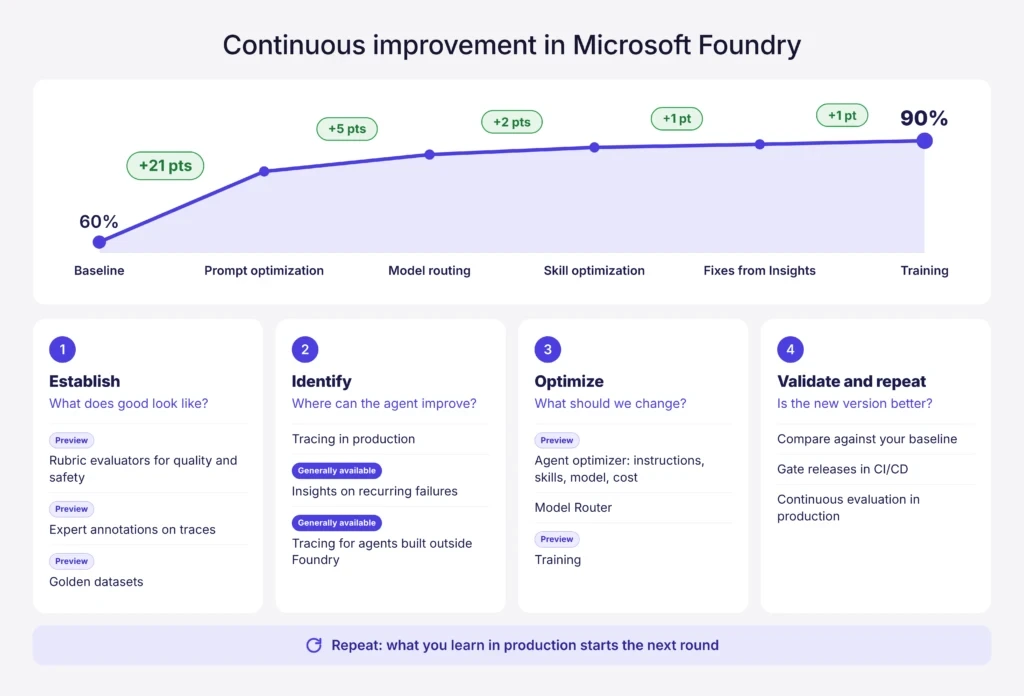
An off-the-shelf AI model behaves the same for every customer. Microsoft’s pitch is that an agent should get better at your work the longer it runs. Foundry splits that into four steps that repeat: Establish, Identify, Optimize, then Validate.
1. Establish: decide what a good answer looks like
Every time an agent runs, Foundry saves a trace, a step-by-step record of what it was asked, what it did and how it answered. With annotations (preview), your experts review real conversations and mark what worked and what should have happened instead.
Those marked-up traces become test sets built from real use. You can lock your best ones into a golden dataset (preview), the answer key every new version has to beat. Rubric evaluators (preview) let you write your own scoring checklist, now for safety as well as quality.
2. Identify: find what keeps going wrong
Nobody can read thousands of traces. Insights (generally available) groups the problems that keep coming up, shows the evidence and points to a likely cause, so teams can fix what affects the most people first.
3. Optimize: let Foundry suggest the fix
Agent optimizer tries better instructions, skills and model choices, and scores each candidate against your tests. It recommends the strongest one, but your team picks what ships. New options include:
- Send Insights to agent optimizer (preview): pick a recurring problem and get tested fixes in one step.
- Skill optimization (preview): turns lessons from past runs and expert feedback into new or better skills. Skills are versioned, so you can roll back.
- Cost optimization (preview): looks for cheaper ways to run an agent, such as a smaller model, without losing quality.
- Managed Training (formerly managed fine-tuning) and Programmed Training (preview), for teams that want to train models on their own data.
4. Validate: prove it is actually better
When you compare a new agent version with the current one, Foundry runs statistical tests to show whether the difference is real or just noise. You can add that check to GitHub Actions or Azure DevOps so nothing ships until it passes. Continuous evaluation (already available) then keeps scoring live traffic after release.
Ready now or preview? The full list
| Feature | What it does | Status |
|---|---|---|
| Insights | Groups recurring agent failures with evidence and a likely cause | Generally available |
| Tracing for outside agents | Same visibility for LangGraph, LangChain and CrewAI agents | Generally available |
| Model router | Sends easy requests to small models and hard ones to large models | Already available |
| Prompt optimization | Improves an agent’s instructions | Already available |
| Continuous evaluation | Scores live traffic with your evaluators | Already available |
| Annotations on traces | Experts mark what worked and what did not | Preview |
| Evaluation and golden datasets | Test sets built from real usage | Preview |
| Rubric evaluators for safety | Your own scoring checklist, now covering safety | Preview |
| Skill and cost optimization | Better skills from past runs, cheaper ways to run | Preview |
| Programmed Training | Write your own training recipes in Python | Preview |
What Microsoft and early customers report
These are Microsoft’s and its customers’ own figures, not independent tests:
- Model router: Microsoft says its testing shows savings of up to 65% compared with sending every request to a top-tier model.
- Alaska Airlines: a tuned MAI-Code-2-Flash model scored 91.1% on sorting aircraft maintenance reports, up from 81.2% out of the box, with trained staff still making the final call.
- Docusign: had already cut AI processing costs by 90% with fine-tuned models in Foundry, and is now tuning MAI models to read agreements.
Foundry offers more than 11,000 models, from OpenAI and Anthropic to Meta, Mistral and Microsoft’s own MAI models, so teams are not tied to one provider.
Who should care, and where to start
This is aimed at developers, DevOps engineers and IT teams that already run agents in production on Azure. If that is you, two parts are ready to use now:
- Turn on Insights for an agent with real traffic to see its most common failures.
- Add a quality gate in GitHub Actions or Azure DevOps so a new agent version has to beat the current one before release.
Treat annotations, golden datasets and the optimizer add-ons as things to test in a sandbox until they leave preview. If you are just starting with agents, our guide to the Microsoft Copilot harness in Foundry is a simpler first step.
Does the agent optimizer change my live agent on its own?
No. Microsoft says agent optimizer recommends the strongest candidate, but your team decides which change to ship, and nothing changes in production until you apply it.
Does this work with agents not built in Foundry?
Partly. Tracing and Insights now work for agents built with LangGraph, LangChain and CrewAI. Microsoft says runtime agent controls for agents built outside Foundry are coming in the future.
Related on Windows Mode
Source: Microsoft Azure Blog.
Discover more from Windows Mode
Subscribe to get the latest posts sent to your email.











Add your first comment to this post