Readers like you help support this site. When you make a purchase using links on our site, we may earn an affiliate commission. All opinions remain our own.
Thorium is a speed-optimized Chromium browser for Windows that you can download from the official Thorium website or directly from GitHub Releases. It takes the exact same open-source code that powers Google Chrome and recompiles it with CPU-level optimizations (AVX2 and SSE4), allowing it to benchmark up to 38% faster than Chrome while stripping out Google’s tracking.
The result is a browser that looks and works exactly like Chrome but loads pages significantly faster, supports all Chrome extensions, and runs with zero bloatware.
In this guide, we cover the key features, walk you through the installation, explain the AVX2 vs SSE4 versions, and answer frequently asked questions.
If you run into any issues, feel free to contact us or leave a comment below.
Extreme Speed
Compiler-level tuning
Extension Support
Full Chrome parity
Zero Bloat
No Google tracking
Google Sync
Login with Gmail
📋 System Requirements
| Requirement | Details |
|---|---|
| Operating System | Windows 11, Windows 10, or Windows 7 |
| Architecture | 64-bit (x64) and ARM64 (separate ARM build) |
| Processor | AVX2 recommended for best speed (SSE3/SSE4 builds available for older CPUs) |
| Memory | 4 GB RAM |
What Makes Thorium Different
To understand Thorium, you have to understand how Google Chrome works. When Google releases an update, they want to ensure it runs on millions of devices, including very old, slow computers. Thorium ignores the old computers and compiles the code strictly to use the advanced math processing found in modern Intel and AMD chips.
🚀 Raw Speed Optimizations
It uses AVX2, AES, and PGO compiler flags. In plain English: these let your processor handle complex JavaScript and heavy websites noticeably faster than a standard Chromium browser would.
🛡️ Enhanced Privacy & Codecs
It natively supports Widevine (so you can watch Netflix in HD) and HEVC/H.265 video formats. It also rips out Google Hangouts tracking and forces DNS-over-HTTPS by default, offering a much more private experience than Chrome.
☁️ Google Account Sync
Unlike fully de-googled browsers like Ungoogled Chromium, Thorium lets you log into your Google Account. This means you can hit “Sync” and pull in all your Chrome bookmarks, saved passwords, and themes right away.
🎨 Familiar Chrome Feel
There is absolutely zero learning curve. If you know how to use Google Chrome, you know exactly how to use Thorium. The interface features the familiar Chrome 2023 Refresh layout, but with sleek custom blue and cyan icons.
How to Download and Install Thorium on Windows
1
Head to the Thorium Windows releases page on GitHub (or browse thorium.rocks for all platform links). If your PC was built after 2013, grab the main AVX2 installer. If you have an older processor, pick the SSE4 or SSE3 build instead. Running a Snapdragon/ARM laptop? Use the ARM64 build.
2
Open the downloaded .exe file. The installation is quick and will place a blue Thorium shortcut on your desktop.
3
Head directly over to the Google Chrome Web Store. Because this is a Chromium shell, you can safely install uBlock Origin or any other favorite extension immediately.
Screenshots of Thorium
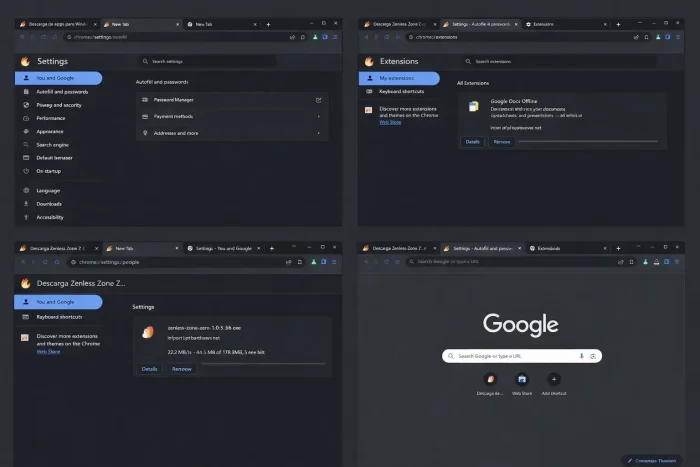 Screenshots Collection from Thorium Browser
Common Issues and Fixes
While Thorium is fast, it is maintained mostly by a single developer. This means there are a few trade-offs compared to browsers backed by big companies.
Delayed Security Patches causing vulnerability
The biggest trade-off of using Thorium is that when Google releases a patch for a major browser exploit, it can take Thorium’s developer several weeks to implement that fix into the custom code. This occasionally means your browser version is vulnerable to known zero-day attacks longer than Chrome users.
Constant Crashing on Startup / White Screen
If your browser flashes a white screen and instantly crashes when you open it, you likely installed the wrong version for your computer hardware. Your CPU likely does not have AVX2 instructions. Uninstall Thorium from Windows Add/Remove programs, go back to the Thorium website, and download the “SSE4” or “SSE3” fallback version.
Browser freezes while loading Google Docs or Heavy Games
While raw browsing is fast, an extension conflict can sometimes ruin the experience. To find the bad apple, right-click the Thorium shortcut on your desktop, select Properties, and add `–disable-extensions` to the end of the “Target” field. If the browser stops freezing, you know a bad extension is the culprit.
Frequently Asked Questions
Why is Thorium Browser faster than Google Chrome?
When Google releases Chrome, it has to ensure that the code works on every possible computer, including laptops from 15 years ago. The developer of Thorium takes that exact same code and manually optimizes the compiler flags specifically for modern CPUs (AVX and AVX2), allowing it to render complex web pages up to 38% faster.
Does Thorium support my Chrome extensions?
Yes. Because Thorium is built directly on the exact same engine as Google Chrome (Chromium), it is fully compatible with the official Chrome Web Store.
Is Thorium Browser safe to use?
Generally, yes. It is an open-source project so anyone can verify the code is not malicious. However, because a single independent developer maintains it, Thorium usually runs a few versions behind the official Google Chrome release. This means it may temporarily lack the absolute latest security patches.
Can I sync my Google Account with Thorium?
Absolutely. Thorium allows you to log in with your primary Google Account to securely sync your bookmarks, browsing history, and saved passwords across your devices.
What does AVX2 vs SSE3 mean?
These refer to CPU instruction sets (essentially how your computer’s brain processes math). AVX2 is the modern standard for fast processors released after 2013. If you have an older computer, you must download the SSE3 or SSE4 installer version from the Thorium website instead, or the browser will crash.

Community Poll: Share Your Thoughts
Helpful Resources and Community
📦 Thorium GitHub
The official open-source repository where you can report bugs, request features, view the source code, and download the latest release builds.
🗨️ r/AltBrowser
Discuss Thorium alongside other Chromium forks. A great place for benchmarking comparisons, privacy tips, and extension recommendations.
📝 Thorium Website
The official homepage with download links for all platforms, changelogs, and performance benchmarks compared to Chrome and Edge.
Get Thorium Browser for PC
A Chromium browser built for speed. Compiled with CPU optimizations that can make it noticeably faster than Chrome on modern hardware.
Windows 11, 10, or 7 · ARM64 build available here
Related Browsers: Samsung Internet for Windows, Waterfox for PC, Zen Browser for Windows, Floorp Browser for Windows
Discover more from Windows Mode
Subscribe to get the latest posts sent to your email.















Add your first comment to this post