Key takeaways
- Microsoft moved its own chip design jobs onto Azure Cobalt 200 VMs and measured 1.30x to 4.15x more performance than Cobalt 100, depending on the tool.
- Tools from Cadence, Synopsys and Siemens ran unmodified. In every test, Cobalt 200 also beat the two x86 Azure VMs Microsoft picked for comparison.
- These are early internal results on Microsoft’s own test cases. Your designs, licences and concurrency levels may give different numbers.
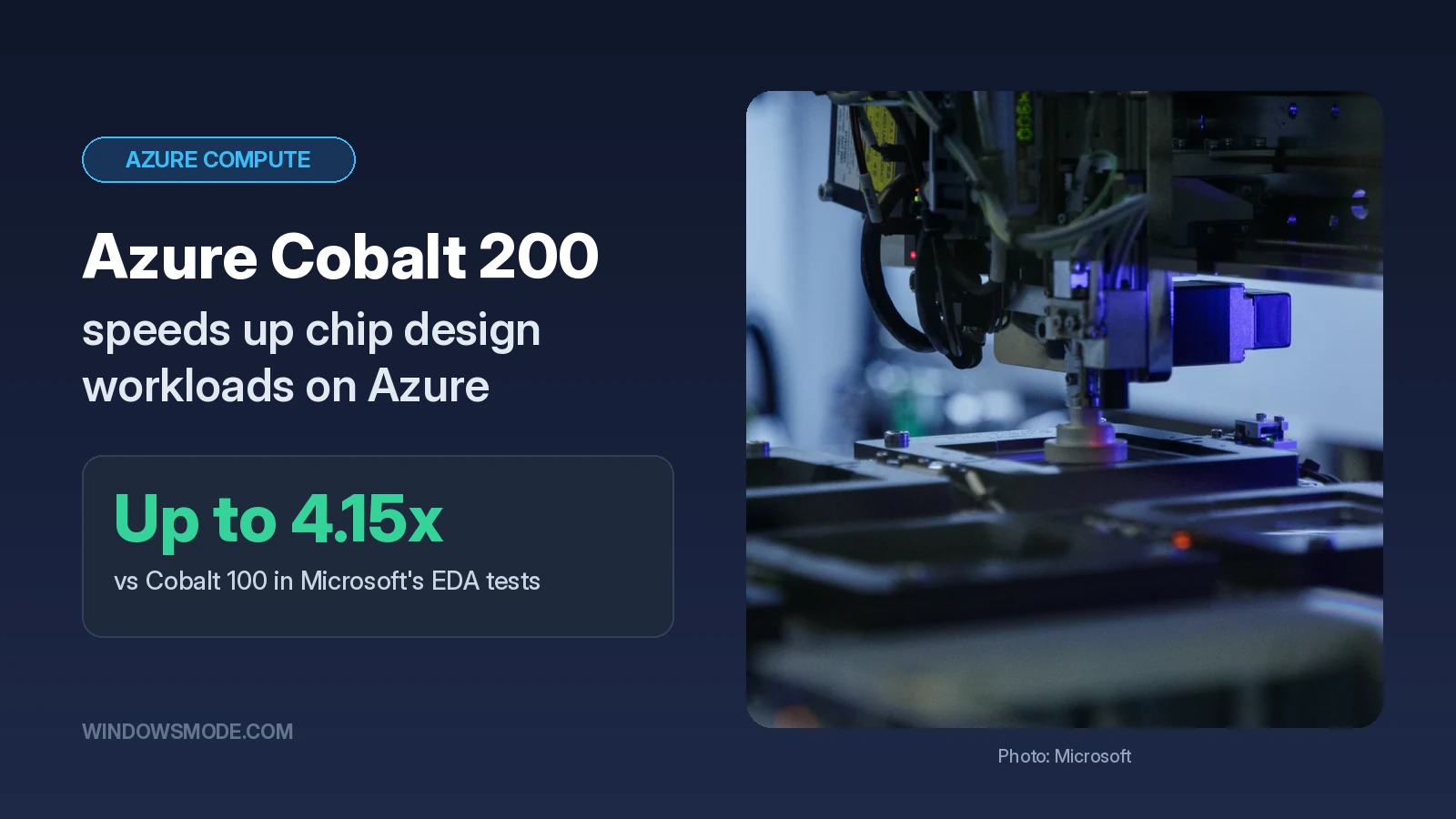
Microsoft says its newest Arm server chip is now speeding up the work of designing its next chips. In a November 5 Azure Blog post, Selim Bilgin (Corporate Vice President, Silicon Engineering) and Silvian Goldenberg shared the first results from running Microsoft’s own electronic design automation (EDA) workloads on Azure Cobalt 200.
EDA is the software chip teams use to simulate, check and sign off a design before it goes to a factory. Microsoft says these jobs add up to hundreds of millions of compute runs a year for its silicon teams, so even small speedups save real time and money.
What Cobalt 200 is, and why it suits chip design
Cobalt 200 is Microsoft’s own server processor, built on Arm Neoverse CSS V3, and it powers a new family of Azure virtual machines. We covered the hardware in our Maia 300 and Cobalt 200 spec guide. Its predecessor arrived in Azure Cobalt 100 VMs.
Microsoft points to three design choices that matter for EDA:
Real cores only
No hyperthreading, so each vCPU is a full physical core and doesn’t share resources with a neighbour.
3MB L2 cache per core
A dedicated cache close to each core keeps more of a big design’s data nearby.
High memory bandwidth
Helps when dozens of jobs run side by side and all pull data from memory at once.
That last point is the one chip teams care about. A core that looks fast on an idle VM can slow down once the machine is packed with overnight test runs. Microsoft says it tested every VM fully loaded, with many jobs running at the same time, to reflect how verification farms actually work.
The results, tool by tool
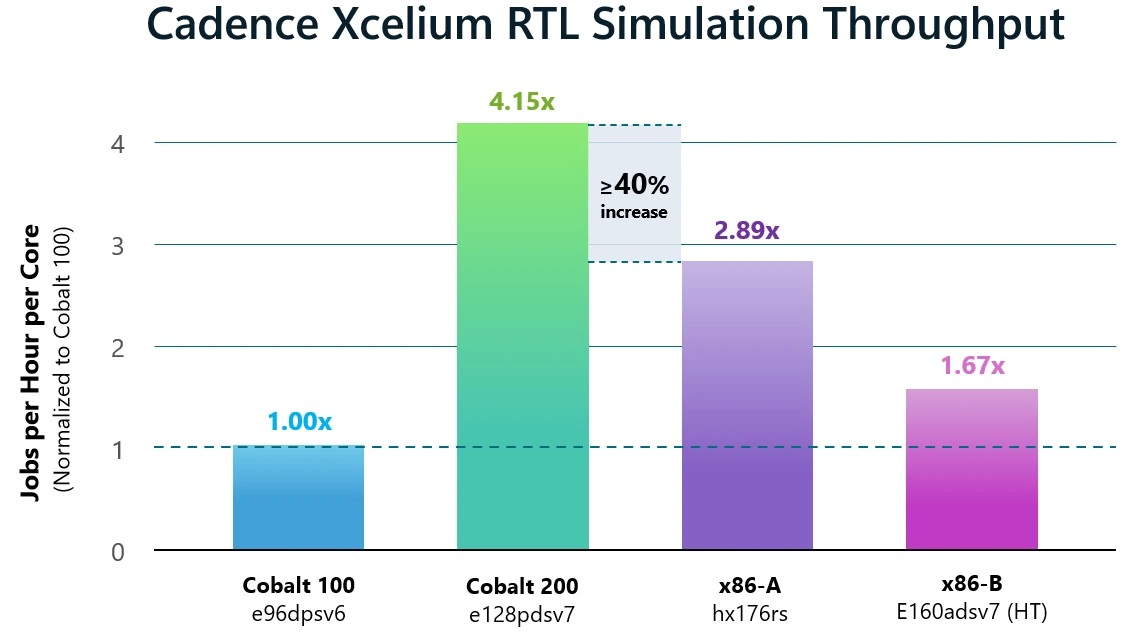
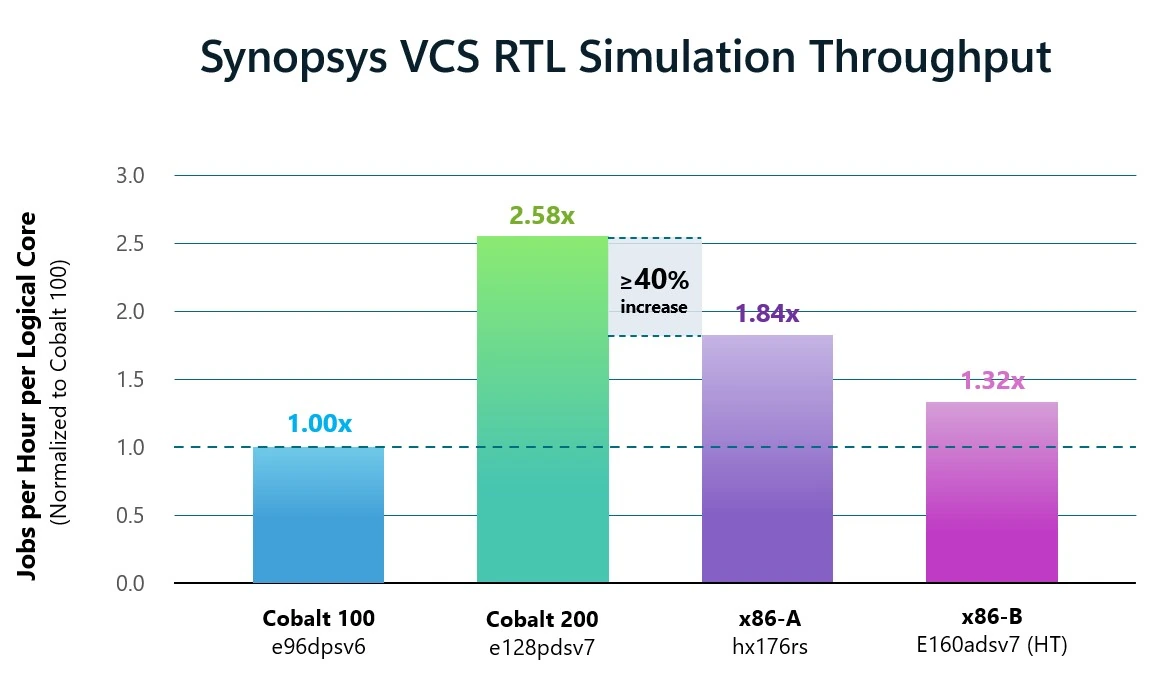
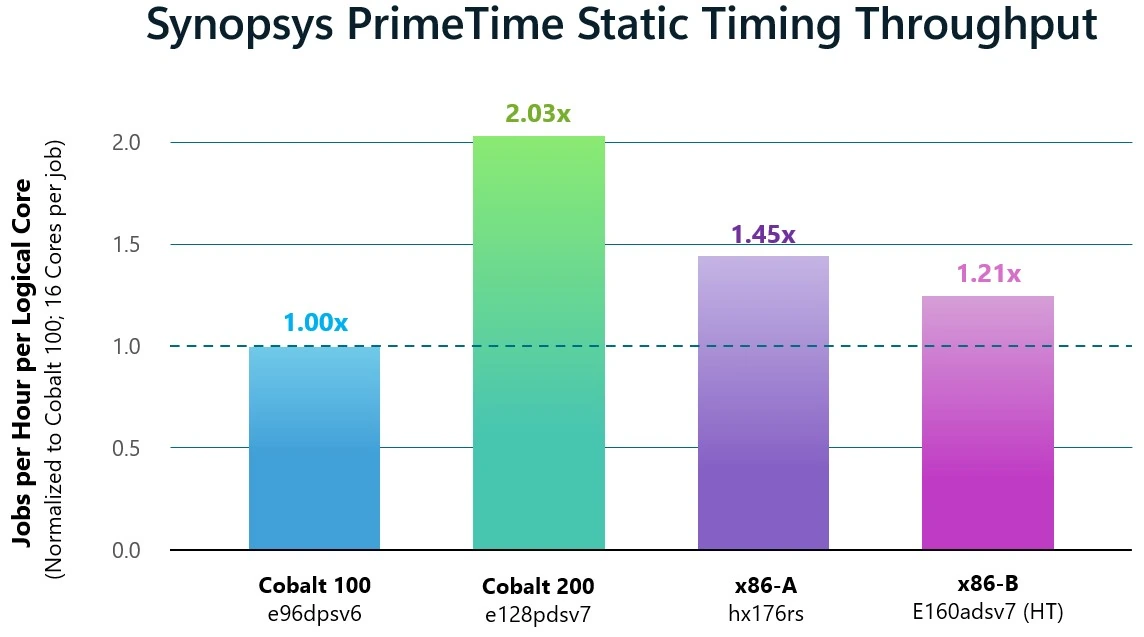
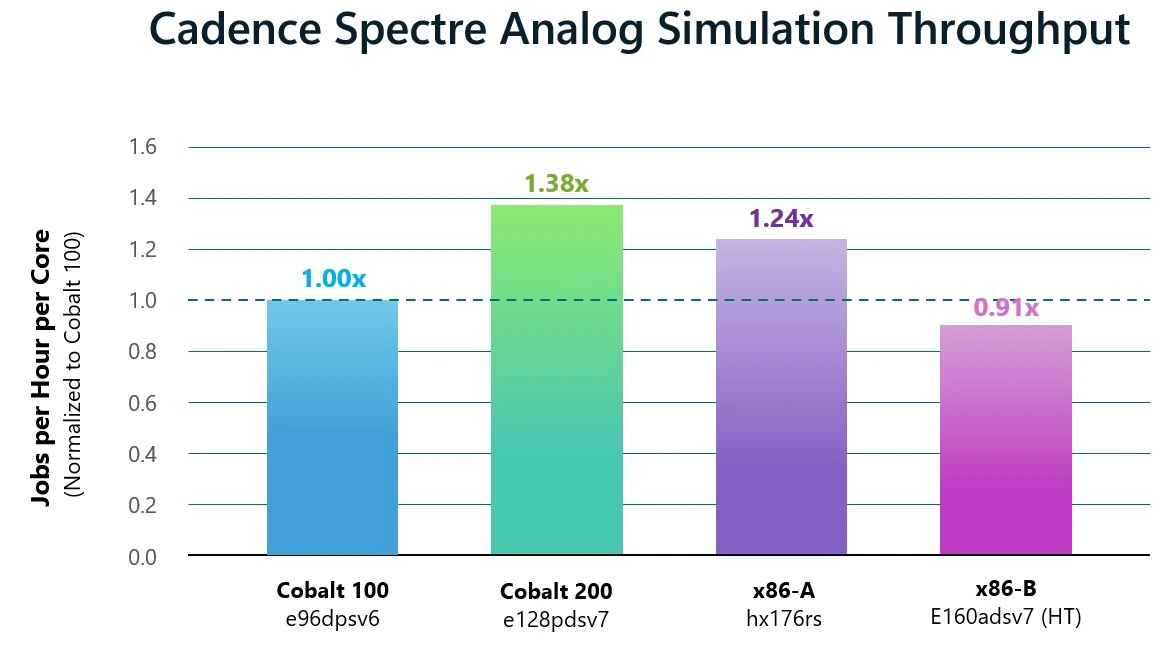
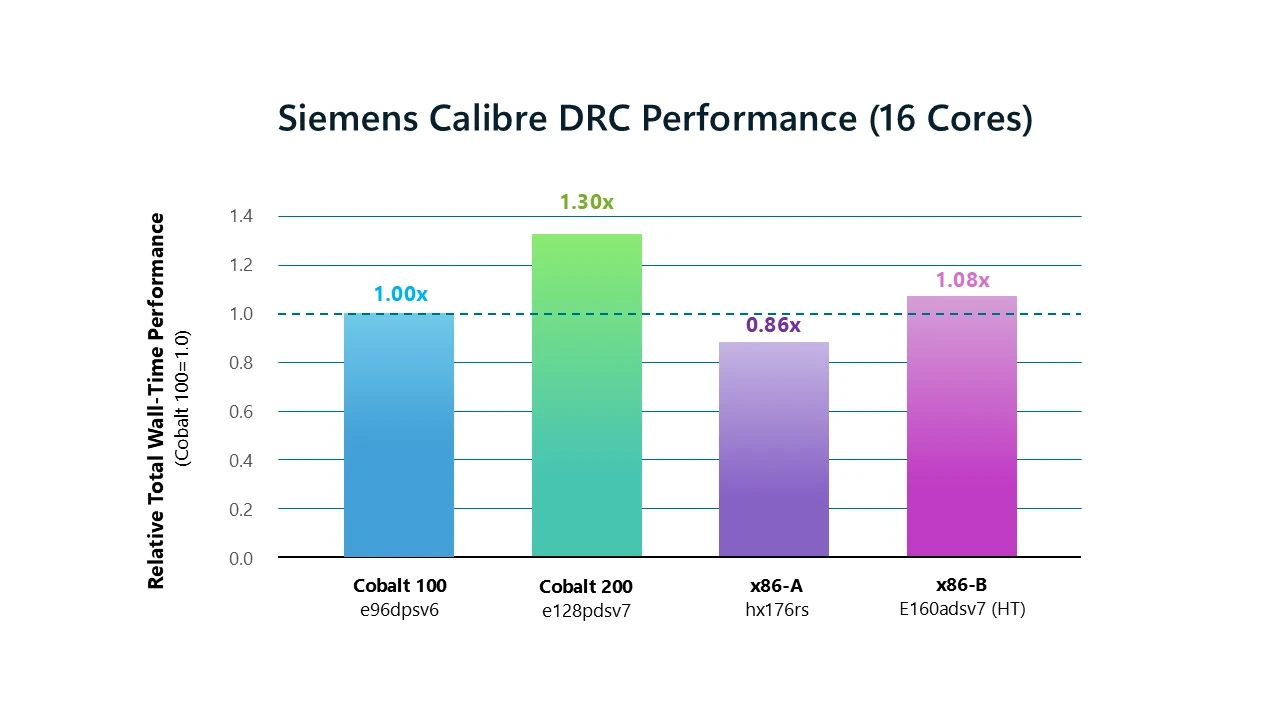
Microsoft compared four Azure VMs: Cobalt 100 (96 cores), Cobalt 200 (128 cores), an x86 HPC VM called hx176rs (176 cores) and an x86 general-purpose VM, e160adsv7 (160 logical cores with hyperthreading). Results are throughput per logical core, so a VM doesn’t win just by having more cores.
| Job type | Tool | Cobalt 200 vs Cobalt 100 | vs tested x86 VMs |
|---|---|---|---|
| Digital (RTL) simulation | Cadence Xcelium | 4.15x throughput | At least 40% higher |
| Digital (RTL) simulation | Synopsys VCS | 2.58x throughput | At least 40% higher |
| Static timing analysis | Synopsys PrimeTime | 2.03x throughput | Higher than both |
| Analog simulation | Cadence Spectre | 1.38x throughput | 11% to 52% higher |
| Physical verification (DRC) | Siemens Calibre | 1.30x (23% less wall time) | Higher than both |
Digital simulation saw the biggest jump
RTL simulation checks that a chip’s logic behaves correctly, and teams run huge batches of these tests every night. On both Cadence Xcelium and Synopsys VCS, Cobalt 200 delivered more than 40% higher throughput per core than any other VM in the test. Microsoft credits the bigger cache and extra memory bandwidth per core.
Timing, analog and layout checks improved too
Static timing analysis confirms a chip can hit its target clock speed. With 16 cores per job, PrimeTime ran at about twice the per-core throughput of Cobalt 100.
Analog simulation (Cadence Spectre) and design rule checks (Siemens Calibre DRC, which makes sure a layout can actually be manufactured) showed smaller gains of 38% and 30%. Microsoft notes both tools already ran well on Cobalt 100, so there was less room to grow.
In their words
“Executing Siemens EDA solutions on Microsoft Azure Cobalt 200 provides an efficient, scalable platform for demanding verification and signoff workloads.”
Craig Johnson, VP of Cloud Solutions, Siemens EDA, to Microsoft Azure Blog
Read the fine print before you plan a move
What these numbers don’t tell you
- Internal test cases: each result comes from a single Microsoft design, specific tool versions and set concurrency levels. Microsoft says they apply only to those conditions.
- Per-core, not per-dollar: the charts compare throughput per core. They say nothing about VM pricing or how your EDA licences are counted, which often decides the real cost.
- Two x86 VMs only: Cobalt 200 beat the two x86 Azure VMs Microsoft chose. That isn’t a comparison with every Intel or AMD option.
- Still early: Microsoft says it is still tuning several tools with Cadence, Synopsys and Siemens, and validating results at larger scale.
The good news for teams already on Arm is that tools enabled on Cobalt 100 ran on Cobalt 200 without changes. That makes a side-by-side trial cheap: run a slice of your own regression suite on both and compare jobs per hour.
What happens next
Microsoft says it is widening the range of workloads it tests as Cobalt 200 enters general availability, and that it uses what it learns to shape the next Cobalt chip. Cadence also says its EDA workflows are now qualified on Cobalt 200.
For most Windows users, nothing changes on your PC. If your company designs chips, or runs other heavy, highly parallel jobs in Azure, check Azure Cobalt 200 VMs and the Cobalt VM sizes on Microsoft Learn for region availability before you run your own benchmark.
Source: Microsoft Azure Blog
Discover more from Windows Mode
Subscribe to get the latest posts sent to your email.















Add your first comment to this post