Key takeaways
- Azure Cloud HSM now produces audit records generated inside the HSM itself, covering sign-ins, user changes, policy changes, key operations and backups.
- Each batch of records is signed by the HSM, so auditors can check the log is genuine and hasn’t been edited.
- Records flow into Azure Monitor Log Analytics and Microsoft Sentinel. Logging can’t be switched off during routine admin work.
Microsoft has added Hardware Audit Logging to Azure Cloud HSM. Announced on the Azure Blog on October 29, 2026, by Salim Chawro, Corporate Vice President of Microsoft Cloud Security, the feature gives every supported management action on the HSM a record that comes straight from the device, with a signature you can check yourself.
An HSM (hardware security module) is a locked-down device that stores and uses encryption keys, so the keys never sit on an ordinary server. Azure Cloud HSM is Microsoft’s single-tenant HSM service for customers who need full control of their keys, such as banks, payment processors and government agencies.

What Hardware Audit Logging adds
Until now, teams mostly relied on platform and application logs to see what happened around their HSM. Those still matter. The difference here is where the record starts: inside the HSM, at the boundary that protects the keys.
Microsoft says the HSM logs five kinds of management activity:
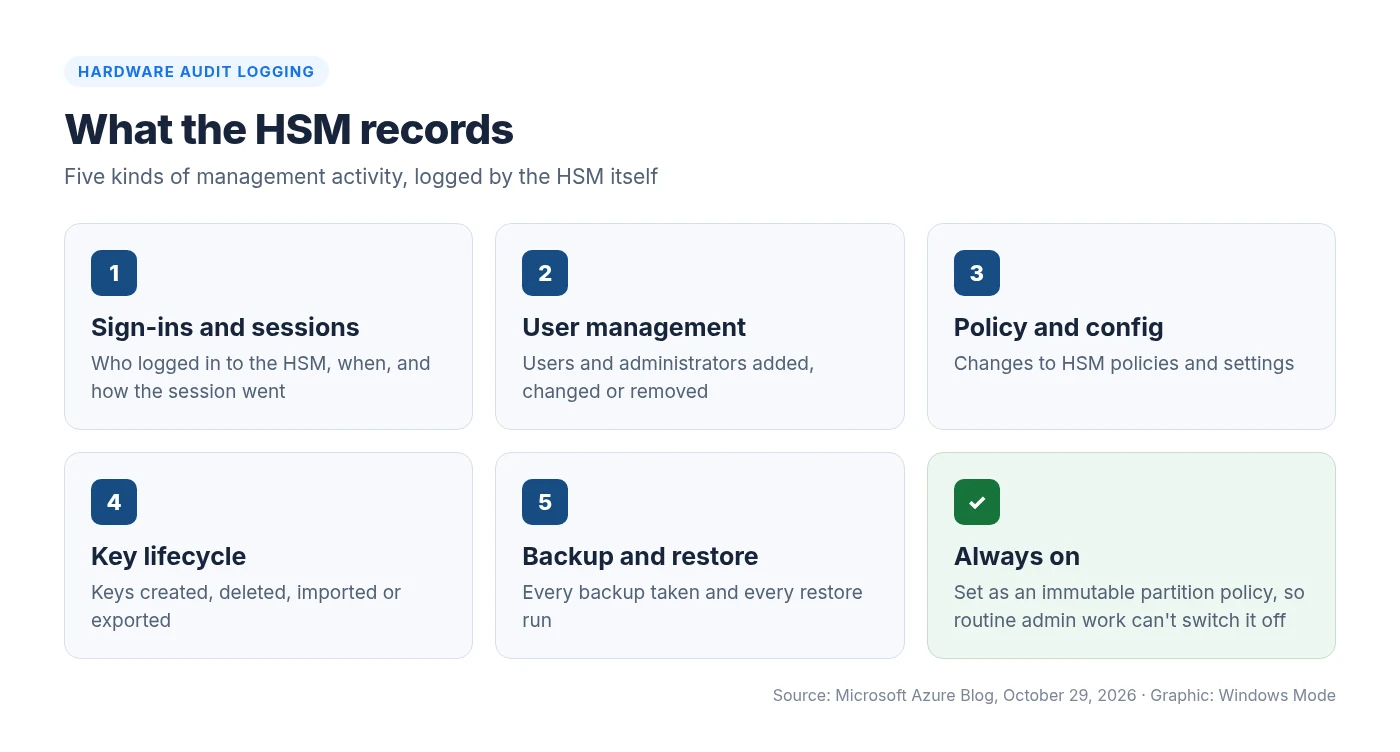
Logging is set as an immutable HSM partition policy. In everyday words, once it’s on, the people who administer the HSM can’t quietly turn it off. That matters for companies that split duties between the team running the HSM and the team watching it.
| Question | Answer |
|---|---|
| What it covers | Management operations on the HSM: sign-ins, users, policies, keys, backups |
| Who creates the record | The HSM firmware itself, not just the Azure platform around it |
| Proof it’s genuine | HSM-signed binary data, signatures and HSM certificates for each batch |
| Where it goes | Azure Monitor Log Analytics (plus a storage account), and on to Microsoft Sentinel |
| Can admins turn it off? | No. It’s an immutable HSM partition policy |
| Availability | Rolling out across public regions, on by default for new resources where available |
How the signed records work
A readable log is useful, but anyone with enough access could, in theory, change a text file. So Microsoft also hands over the raw evidence behind each record: the HSM-signed binary audit data, the signatures, and the HSM certificates needed to check them.
According to the Microsoft Learn tutorial, the HSM pulls records from each partition in batches and signs each batch with the partition certificate key. Every record in a batch shares the same CorrelationId, which ties it back to its signed batch.
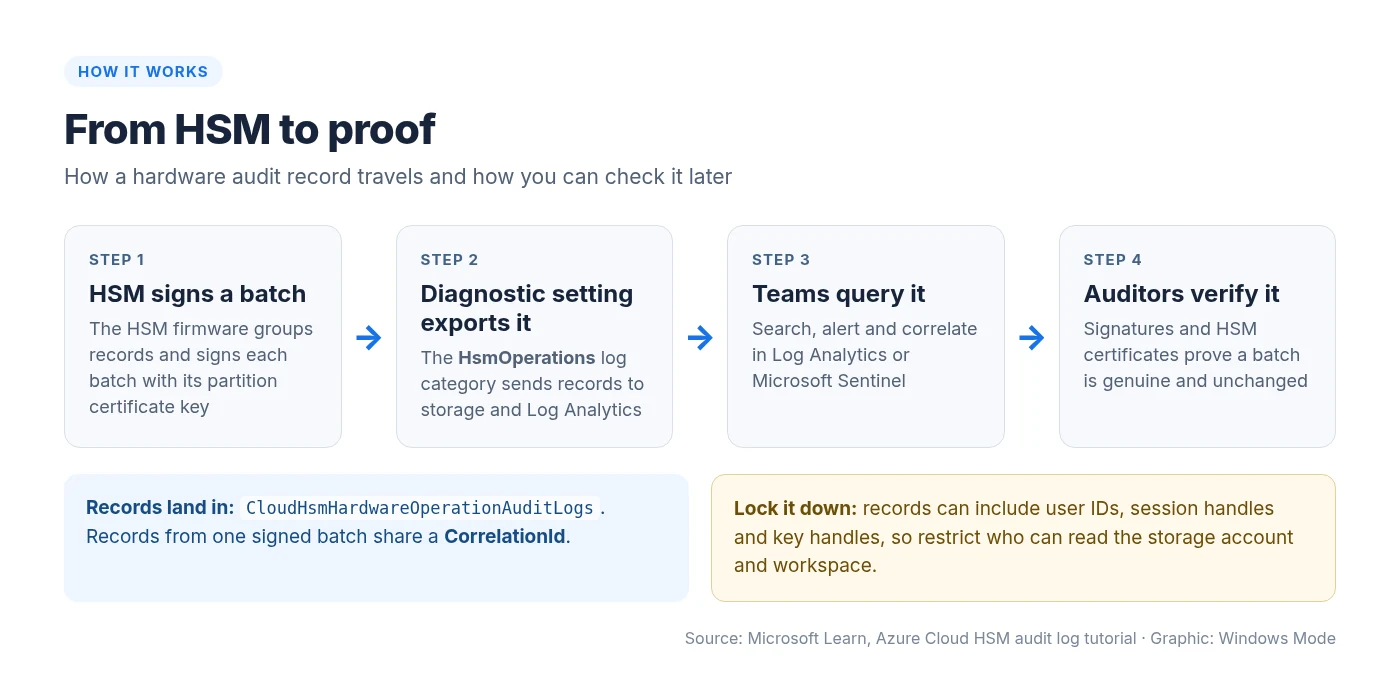
You can keep that signed evidence outside your logging pipeline and check it whenever an audit or investigation calls for it, instead of trusting only the delivered text.
Who should care
- Compliance teams in finance, payments, government and critical infrastructure get evidence that privileged HSM actions were logged during an assessment period.
- Security operations can review an odd sign-in, a new administrator or a policy change next to related Azure activity in Microsoft Sentinel.
- Incident responders can rebuild the sequence of HSM management events around an investigation.
Microsoft is clear that this doesn’t replace your own governance. You still decide who can read the logs, how long to keep them, which alerts to build and how the evidence fits your control framework.
How to turn it on and query it
Hardware Audit Logging is rolling out across Azure Cloud HSM public regions and is on by default for newly provisioned Cloud HSM resources where it’s available. To actually collect the records, you point a diagnostic setting at the HsmOperations log category. Microsoft’s tutorial sends them to both a storage account and a Log Analytics workspace.
From Windows, the Azure CLI or Azure PowerShell both work. This is the CLI command from Microsoft Learn, with your own resource, storage and workspace IDs filled in:
az monitor diagnostic-settings create \
  --resource $resourceId \
  --name "my-chsmAuditLogs" \
  --storage-account $storageAccountId \
  --workspace $workspaceId \
  --export-to-resource-specific true \
  --logs '[{"category":"HsmOperations","enabled":true}]'
Once a supported management action happens, the records land in the CloudHsmHardwareOperationAuditLogs table. A simple query for sign-in activity looks like this:
CloudHsmHardwareOperationAuditLogs
| where OperationName in ("CN_LOGIN", "CN_LOGOUT")
| project TimeGenerated, OperationName, ResultType, UserID, HsmInstance
Before you start
- Retention: Microsoft says the Log Analytics workspace must keep data for at least 30 days.
- No backfill: diagnostic settings don’t collect anything logged before the setting existed. Ingestion usually takes minutes, around 20 under normal conditions, and the first activation can take up to 90.
- Lock it down: records can include user IDs, session handles and key handles, so limit who can read the storage account and workspace.
What about the older service operation logs?
Azure Cloud HSM also has an HsmServiceOperations category. Those logs describe requests the Cloud HSM service saw, and Microsoft positions them as a troubleshooting supplement. You can enable both categories in the same diagnostic setting. Service records go to a separate table, CloudHsmServiceOperationAuditLogs.
The bigger picture
This is part of a steady push by Microsoft to make Azure’s hardware security easier to inspect from the outside. Earlier this year it open sourced the Azure Integrated HSM, its in-house security chip for Azure servers. Signed, tamper-evident HSM logs follow the same idea: don’t just say the system is secure, give customers a way to check.
If you already run Azure Cloud HSM, check Azure products by region for availability, then add the HsmOperations diagnostic setting so the signed records actually reach a place your auditors can see.
Source: Microsoft Azure Blog and Microsoft Learn. Details checked October 31, 2026.
Discover more from Windows Mode
Subscribe to get the latest posts sent to your email.















Add your first comment to this post