Attackers broke into a couple of dozen unpatched Check Point security gateways, took full root control, and used them as a launch point into the networks behind them. In some cases they went on to wipe a VMware ESXi server. Check Point disclosed the campaign on November 12, 2026, and is urging every customer to install its November Jumbo Hotfix.
The fix for the first flaw in the chain had been out since October 23, a week before the attacks started. That makes this a story about patch speed as much as about a new bug.
Key takeaways
- Two steps to root: PHP2Shell (CVE-2026-109618 and CVE-2026-109619) opened the Mobile Access portal, then CVE-2026-123039 turned that access into root.
- Who was hit: Check Point says only a couple of dozen unpatched systems, in a single region, were compromised. Affected customers were contacted in real time.
- What to do: Install the November Jumbo Hotfix on all Management Servers and Security Gateways, starting with any gateway that exposes Mobile Access to the internet.
How the attack worked
A security gateway is the firewall box that sits between a company network and the internet. Many also run a Mobile Access portal, a web login page that lets staff reach internal apps from outside. That portal was the door.
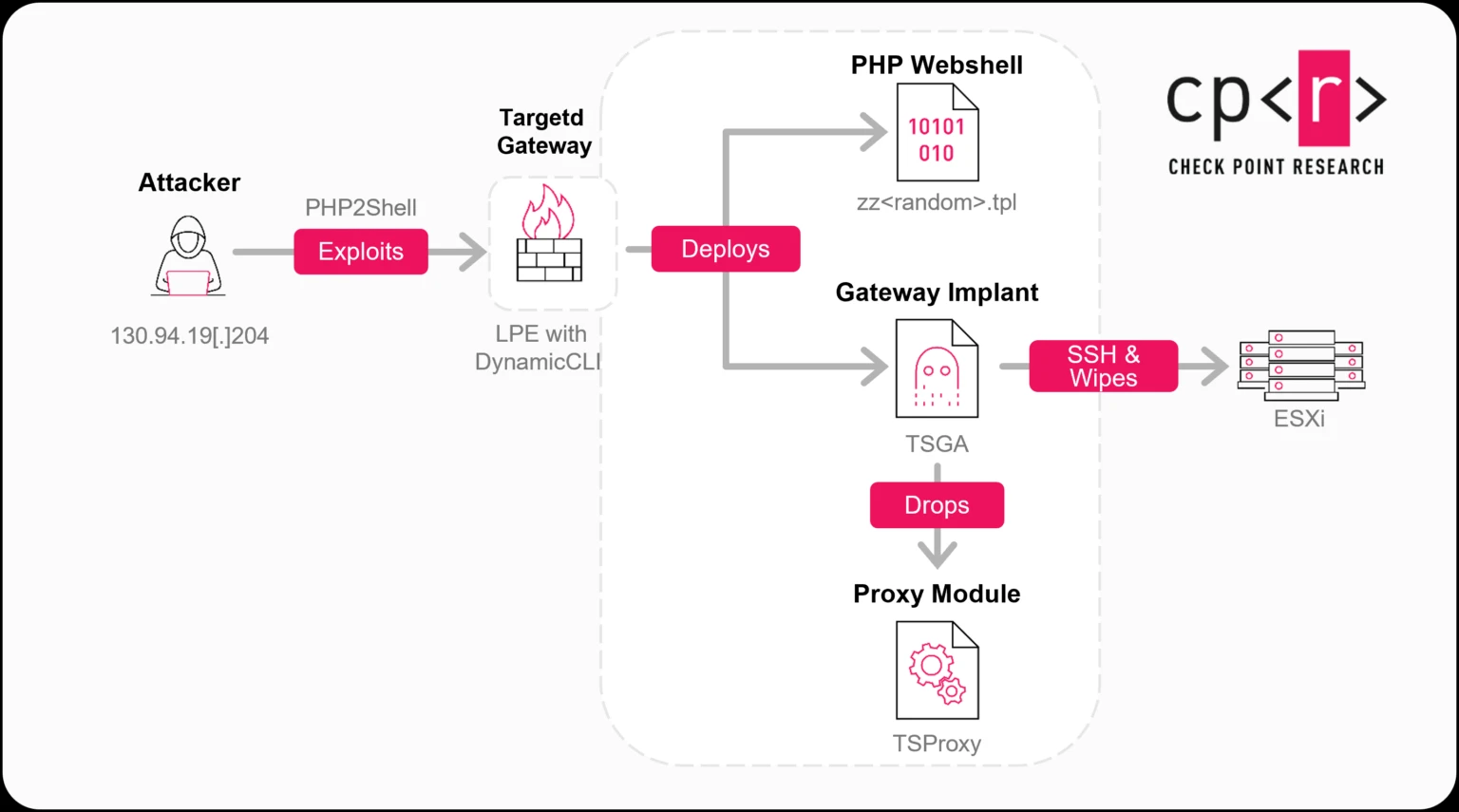
According to Check Point Research, the attacker first used PHP2Shell, two flaws in PHP that allow remote code execution without a login. That gave them a foothold as the portal’s limited service account.
They then used CVE-2026-123039, a privilege escalation bug in Gaia OS (Check Point’s appliance operating system). A management service called DynamicCLI runs as root and listens on a local control socket that any process on the box can write to. Writing commands to it turned limited access into full control.
The timeline
| Date (2026) | What happened |
|---|---|
| October 23 | Check Point makes security fixes available, including the PHP2Shell hotfix. |
| October 30 | First wave hits Israeli organizations through Mobile Access portals. Some see destructive activity. |
| November 2 | A broader second wave targets organizations in several countries and sectors, with no sign of destructive activity. |
| November 4 | Last exploitation activity Check Point observed. |
| November 12 | Check Point publishes its advisory and full research write-up. |
The flaws and the versions affected
Check Point’s security advisory lists the bugs fixed in the November Jumbo Hotfix. Only the first two rows below were used in the wild.
| CVE | What it does | CVSS | Affected | Exploited |
|---|---|---|---|---|
| CVE-2026-109618, CVE-2026-109619 (PHP2Shell) | Remote code execution without login through firewall web interfaces | 9.2 | Security Gateways with Mobile Access Portal, R80 to R82.20, plus some Spark Firewall versions | Yes |
| CVE-2026-123039 | Local privilege escalation to root in the Gaia OS Dynamic CLI service | 7.8 | Gaia R81.20, R82, R82.10, R82.20 | Yes |
| CVE-2026-107484 | Privilege escalation in Gaia Portal by a signed-in user | 7.3 | Gaia WebUI, R80 to R82.20 | No |
| CVE-2026-120490 | Management-to-gateway access through a NAT rule | 3.8 | Management Servers and Security Gateways, R81.20 and R82 | No |
The 7.8 score on CVE-2026-123039 looks moderate because an attacker must already be running code on the box. Paired with PHP2Shell, that bar is easy to clear.
What the attackers did once inside
With root, the attackers hid PHP web shells (small scripts that accept remote commands) in the templates the portal uses to build its login page. They then installed a backdoor called TSGA and an embedded proxy module called TSProxy.
- Persistence: TSGA survives reboots and tucks itself into backups and snapshots.
- Theft: It can copy the firewall configuration, which maps out the whole network.
- Cover-up: It can tamper with firewall logs, and TSProxy hides inside normal appliance processes.
- Damage: From one gateway, they moved over SSH to a VMware ESXi host, ran a wiper called destroy_v6, and left a politically themed note named DREAM_ANNEXATION.txt.
In their words
“For customers, one foothold delivered the full menu: Spying, staying, and destroying.”
Frank Dickson, Dickson Research, to Network World
Who is behind it is still unclear
TSGA and TSProxy are modified versions of PhiliKit, a toolkit seen before in attacks on Ivanti VPN appliances and linked by ESET to the China-nexus group UNC5221. The infrastructure and working hours also point that way.
But the wiper, the focus on Israel and the Hebrew note do not fit that group’s usual goals. Check Point says it cannot judge with high confidence whether one actor ran everything, sold access to another, or staged a false flag.
What admins should do now
1. Patch
Install the November Jumbo Hotfix on every Management Server and Security Gateway. Do internet-facing Mobile Access gateways first.
2. Hunt
Check any gateway exposed since late October against Check Point’s published indicators of compromise.
3. Shrink the edge
Turn off Mobile Access where nobody uses it and keep management interfaces off the internet.
Can’t patch today?
Check Point’s guidance is to stop the dynamic_server process and stop it from restarting until you can install the fix. Some CLI commands will not work while it is off. The exact steps are in sk1000362.
Signs worth looking for, from Check Point’s advisory:
- PHP session files containing the string
upload_progress_pwn. - A process or file named like
CPconfigdaemonpretending to be a Check Point component. - Files with “scanner” or “wiper” in the name under
/tmp. - Traffic from 130.94.19[.]204 or 130.94.19[.]168.
- Unexplained gaps in firewall traffic logs, especially after the logging daemon crashed.
No match does not prove a gateway is clean. Patching also does not remove an attacker who is already in, so a gateway that shows signs of compromise should be rebuilt from a trusted image.
Why this matters if you run Windows servers
Many Windows networks sit behind a perimeter gateway like this one. Once it is taken over, it becomes a trusted path to everything inside, including the virtualization hosts that run Windows Server VMs.
The practical lesson: treat firewalls and VPN boxes as high-value systems. Send their logs off the box as they happen, to a system the firewall cannot touch. And do not give an internet-facing gateway a trusted SSH path to your hypervisors.
Source: Check Point Research, via Network World
Discover more from Windows Mode
Subscribe to get the latest posts sent to your email.













Add your first comment to this post