 Let’s be real, Windows is packed with powerful shortcuts, but most of us only use a handful.
Whether you’re just getting started or want to become a keyboard ninja, this guide breaks down the most useful shortcuts for Windows 10 and 11, all neatly organized by category.
There’s even a downloadable cheat sheet to keep by your desk! Feel free to leave a comment below or contact us for any help.
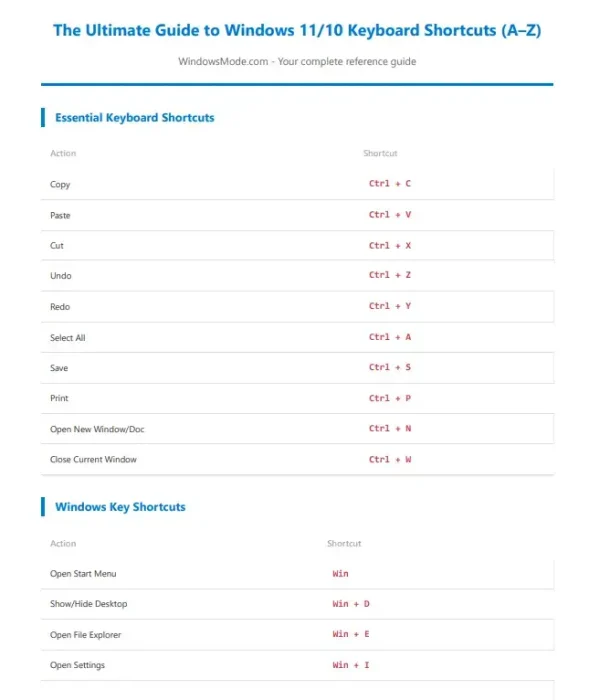
Guide to Windows 11 Keyboard Shortcuts
Essential Shortcuts
| Action | Shortcut |
|---|---|
| Copy | Ctrl + C |
| Paste | Ctrl + V |
| Cut | Ctrl + X |
| Undo | Ctrl + Z |
| Redo | Ctrl + Y |
| Select All | Ctrl + A |
| Save Document | Ctrl + S |
Ctrl + P |
|
| Open New Document | Ctrl + N |
| Close Current Window | Ctrl + W |
Windows Key Shortcuts
| Action | Shortcut |
|---|---|
| Start Menu | Win |
| Show Desktop | Win + D |
| File Explorer | Win + E |
| Settings | Win + I |
| Lock PC | Win + L |
| Task View | Win + Tab |
| Action Center | Win + A |
| Search | Win + S |
| Run Box | Win + R |
| System Properties | Win + Pause/Break |
Navigation Shortcuts
| Action | Shortcut |
|---|---|
| Switch Apps | Alt + Tab |
| Switch Tabs | Ctrl + Tab |
| Move Word-by-Word | Ctrl + ← / → |
| Select Word-by-Word | Shift + Ctrl + ← / → |
| Go to Start/End | Ctrl + Home / End |
| Cycle Open Windows | Alt + Esc |
Text Editing Shortcuts
| Action | Shortcut |
|---|---|
| Line Start/End | Home / End |
| Select to Line Start/End | Shift + Home / End |
| Delete Word | Ctrl + Backspace / Delete |
| Select Paragraph | Ctrl + Shift + ↑ / ↓ |
| Select Lines Up/Down | Shift + ↑ / ↓ |
Screenshot Shortcuts
| Action | Shortcut |
|---|---|
| Full-Screen Screenshot | PrtScn |
| Active Window | Alt + PrtScn |
| Custom Area (Snip Tool) | Win + Shift + S |
| Auto-Save Screenshot | Win + PrtScn |
| Game Bar Screenshot | Win + G |
Window Management
| Action | Shortcut |
|---|---|
| Minimize Window | Win + ↓ |
| Maximize Window | Win + ↑ |
| Snap Left/Right | Win + ← / → |
| Minimize All | Win + M |
| Restore All | Win + Shift + M |
| New Virtual Desktop | Win + Ctrl + D |
| Close Virtual Desktop | Win + Ctrl + F4 |
| Switch Desktops | Win + Ctrl + ← / → |
Bonus: Command Prompt + Browser Shortcuts
| Action | Shortcut |
|---|---|
| Copy (CMD) | Ctrl + C |
| Paste (CMD) | Ctrl + V |
| New Tab (Browser) | Ctrl + T |
| Close Tab | Ctrl + W |
| Reopen Closed Tab | Ctrl + Shift + T |
| Switch Tabs | Ctrl + Tab |
| Open History | Ctrl + H |
| Downloads | Ctrl + J |
💾 Download the Printable Shortcut Cheat Sheet (PDF)
If this guide helped you, consider supporting it by downloading the printable PDF version for just $1.
It’s the same content, organized cleanly for printing or offline viewing.
Choose your preferred option below:
Check out our other guide how to disable Windows 11 auto drive updates and how to customize your Windows taskbar.
Discover more from Windows Mode
Subscribe to get the latest posts sent to your email.














Thank you