Readers like you help support this site. When you make a purchase using links on our site, we may earn an affiliate commission. All opinions remain our own.

The best torrent client for Windows in 2026 is qBittorrent for most users (free, open-source, no ads), uTorrent for those who want remote access features, and PicoTorrent for older PCs that need a lightweight option.
We tested 12 BitTorrent clients for Windows 10 and 11, comparing download speeds, system resource usage, privacy features, and ad intrusiveness. Below you’ll find our rankings, feature comparisons, and honest recommendations to help you choose the right torrent client for your needs.
Whether you’re downloading large files, Linux ISOs, or open-source software, BitTorrent technology remains one of the fastest and most efficient ways to transfer data.
qBittorrent
uTorrent
PicoTorrent
12 Apps
⚠️ Important Safety Warning
Your ISP can see what you download. Torrents expose your IP address to thousands of peers. To reduce the risk of ISP throttling and protect your privacy, use a VPN and scan all downloaded files with a trusted antivirus before opening them.
🔍 What We Evaluated
Download Speed
Performance with popular torrents
System Impact
CPU/RAM usage while downloading
Ads & Bloatware
Clean install experience
Privacy Features
Encryption, IP filtering, VPN support
Quick Comparison: Top Torrent Clients
| Client | Best For | Open Source | Ads | Rating |
|---|---|---|---|---|
| 1. qBittorrent | Overall Best / Privacy | ✅ Yes | None | ⭐⭐⭐⭐⭐ |
| 2. uTorrent | Remote Access / Features | ❌ No | Yes (Free) | ⭐⭐⭐⭐ |
| 3. PicoTorrent | Lightweight / Old PCs | ✅ Yes | None | ⭐⭐⭐⭐⭐ |
| 4. Deluge | Plugin Customization | ✅ Yes | None | ⭐⭐⭐⭐ |
| 5. Transmission | Simplicity / Cross-Platform | ✅ Yes | None | ⭐⭐⭐⭐ |
| 6. BiglyBT | Privacy (I2P/Tor Support) | ✅ Yes | None | ⭐⭐⭐⭐ |
💡 Our Recommendation for Most Users:
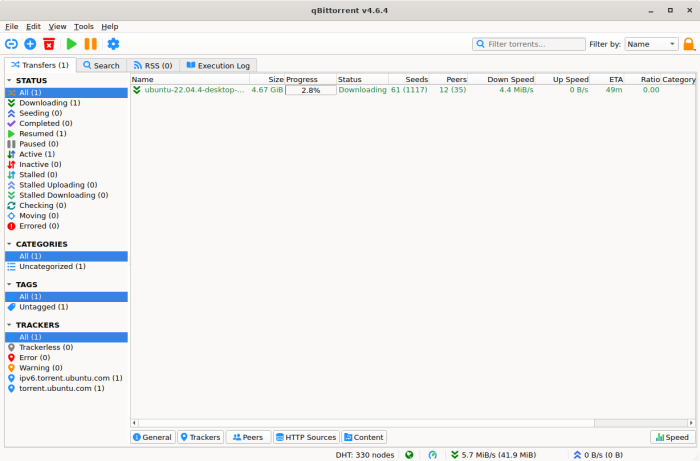
qBittorrent is the best choice for most Windows users in 2026. It’s completely free, open-source, has no ads, includes a built-in search engine, and offers the features most people need. The main reason to choose uTorrent instead is if you specifically need its mobile remote access features.
What are the Best Free Torrent Clients for PC?
1. qBittorrent
🏆 Best Overall: Free, Open Source, No Ads
Key Features:
- 💻 Completely Ad-Free: No advertisements, popups, or bundled software
- 🔍 Built-In Search Engine: Find torrents directly within the app
- 🔒 Privacy Tools: Encryption, IP filtering, and anonymous mode
- 🌐 Web UI: Control downloads remotely via a browser
✅ The Good
- Free with no ads
- Integrated torrent search engine
- Sequential downloading for streaming
- Lightweight and fast
❌ The Bad
- Interface less polished than uTorrent
- No native mobile app
- Slightly steeper learning curve
Why we recommend it: qBittorrent offers everything uTorrent does, minus the ads, bundled software, and common privacy concerns. It’s the client many power users prefer.
2. uTorrent
Most Popular: Feature-Rich with Mobile Access
Key Features:
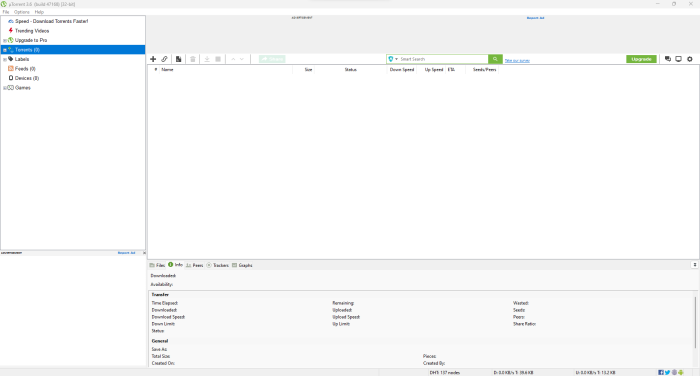
- 📂 Lightweight Core: Small install footprint with low resource usage
- 🌐 Remote Access: Manage downloads via mobile or web tools
- 🎛️ Built-In Media Player: Preview files while downloading
- 🔧 Advanced Scheduling: Control bandwidth and download times
✅ The Good
- Useful remote access options
- Widely used (easy to find help)
- Clean, familiar interface
- Built-in media preview
❌ The Bad
- Ads in the free version
- Bundled offers during install (decline them)
- Past controversy (choose qBittorrent if you want the cleanest option)
Why we recommend it: uTorrent remains popular because it works and stays lightweight. If you install it, use the official site and decline any optional extras.
3. PicoTorrent
Ultra Lightweight: Perfect for Older Hardware
Key Features:
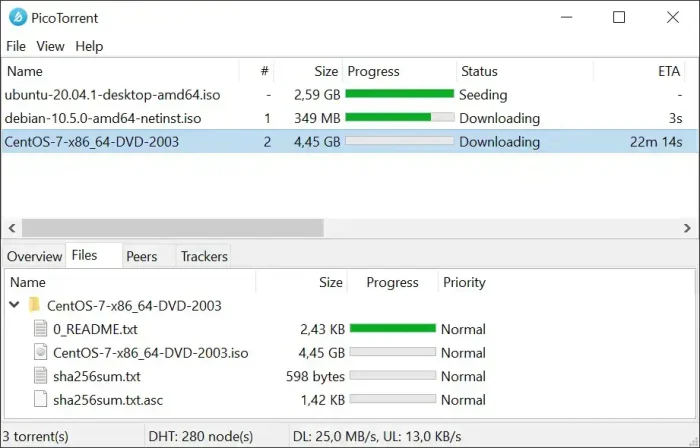
- ⚡ Incredibly Small: Small download size and minimal footprint
- 🔓 Open Source: Transparent, community-driven development
- 🚀 Fast Performance: Optimized for speed on low-end hardware
- 🛡️ Clean Install: No ads, no bloat
✅ The Good
- Very lightweight
- Native Windows feel
- Low CPU usage
- Open source
❌ The Bad
- Minimal features vs. bigger clients
- No built-in search engine
- Basic interface
Why we recommend it: If you have an older PC or want a minimal torrent client, PicoTorrent is a solid choice.
4. Deluge
Plugin Powerhouse: Highly Customizable
Key Features:
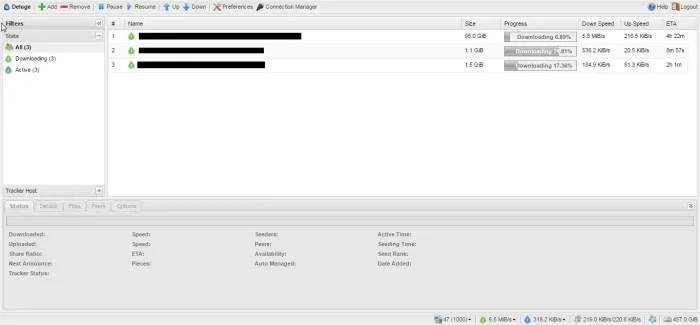
- 🧩 Plugin System: Add only the features you want
- 🌐 Cross-Platform: Windows, Mac, Linux
- 🔧 Daemon Mode: Run headless on servers
- 📈 Detailed Stats: Download analytics
✅ The Good
- Strong plugin ecosystem
- Can run headless
- Open source
- Light base install
❌ The Bad
- Larger install vs. minimal clients
- Setup can feel complex for beginners
- Updates can be less frequent
Why we recommend it: Deluge is a good fit if you want a modular client that can scale up with plugins, and it can work well on a home server.
5. Free Download Manager
All-in-One: Torrents + Regular Downloads
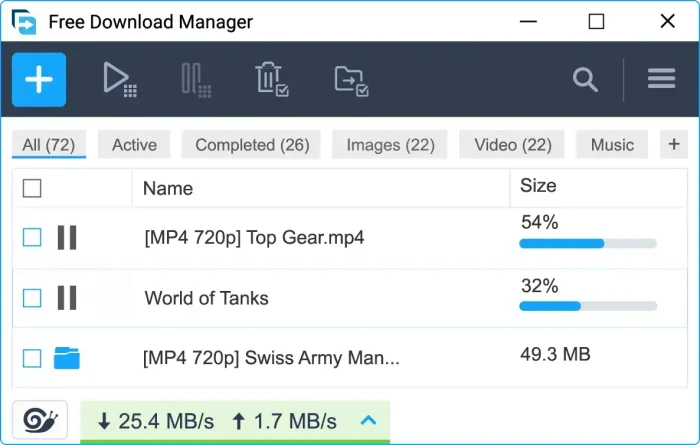
Key Features:
- 🌐 Multi-Protocol: HTTP, FTP, and BitTorrent in one app
- 🚀 Speed Boost: Splits downloads for faster speeds
- 📊 Video Downloading: Download videos from supported sites
- 💾 Portable Mode: Run without installation
✅ The Good
- One app for multiple download types
- Browser integration
- Resume broken downloads
- Free tier available
❌ The Bad
- Torrent tools are less advanced than dedicated clients
- Interface can feel busy
- Heavier than minimal torrent-only apps
Why we recommend it: If you want one download manager that can handle torrents plus standard downloads, FDM is a practical option.
6. Transmission
Minimalist: Simple and Cross-Platform
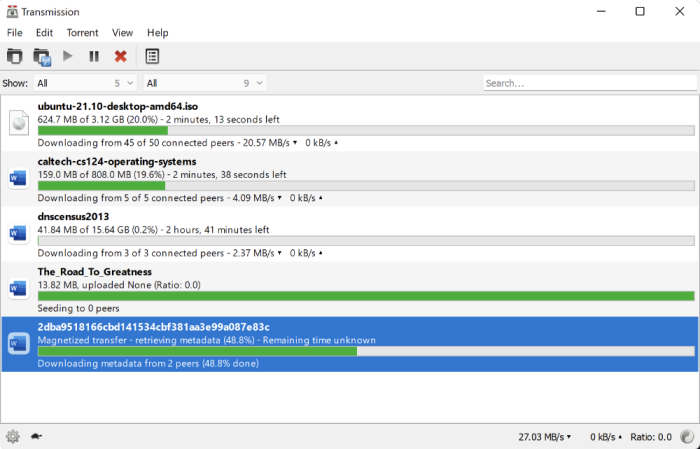
Key Features:
- 💻 Minimal Interface: Clean, distraction-free design
- 🔒 Privacy Features: Encryption and blocklists
- 🌐 Web Interface: Remote management via browser
- 🔧 Low Resource Usage: Runs smoothly in the background
✅ The Good
- Simple to use
- Popular on Mac and Linux
- Good web UI for remote access
- Open source
❌ The Bad
- Fewer features than alternatives
- Windows version can vary by build/source
- No built-in search
Why we recommend it: Transmission is a good fit if you want a clean interface and basic torrent features without extra clutter.
7. BiglyBT
Privacy-Focused: I2P and Tor Support
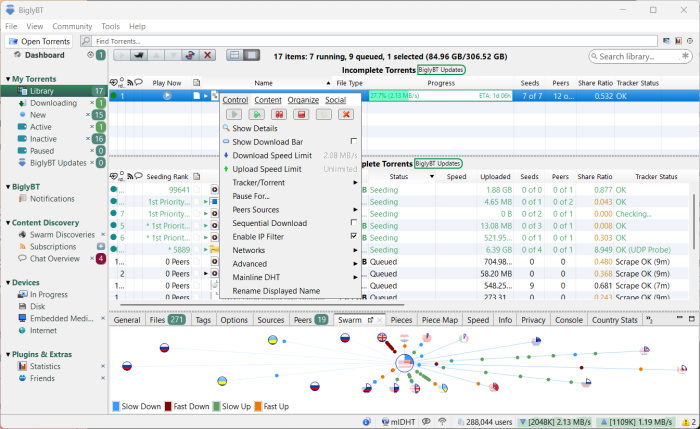
Key Features:
- 🔒 Anonymous Networks: I2P and Tor support
- 🌐 Open Source: Transparent codebase
- 🔧 Extensive Plugins: Highly customizable
- 📊 Detailed Analytics: Download stats and monitoring
✅ The Good
- Strong privacy options
- No ads
- Built on a long history (Azureus/Vuze lineage)
- Active development
❌ The Bad
- Requires Java
- Interface can feel overwhelming
- Higher resource usage
Why we recommend it: If privacy is your top priority, BiglyBT’s I2P/Tor support makes it one of the more capable options for anonymous torrenting.
More Torrent Clients Worth Considering
8. FrostWire
Media-Focused
Built-in media player and cloud sync. Good for downloading and consuming content in one app.
9. BitComet
Veteran Choice
Multi-protocol support (torrents, HTTP, FTP) with browser integration.
10. Tixati
Power User Stats
Detailed bandwidth analytics, IP filtering, and portable mode.
11. Vuze
Feature-Rich
Media conversion, plugins, and remote features. A Pro version exists for extra tools.
12. WebTorrent
Streaming-First
Stream content while downloading. Desktop app available.
Feature Comparison Table
| Feature | qBittorrent | uTorrent | PicoTorrent | Deluge | BiglyBT |
|---|---|---|---|---|---|
| Open Source | ✅ | ❌ | ✅ | ✅ | ✅ |
| Ad-Free | ✅ | ❌ (Paid) | ✅ | ✅ | ✅ |
| Built-in Search | ✅ | ❌ | ❌ | Plugin | ✅ |
| Mobile App | ❌ | ✅ | ❌ | ❌ | ✅ |
| Web UI | ✅ | ✅ | ❌ | ✅ | ✅ |
| I2P/Tor Support | ❌ | ❌ | ❌ | Plugin | ✅ |
| RAM Usage | ~50MB | ~30MB | ~3MB | ~80MB | ~150MB |
What Are Torrents?
A torrent is a file format used by BitTorrent clients to facilitate peer-to-peer (P2P) file sharing. Instead of downloading from a single server, torrents let you download pieces of a file from many users simultaneously, which can make large downloads faster and more reliable.
🔒 Are Torrents Safe?
Torrents are safe technology, but files can contain malware. Download from trusted sources and scan files before opening them.
⚖️ Are Torrents Legal?
BitTorrent is legal. What matters is what you download. Linux ISOs, open-source software, and Creative Commons content are legal. Pirated movies and software are not.
Common Issues and Fixes
Torrent downloads are extremely slow
Check seeders (few seeders means slow speeds). Also verify your ISP is not throttling torrents (use a VPN to test). In your client, confirm ports and firewall/router settings are correct.
Torrent is stuck at “Connecting to peers”
Your firewall may be blocking the connection. Add your torrent client to Windows Firewall exceptions. Also try enabling DHT and PeX in settings, and confirm the torrent has active seeders.
Downloaded file won’t open or is corrupted
Force a re-check of the torrent to verify all pieces. If issues persist, the torrent source may be bad. Find an alternative with more seeders.
ISP sent a warning letter about torrenting
Your IP may have been logged while downloading copyrighted content. A VPN can reduce exposure by encrypting traffic and masking your IP. Choose a VPN with a no-logs policy and a kill switch.
Frequently Asked Questions
What is the best torrent client for Windows in 2026?
qBittorrent is the best overall choice. It’s free, open-source, ad-free, and includes a built-in search engine. For users who need remote access, uTorrent is an alternative, but it includes ads.
Is uTorrent safe to use?
uTorrent from the official website is generally safe, but be careful during installation and decline optional bundled offers. If you want the cleanest experience, use qBittorrent.
Do I need a VPN while torrenting?
Strongly recommended. Torrents expose your IP address to peers in the swarm. A VPN hides your IP and encrypts traffic, which can reduce ISP throttling and improve privacy.
What does “seeding” mean?
Seeding means uploading a completed torrent to other users. A good habit is to seed at least as much as you download (a 1:1 ratio). More seeders usually means faster downloads.
Which torrent client uses the least resources?
PicoTorrent is one of the lightest options and works well on older PCs.
Can my ISP see what I’m downloading?
Yes. Without a VPN, your ISP can see BitTorrent traffic and may throttle it. A VPN encrypts your traffic, so your ISP mainly sees encrypted data.
Our Top Recommendation
For most users, qBittorrent is the best choice: free, open-source, and no ads.
Related Guides:
Best Antivirus Software,
Best Free Media Players,
Best Free FTP Clients
Discover more from Windows Mode
Subscribe to get the latest posts sent to your email.
















Utorrent is by far the best, at least it loads the fastest for me on my Laptops.
I remember when McAfee and Norton were the only antivirus companies that people loved, now those two are literally spyware, lol how times change.
I always felt like those two were just forced on me everywhere. Can’t imagine anyone who know at least a little bit about internet would use them. They do nothing but download updates. I like to call them “update engines”:)
Give Bitport.io a look. It pretty much combines VPN and torrent client in one. It should make for interesting article:)
Try Deluge. It’s the best one out there right now right after Utorrent. If you really want to us Utorrent go for version 2.2.1
I agree.
Frostwire is underrated.