ArtCraft for Windows: The Free, Open-Source Apps Built to Replace Adobe

Share

Readers like you help support this site. When you make a purchase using links on our site, we may earn an affiliate commission. All opinions remain our own.
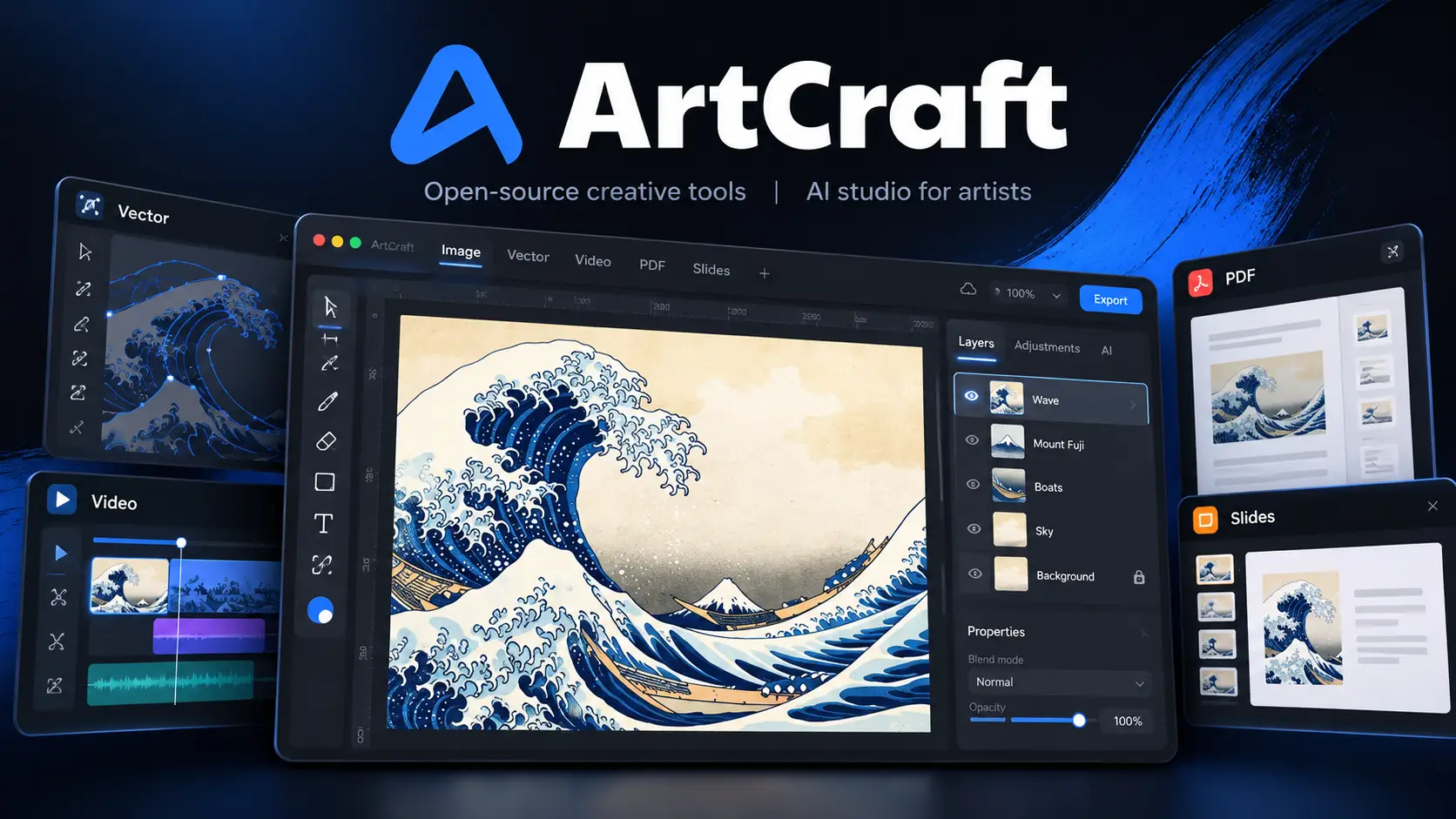
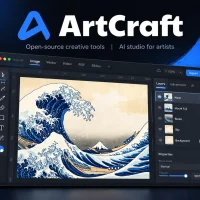
ArtCraft logo above a dark app window editing The Great Wave off Kanagawa in layers, with smaller Vector, Video, PDF and Slides app panels around it

ArtCraft is a free, open-source set of creative apps for photos, vectors, video, PDFs and more.

ArtCraft is a set of free, open-source apps for Windows built to do the jobs of Photoshop, Premiere Pro, Lightroom and other Adobe apps, available from the official ArtCraft website and GitHub. Each app is its own native program, and a free launcher installs and updates them all. There is no subscription.

The familiar layout is what got everyone talking. PhotoCraft looks and works like Photoshop, and it opens and saves layered PSD files. The rest of the lineup applies the same idea to video, vectors, photos, PDFs, page layout and even office documents.

Developer Brandon Thomas and the ArtCraft team released the apps in October 2026, written in Rust. They run on Windows 10 and 11, including Arm laptops, plus macOS and Linux. Every app is labeled early alpha or in development.

This guide covers what each app does, how to install them on Windows, what is free, whether it is legal, and whether you should switch yet. Tried one already? Tell us how it went.

Price
Free
License
MIT or Apache 2.0
Windows
10 and 11, x64 and Arm
Stage
Early alpha

What Is ArtCraft?

Two different things share the ArtCraft name, so it helps to separate them first. The one that made headlines is the set of Crafting Apps: standalone editors for photos, video, vectors, PDFs and more. This page is mostly about those.

The other is the ArtCraft studio, the team’s original app. It is an AI image and video tool where you place characters, 3D props and backgrounds on a canvas, then generate images or video from that scene. It is also open source, but its AI models run on paid credits unless you bring your own.

The Crafting Apps were written in Rust, and Thomas has said he used Anthropic’s Claude Opus 5.5 to write much of the code. He calls them clean-room rebuilds. That means they were built from public file specifications and from watching how the Adobe apps behave, not from Adobe’s code.

Made by
Brandon Thomas and the ArtCraft team
Written in
Rust
Also runs on
macOS, Linux, web

Every ArtCraft App at a Glance

Each Craft app fills the role of one well-known paid program. Use this table to find the one you came for, then jump to its card below.

The Crafting Apps
What each app does, and the paid program it is built to replace
App What it does Fills the role of
PhotoCraft Image editing Adobe Photoshop
VectorCraft Vector illustration Adobe Illustrator
FilmCraft Video editing Adobe Premiere Pro
LightCraft Photo library and raw editing Adobe Lightroom
EffectCraft Motion graphics and effects Adobe After Effects
DesignCraft Page layout Adobe InDesign
PdfCraft PDF reading and organizing Adobe Acrobat
WordCraft Word processing Microsoft Word
GridCraft Spreadsheets Microsoft Excel
DeckCraft Presentations Microsoft PowerPoint
CADCraft CAD and drafting AutoCAD
SoundCraft Audio recording and mixing Studio recording apps (DAWs)

Adobe, Photoshop, Microsoft and the other product names are trademarks of their owners. ArtCraft states it is not affiliated with or endorsed by Adobe.

The Adobe Alternatives

These are the apps that went viral. Each card shows the real app, what it can do today, and the files it works with.
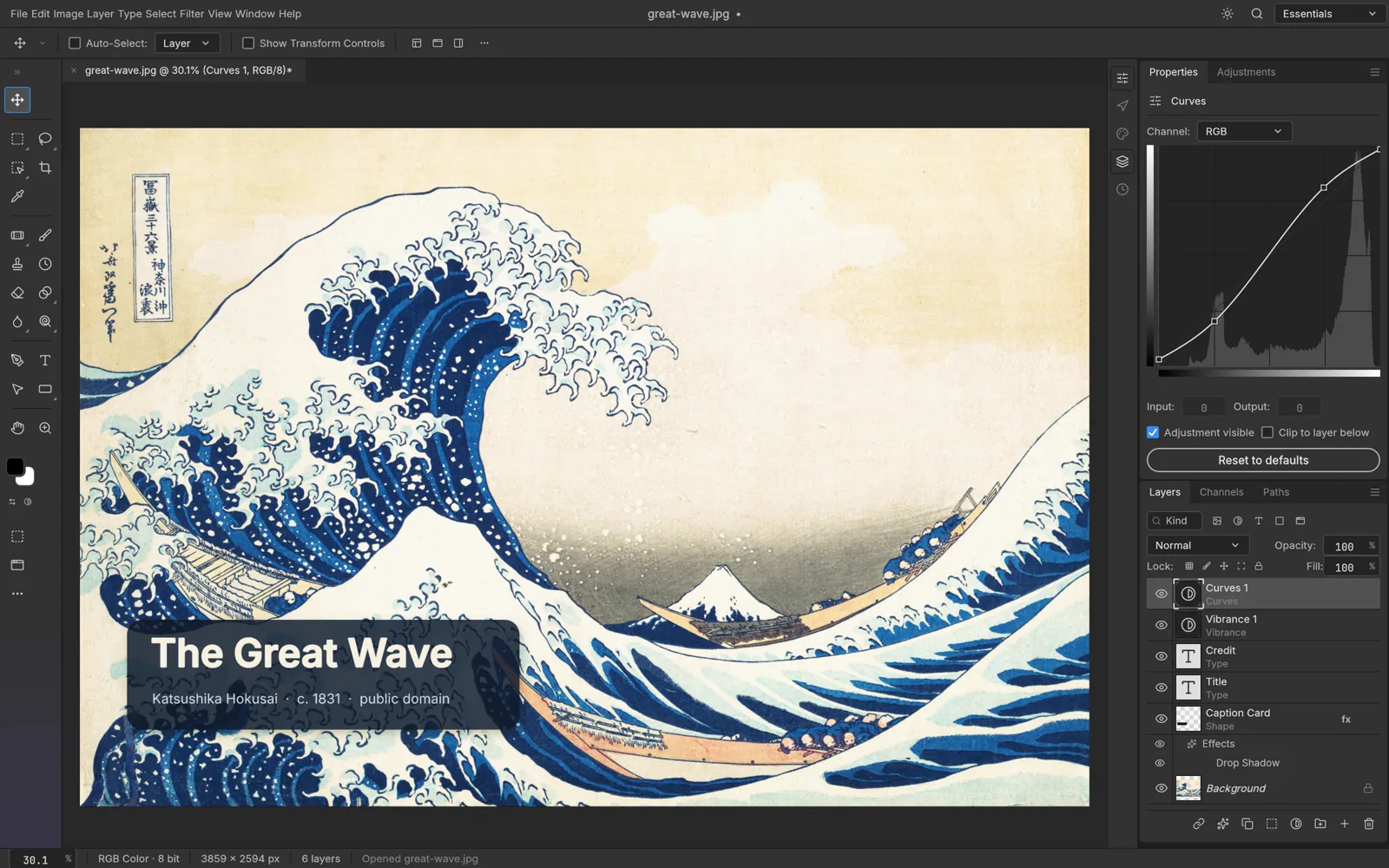
PhotoCraft image editor showing The Great Wave off Kanagawa open with a Curves adjustment and a Layers panel

PhotoCraft app icon

PhotoCraft Image editor

Photoshop alternativeEarly alpha

Layers, masks, adjustment layers, layer styles, type and brushes, with menus and shortcuts placed where Photoshop users expect them. It opens and saves layered PSD and PSB files. Subject selection runs on your PC, with no cloud and no account.

Files: PSD and PSB, at 8, 16 or 32 bits, in RGB, CMYK, Lab and Grayscale

PhotoCraft page · Source on GitHub

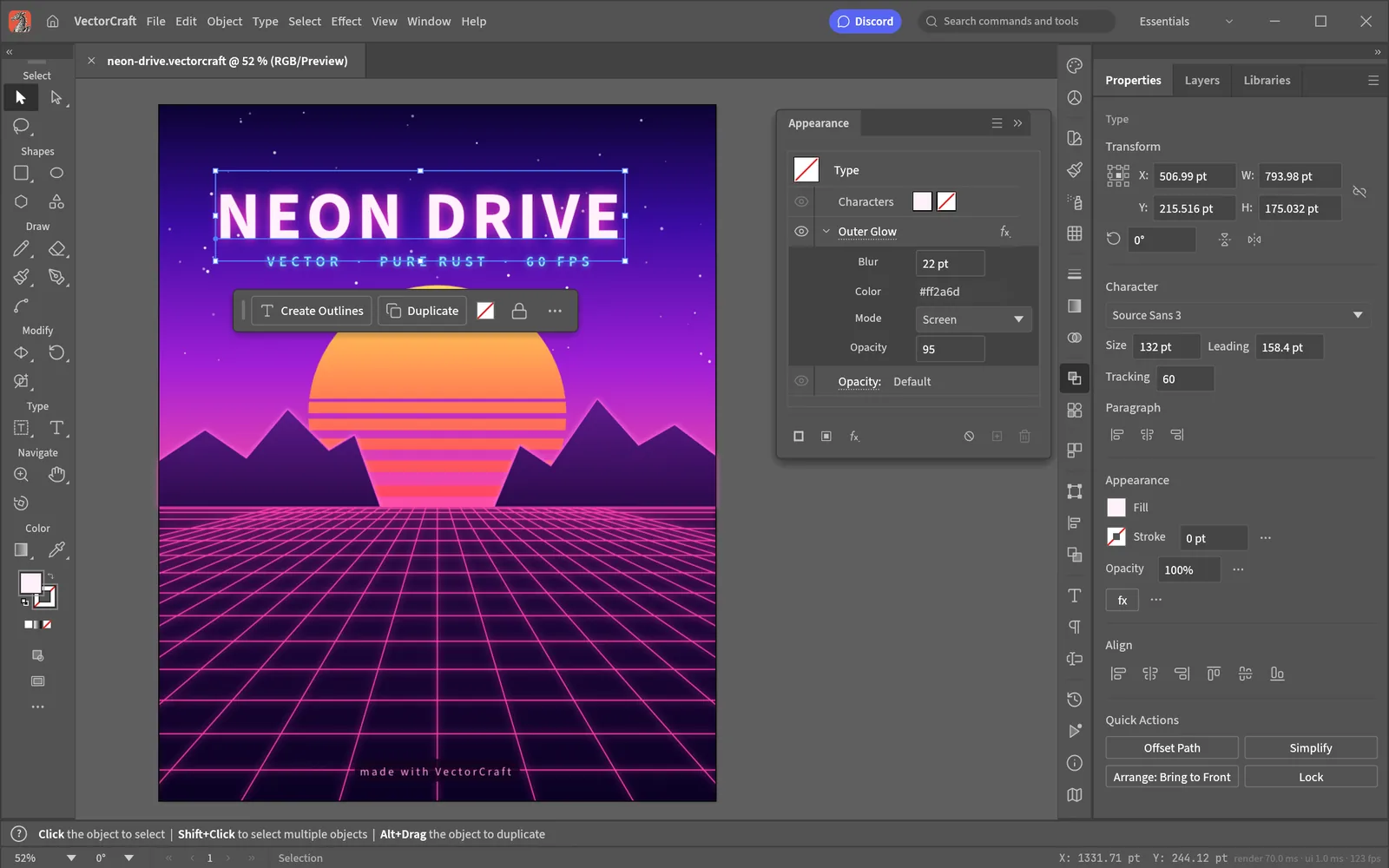
VectorCraft vector editor with a retro sunset poster design selected on the canvas and the Appearance panel open

VectorCraft app icon

VectorCraft Vector illustration

Illustrator alternativeIn development

Pen tool, shape combining and cutting, snapping guides and an appearance panel. Live effects like blends, envelope distort and gradient mesh stay editable. Image tracing turns a photo or scan into vector paths, with 12 presets.

Files: SVG and PDF in; SVG, PDF, PNG, JPEG and WebP out

VectorCraft page · Source on GitHub

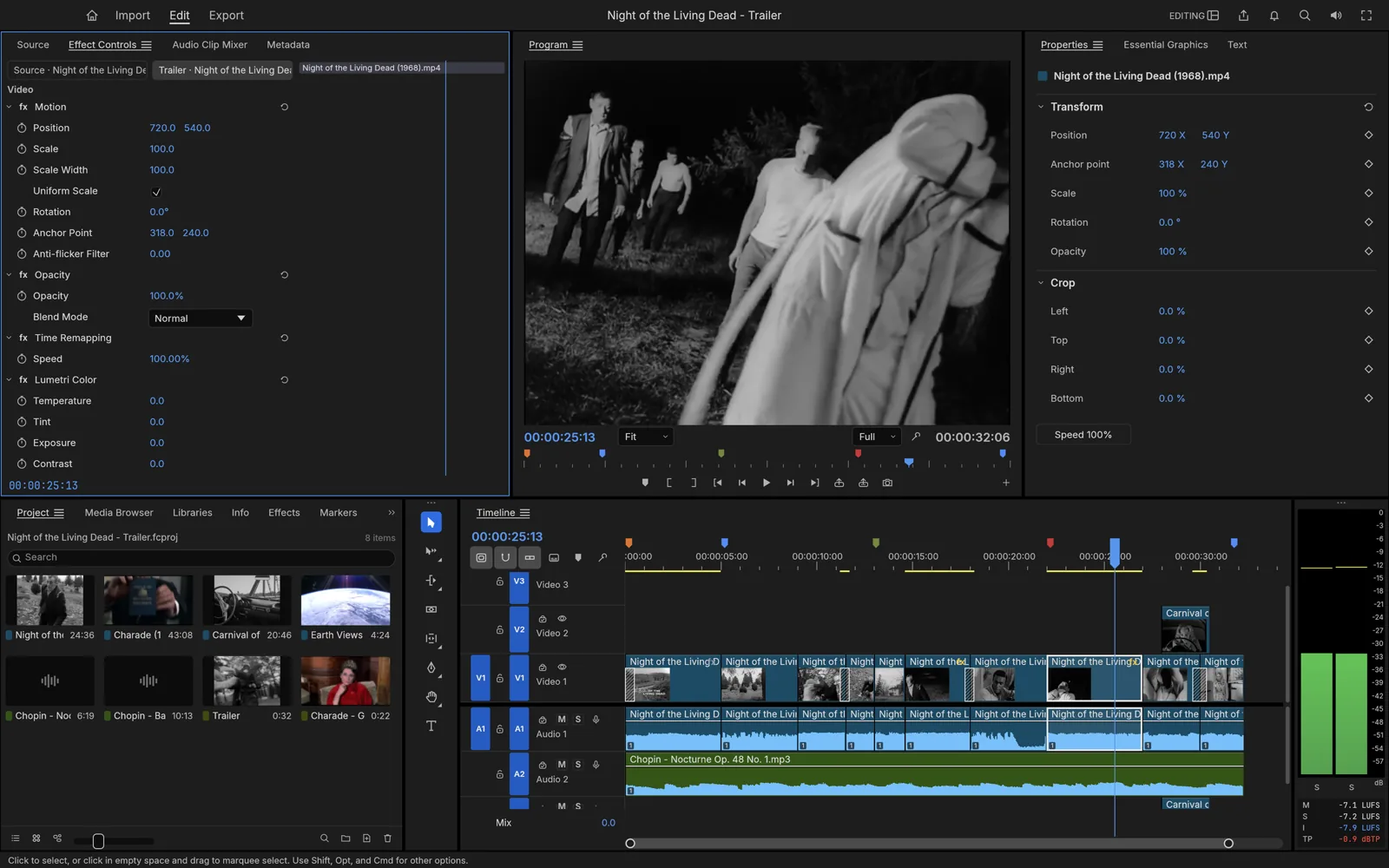
FilmCraft video editor with source and program monitors above a multi-track timeline and audio meters

FilmCraft app icon

FilmCraft Video editor

Premiere Pro alternativeIn development

Source and program monitors, a multi-track timeline, trim tools, about 55 effects and 30 transitions. Color grading covers curves, color wheels and LUTs (ready-made color looks). It handles H.264, HEVC and ProRes on its own, with no extra codec pack to install.

Files: H.264, HEVC, ProRes and VP9 video; AAC and Opus audio

FilmCraft page · Source on GitHub

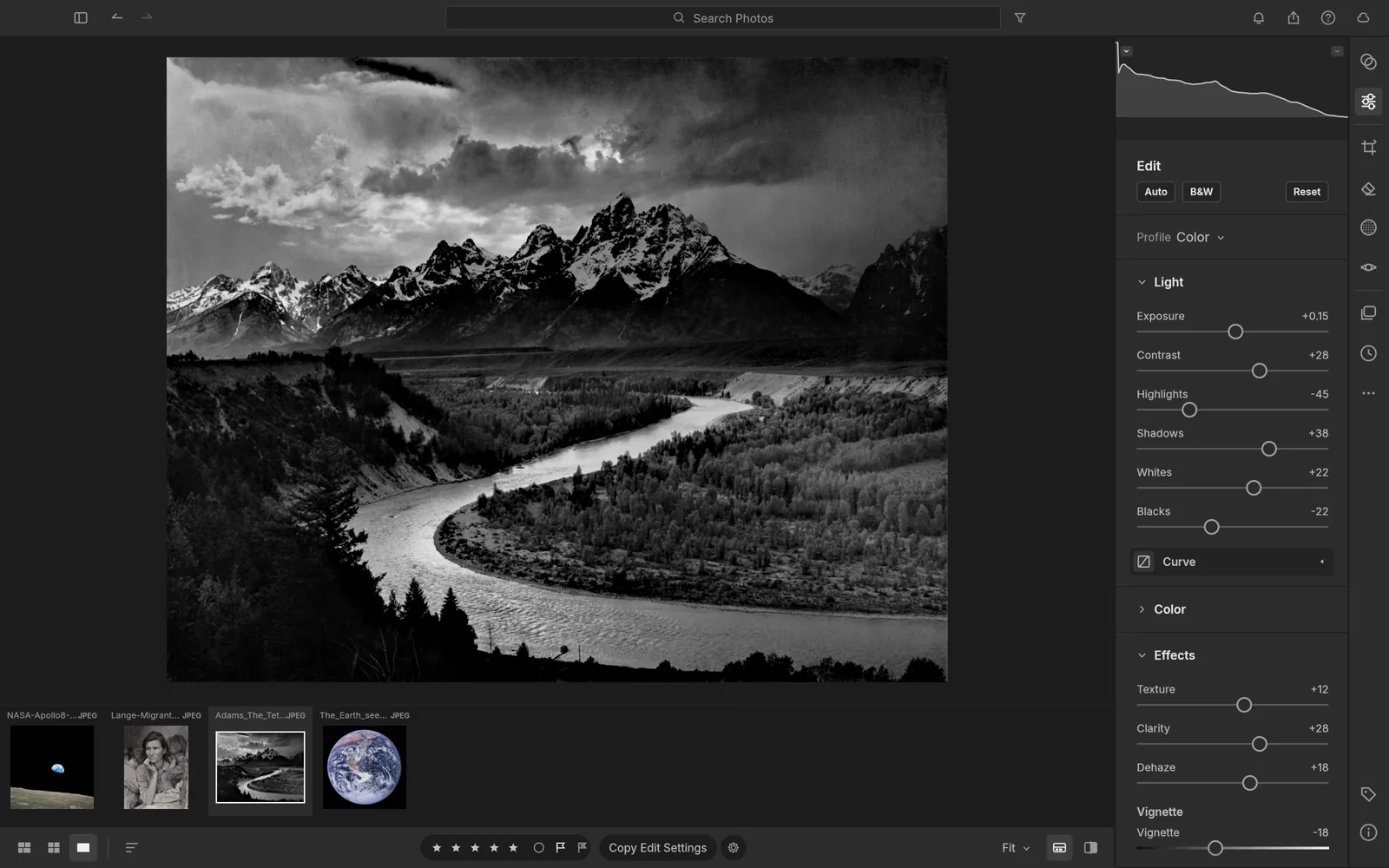
LightCraft photo developer editing a black and white mountain landscape with light and color sliders on the right

LightCraft app icon

LightCraft Photo library and raw editor

Lightroom alternativeIn development

A photo library with albums, ratings, flags and search, plus a raw developer with tone curve, color mixer and grading wheels. Masks pick out the sky, subject or background for you. Edits never touch your original files.

Files: Raw files from Canon (CR2), Sony, Nikon, Fujifilm, Panasonic, Pentax and Olympus, plus DNG

LightCraft page · Source on GitHub

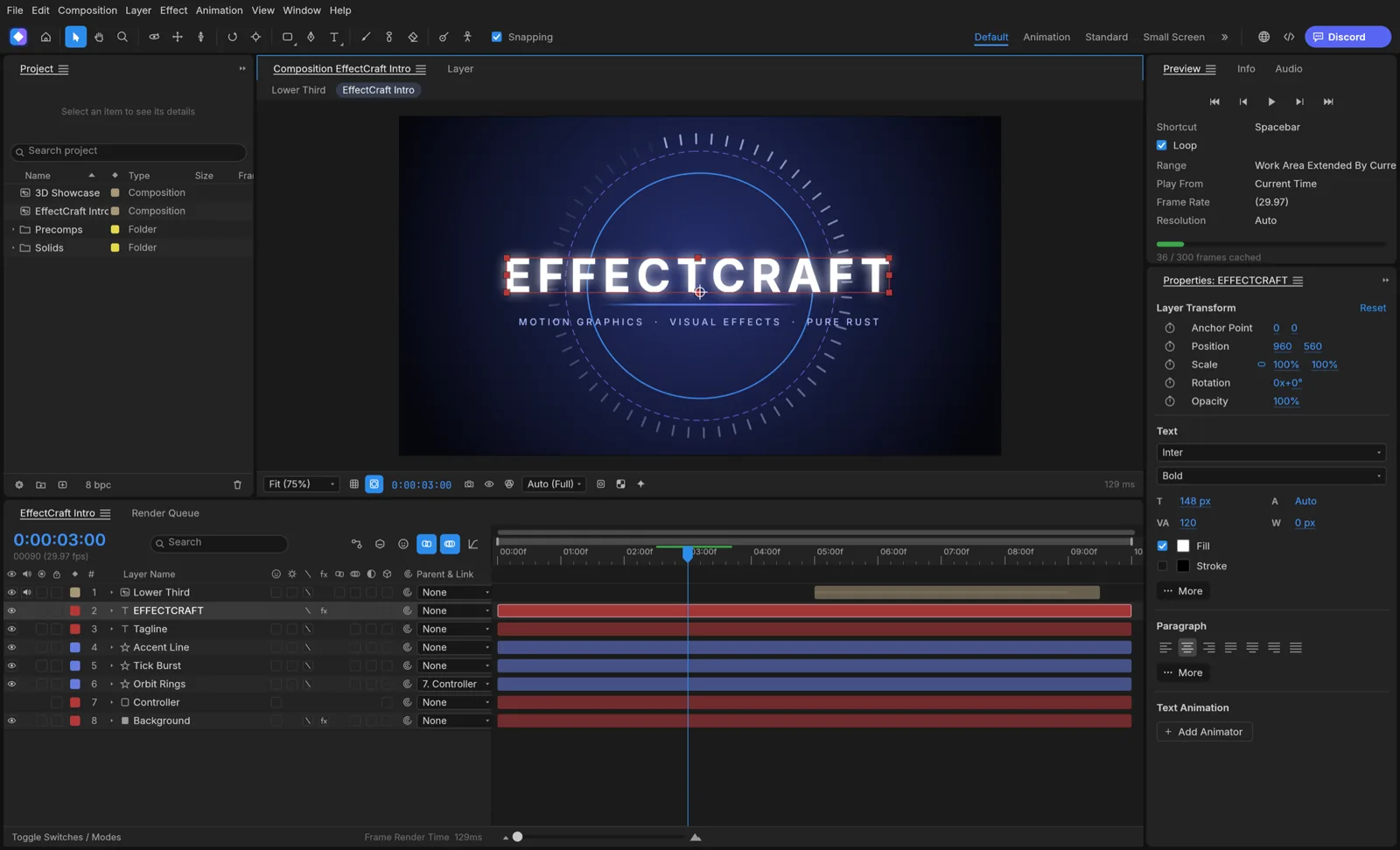
EffectCraft motion graphics editor with an animated title composition and a layered keyframe timeline

EffectCraft app icon

EffectCraft Motion graphics and effects

After Effects alternativeIn development

Keyframe animation with a graph editor, text, shape, camera and light layers, and 3D layers with depth of field. It ships with 259 built-in effects and supports JavaScript expressions for animation driven by code.

Files: Exports H.264 and ProRes video, PNG, TIFF and EXR sequences, GIF and Lottie (an animation format for websites and apps)

EffectCraft page · Source on GitHub

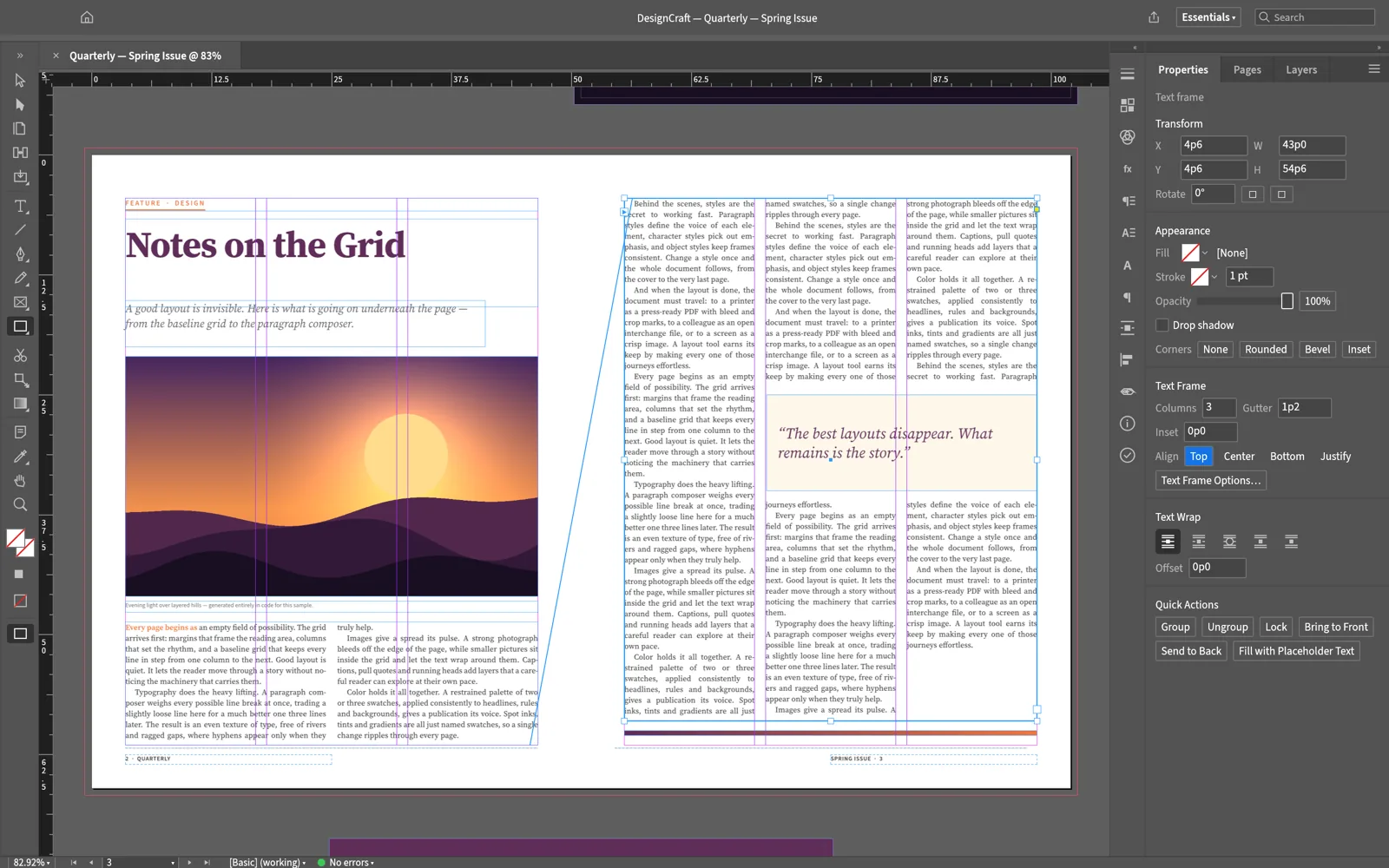
DesignCraft page layout app showing a two-page magazine spread with text columns and an image

DesignCraft app icon

DesignCraft Page layout

InDesign alternativeIn development

Spreads, parent pages, text that flows from column to column, paragraph styles, swatches and text wrap. It exports print-ready PDF with CMYK color, bleed and crop marks. The app page says it has no license server and no telemetry (usage tracking).

Files: Its own document format, PDF and PNG export

DesignCraft page · Source on GitHub

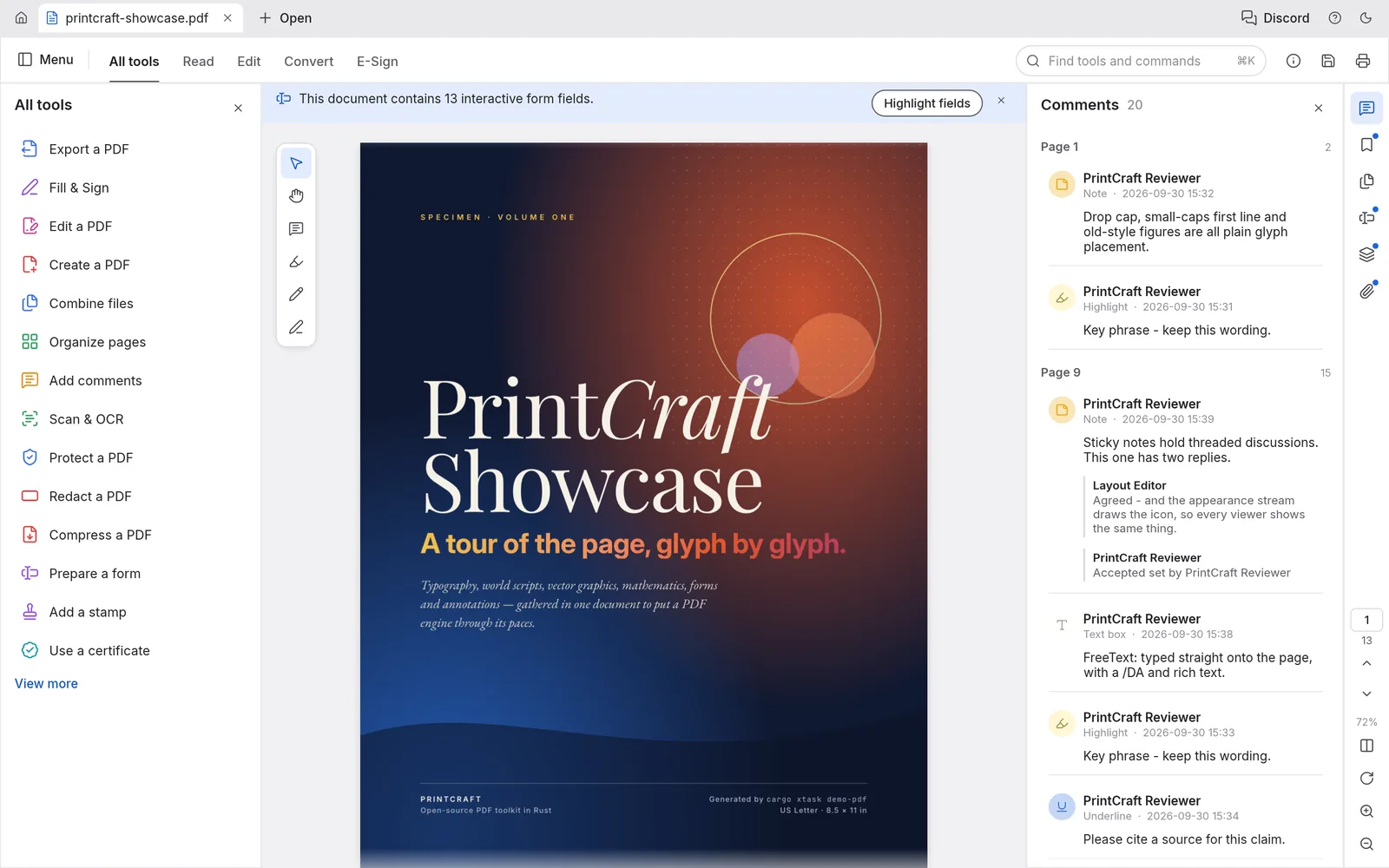
PdfCraft PDF workbench showing a poster-style PDF page with a tools list on the left and comments on the right

PdfCraft app icon

PdfCraft PDF workbench

Acrobat alternativeEarly alpha

Read and search PDFs, then rotate, delete, insert and reorder pages, or combine and split files while keeping links, form fields and bookmarks. Saves happen in the background, with crash recovery. Early coverage called this app PrintCraft.

Files: PDF, including password-protected files you have the password for

PdfCraft page · Source on GitHub

Beyond Adobe: Office, CAD and Audio Apps

The lineup kept growing after launch. These apps take on Microsoft Office, AutoCAD and studio recording software instead of Adobe.
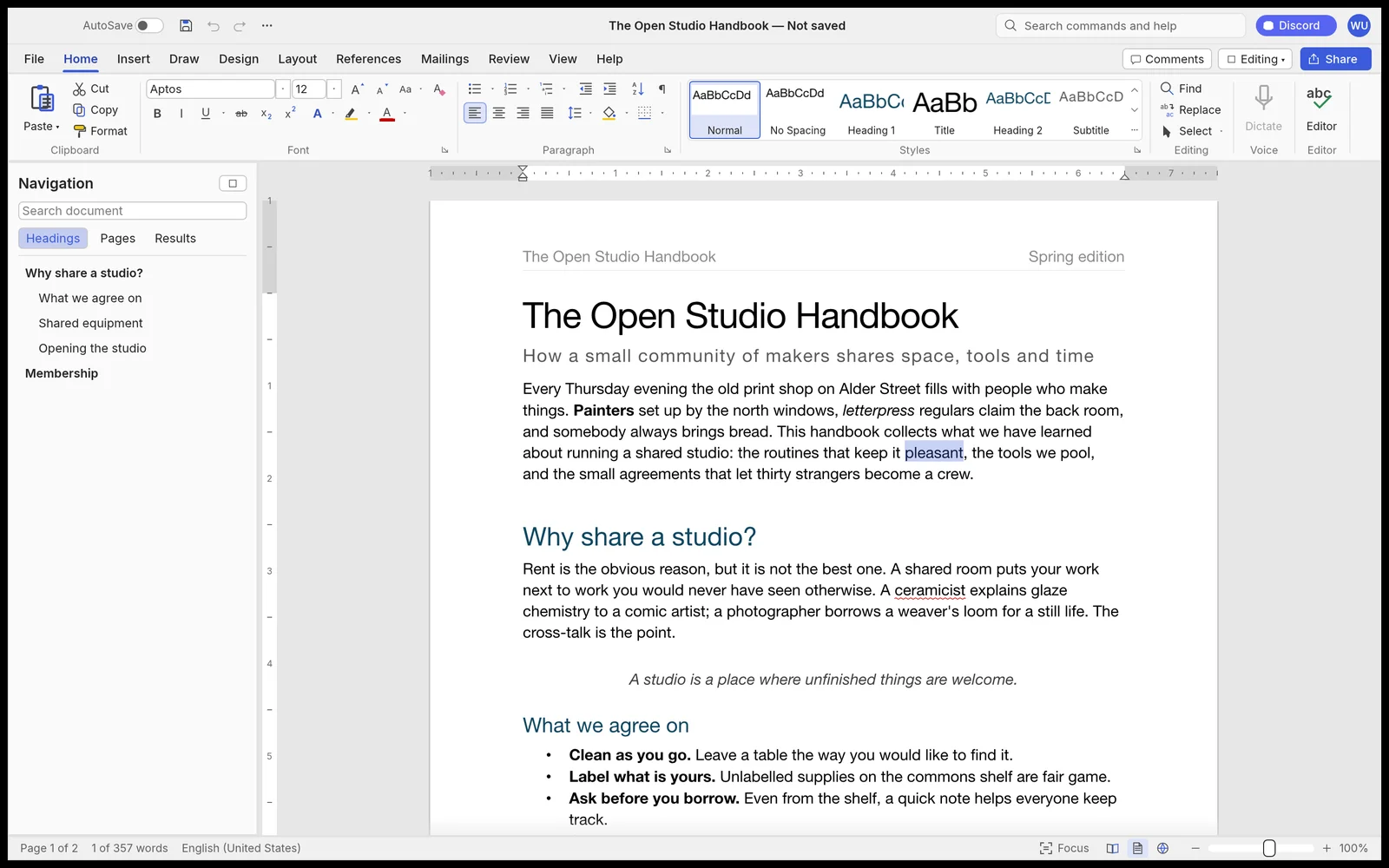
WordCraft word processor with a ribbon toolbar, a navigation pane and a handbook document open

WordCraft app icon

WordCraft Word processor

Microsoft Word alternativeIn development

A ribbon toolbar with a live Styles gallery, track changes, margin comments and spelling and grammar checks that work offline. It reads and writes .docx files natively.

Files: .docx, .odt, .rtf, .html, .md and .txt; PDF export

WordCraft page · Source on GitHub

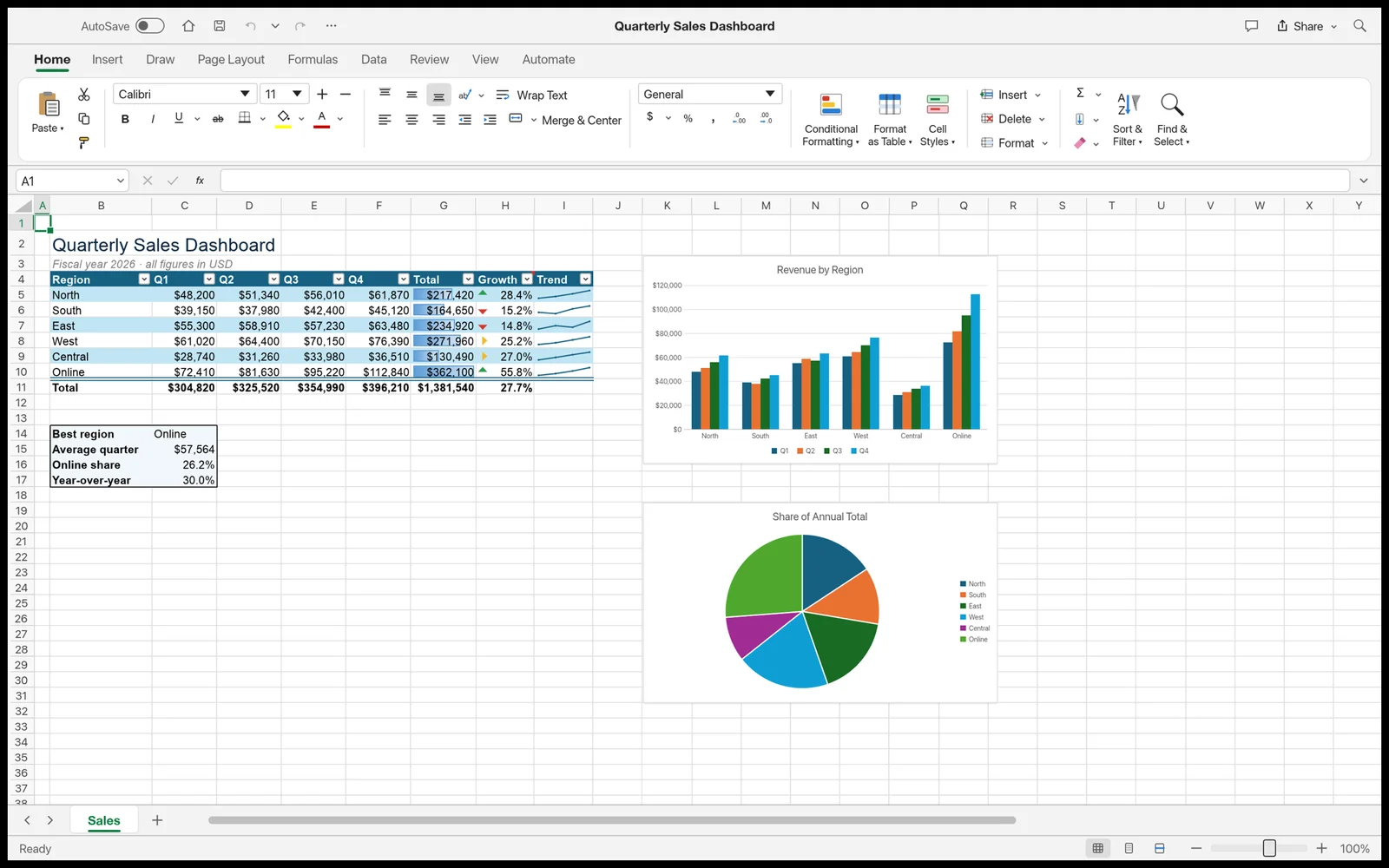
GridCraft spreadsheet with a quarterly sales table, a bar chart and a pie chart

GridCraft app icon

GridCraft Spreadsheets

Microsoft Excel alternativeIn development

More than 500 formula functions, 17 chart types and PivotTables with filters and date grouping. It opens and saves .xlsx files with their styles, formulas and tables.

Files: .xlsx

GridCraft page · Source on GitHub

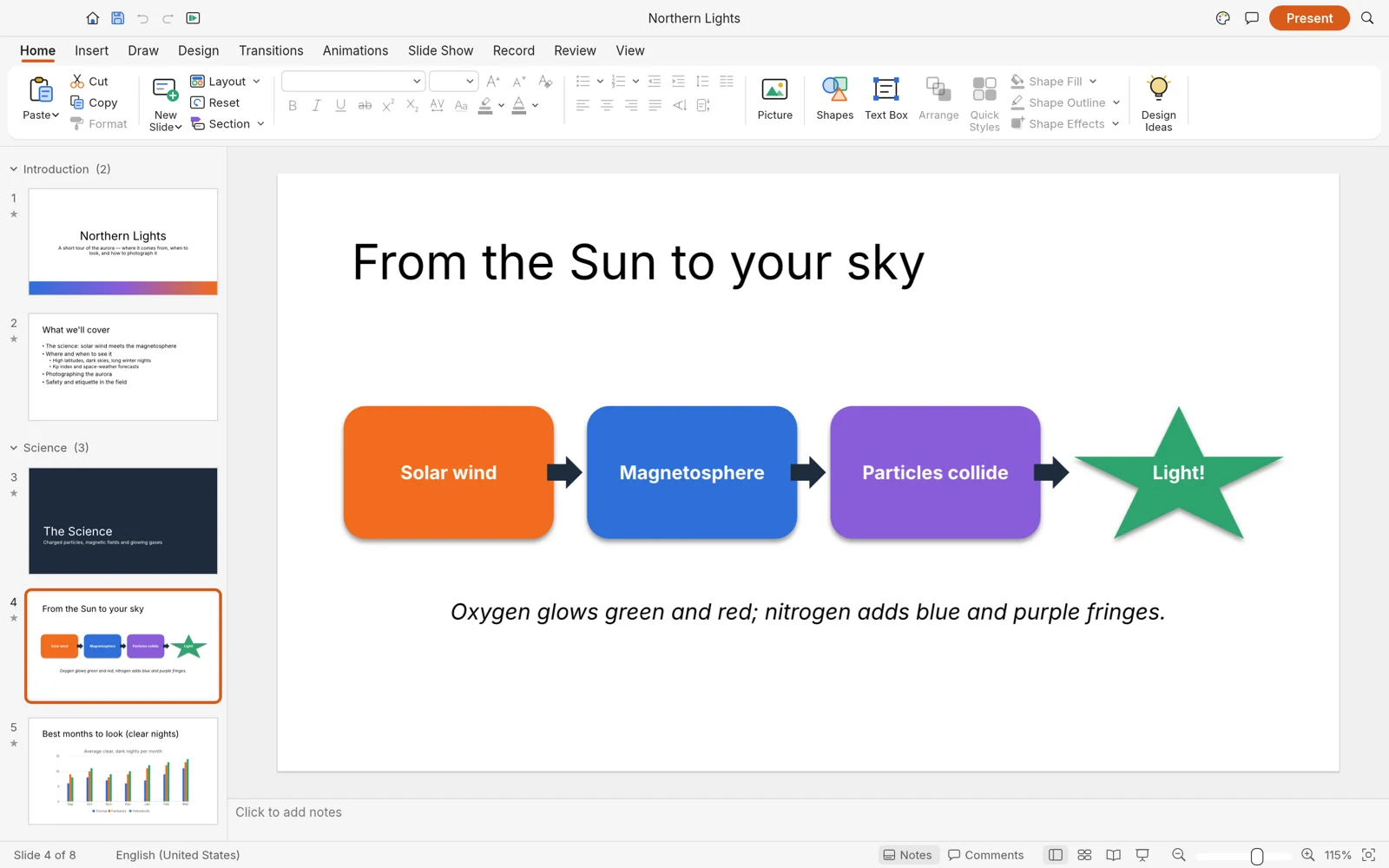
DeckCraft presentation app with a slide showing a four-step diagram and the slide list on the left

DeckCraft app icon

DeckCraft Presentations

PowerPoint alternativeIn development

Slide masters and themes, more than 150 shapes with connectors, transitions and animations. Presenter view shows your notes and a timer while you present.

Files: The app page does not list file formats yet

DeckCraft page · Source on GitHub

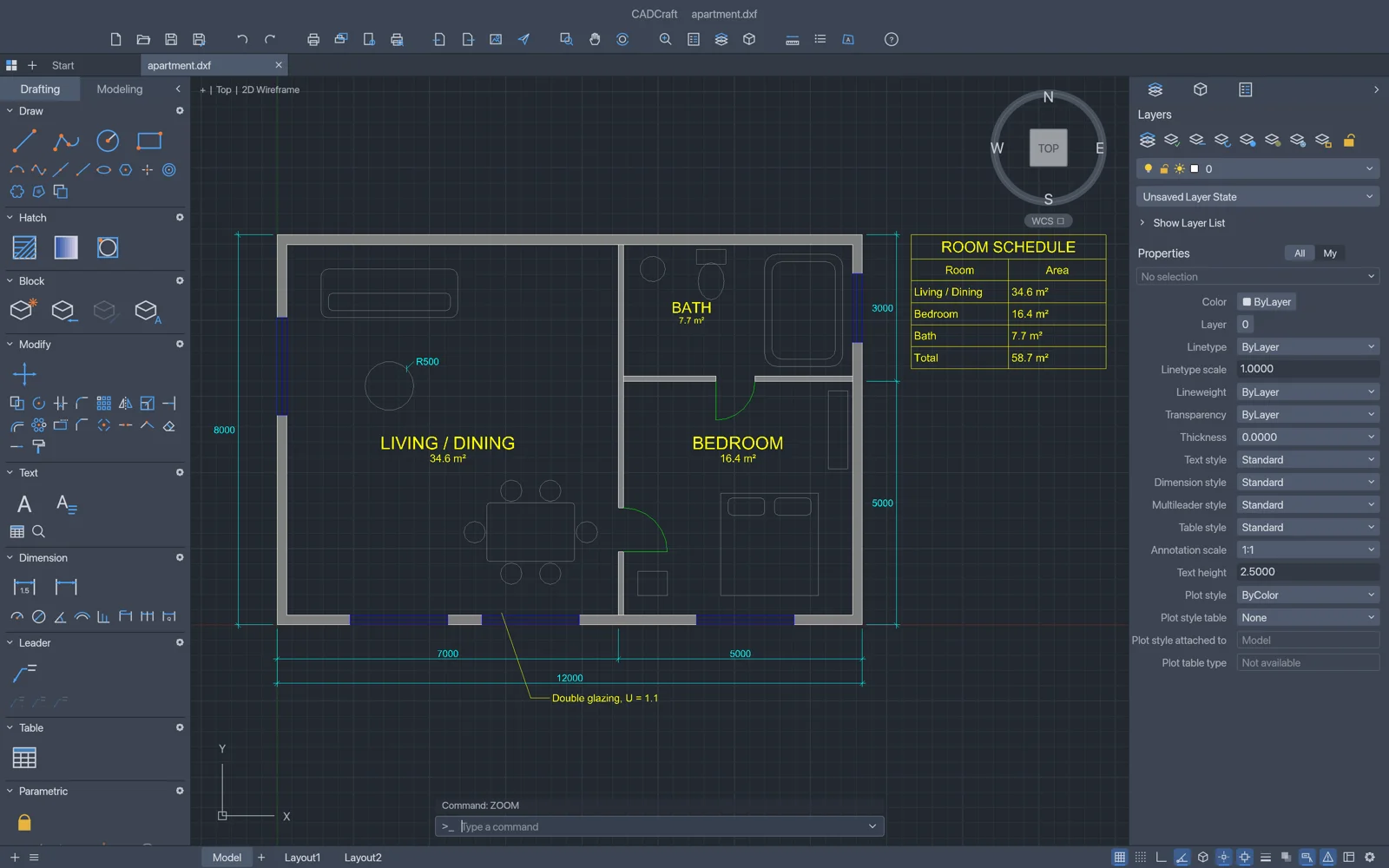
CADCraft drafting app showing a dark floor plan of a small apartment with a room schedule table

CADCraft app icon

CADCraft CAD and drafting

AutoCAD alternativeIn development

Typed commands, object snaps, polar tracking and grips, the drafting habits CAD users already have. It opens DXF and DWG drawings and prints to scale from paper space layouts.

Files: DXF and DWG in; PDF, SVG and PNG out

CADCraft page · Source on GitHub

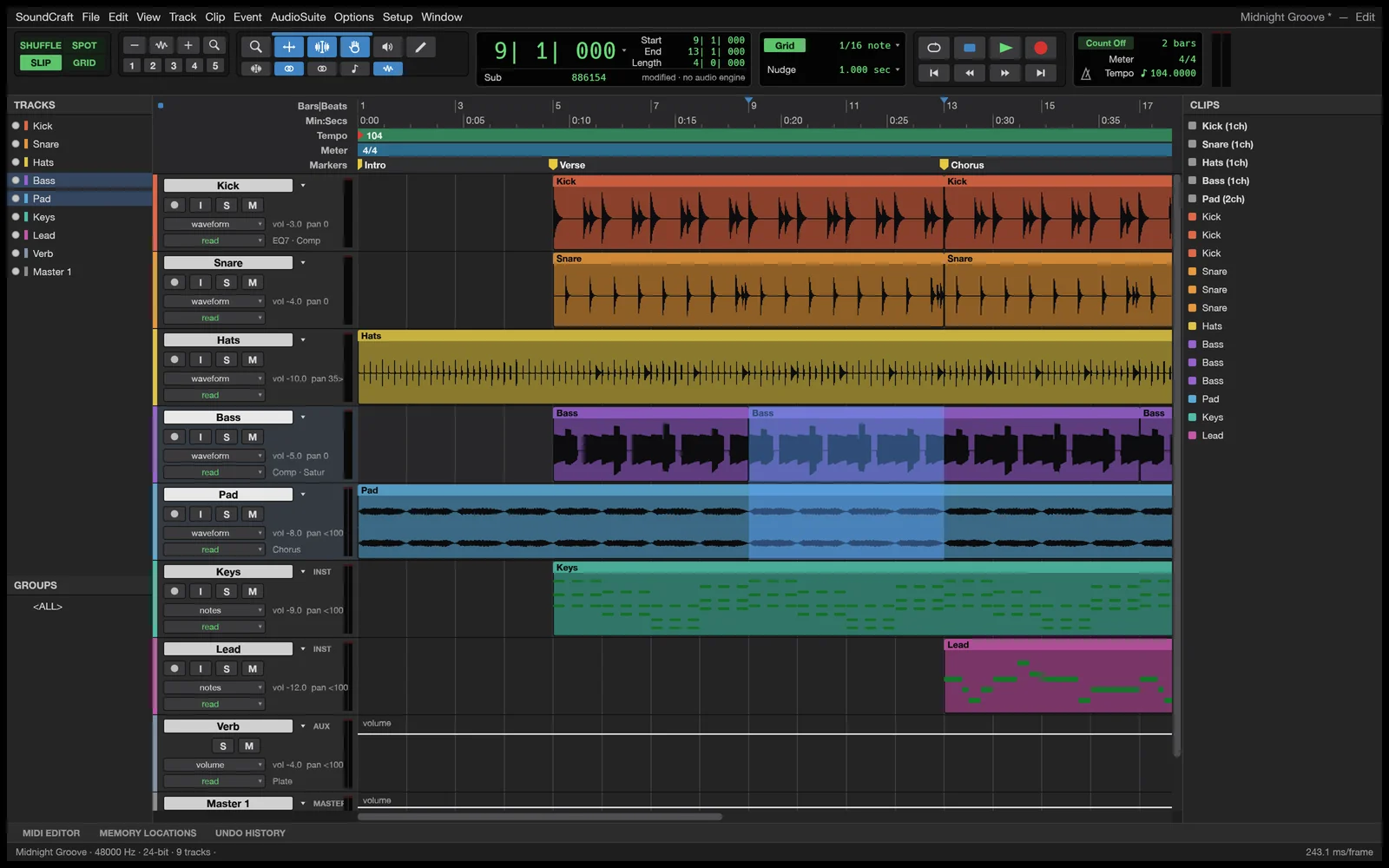
SoundCraft audio workstation showing colored multitrack audio regions in the Edit window

SoundCraft app icon

SoundCraft Audio workstation

Studio recording app alternativeIn development

Separate Edit and Mix windows for multitrack audio and MIDI, a mixing console with inserts, sends, busses and VCAs, and live automation passes. It is a full DAW (digital audio workstation), not a simple audio trimmer.

Files: The app page does not list file formats yet

SoundCraft page · Source on GitHub

How to Install ArtCraft Apps on Windows

The ArtCraft Launcher is the easy route. It installs every Craft app you pick and keeps them updated from one window.

1 Open the Crafting Apps page on getartcraft.com and click Download Launcher.

2 Pick the Windows file for your PC: the x64 .msi for most PCs, arm64 for Windows on Arm laptops, or x86 for 32-bit Windows.

3 Run the .msi installer. It installs for your user account only, so it does not ask for admin rights.

4 Open ArtCraft Launcher from the Start menu or the system tray.

5 Install the apps you want. The Launcher picks the right build for your PC and tells you when updates arrive.

Prefer one app at a time?

Every app page also offers its own MSI installers for 64-bit, 32-bit and Arm PCs, plus portable zips that run without installing anything. The portable zip is the easiest way to try an app and remove it later. Always download from getartcraft.com or the official storytold GitHub pages, never a mirror site.

Is ArtCraft Free?

Yes, the Crafting Apps are free. They are open source under the MIT or Apache 2.0 license, and there is no subscription to use them.

Paid plans exist only for the separate ArtCraft AI studio, where credits pay for image and video generation. You can skip them by bringing your own compute or third-party AI subscriptions. None of this applies to PhotoCraft, FilmCraft or the other Craft apps.

ArtCraft AI Studio Credit Plans
Optional, for AI image and video generation only
Plan Price per month Credits per month
Basic $8 1,000
Pro $28 3,750
Max $48 6,600
Enterprise Custom Custom

Prices are the yearly-billing rates on ArtCraft's pricing page when we checked in October 2026. Yearly billing saves 20% over paying month to month. One-time credit packs are also available.

Should You Switch to ArtCraft Yet?

The apps are real and usable, but they are early builds. Here is who gets the most out of them at this stage.

Try it now if
  • You quit Adobe over the price and want a familiar layout back.
  • You edit for fun or for personal projects.
  • You have old PSD files and nothing to open them with.
  • You like testing new software and reporting bugs.
Wait if
  • Clients or deadlines depend on your work.
  • You rely on Photoshop plugins or Adobe cloud features.
  • You need exact color matching for print work.
Be careful if
  • You open your only copy of an important file.
  • You expect every Adobe feature to be there.
  • You download from anywhere but the official pages.

OUR TAKE

ArtCraft is an impressive start, and it is also clearly an alpha. PhotoCraft opening real PSD files with their layers is a genuine achievement. But a suite this young will have bugs, missing tools and changes from week to week.

Install it, play with it, and keep your current tools for anything that matters. If a Craft app gets you through one full real project without trouble, that is the moment to think about switching.

ArtCraft vs the Free Apps You Already Know

Free alternatives to Adobe and Office are not new. The difference is that the Craft apps copy the Adobe and Office layouts on purpose, while older free apps have their own way of doing things and years of fixes behind them.

Craft App or an Established Free App?
The same jobs, from a brand new suite or a long-running project
Job ArtCraft app Established free option
Photo editing PhotoCraft Our list of the best photo editors
Vector art VectorCraft Inkscape
Video editing FilmCraft DaVinci Resolve (free version)
PDFs PdfCraft Our list of the best free PDF editors
Documents, sheets and slides WordCraft, GridCraft, DeckCraft LibreOffice or ONLYOFFICE

For work that has to be right today, the established apps are the safer pick. For an Adobe-style layout at no cost, and to watch a new project grow fast, the Craft apps are worth a spot on your PC.

Is ArtCraft Legal, and Will It Last?

Downloading and using ArtCraft is legal. Whether the project itself faces a challenge from Adobe is an open question.

Building software that does the same job as another app is allowed, which is why GIMP, Krita and LibreOffice exist. ArtCraft says its apps use no Adobe code, PhotoCraft reads PSD files using Adobe's own published format specification, and every app states that it is not affiliated with Adobe. As of October 12, 2026, Adobe had made no public statement and taken no legal action against the project.

The open questions are trademarks, software patents and how closely the apps copy the look of Adobe's interfaces. If any of those became a problem, the likely result would be renamed or redesigned apps, not apps that vanish.

The bigger risk is the usual one for a young project: it slows down, changes direction or leans harder on paid AI features. Because the code is open source, anyone can keep it alive, and thousands of people have already copied it on GitHub.

Tips for Getting Started

1 Start with a portable zip. It runs without installing, and deleting the folder removes it completely.

2 Work on copies of your files. Alpha apps can crash or save in ways you did not expect, so never open your only copy of a project.

3 Check your download. Each release lists SHA256 checksums (a fingerprint for the file). In PowerShell, run Get-FileHash on the file and compare the result to the list.

4 Let the Launcher handle updates. New builds arrive often during the alpha, and many fixes land between versions.

5 Report what breaks. Each app has an Issues page on GitHub. A short bug report with steps to repeat it helps the apps improve faster.

FAQ

What are the system requirements for the ArtCraft apps?
The Craft apps run on Windows 10 and Windows 11, with separate builds for 64-bit PCs, 32-bit PCs and Windows on Arm laptops. The app pages do not list a minimum amount of memory. The separate ArtCraft AI studio asks for 64-bit Windows 10 or newer, 8 GB of RAM and 2 GB of free storage.
Do the ArtCraft apps work on Windows on Arm laptops?
Yes. Every Craft app and the ArtCraft Launcher ship an ARM64 build, as both an MSI installer and a portable zip, so they run natively on Windows 11 laptops with Snapdragon chips instead of through emulation.
Are the ArtCraft apps available for Mac and Linux?
Yes. The same apps have macOS and Linux builds, and the Linux side covers AppImage, Flatpak, .deb and .rpm packages. Most of the apps also have a web build that runs in a browser, offered as a zip you host yourself.
Was ArtCraft really written by AI?
Developer Brandon Thomas has said he used Anthropic’s Claude Opus 5.5 to write much of the code, in the Rust programming language. He describes the apps as clean-room rebuilds, made from public file specifications and how the Adobe apps behave, not from Adobe’s own code.
What happened to PrintCraft?
PrintCraft was the name early news coverage used for the Acrobat-style PDF app. On the ArtCraft website it is now called PdfCraft, with its own page, installers and GitHub repository.
How do I uninstall an ArtCraft app?
If you used an MSI installer or the Launcher, open Settings, go to Apps, then Installed apps, find the app and choose Uninstall. If you used a portable zip, close the app and delete its folder.

Support and Community

Need help with an app or want to follow the project? Start here.

More Windows software guides: Inkscape · DaVinci Resolve · LibreOffice · ONLYOFFICE · Best Photo Editors · Best Free PDF Editors · Microsoft Office Alternatives · Adobe Premiere Pro


Discover more from Windows Mode

Subscribe to get the latest posts sent to your email.