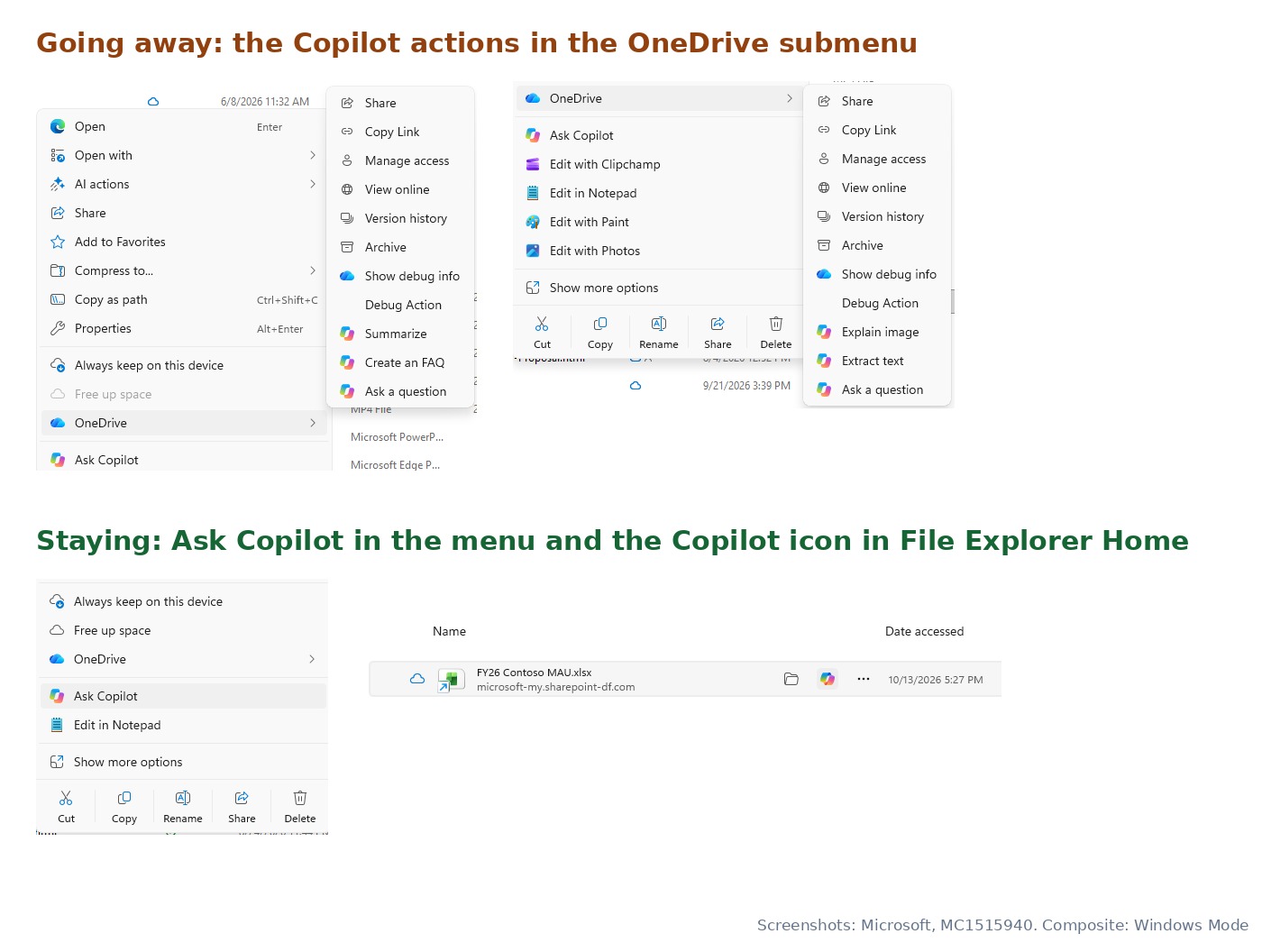
Which Copilot actions are leaving File Explorer? Microsoft is removing eight OneDrive Copilot shortcuts from the right-click menu: Summarize, Create FAQ, Compare Files, Ask a question, Explain image, Explain images, Compare images and Extract text. The retirement starts in mid-November 2026 and should be finished by early December.
Ask Copilot stays in the menu, so you can still send a OneDrive file to Copilot with a right-click. The change only affects people who use Copilot with OneDrive files, and Microsoft says admins don’t need to do anything.
Microsoft announced the change in Microsoft 365 Message Center notice MC1515940, published October 19 and updated October 20. Windows Latest spotted it first. You can read the full notice on the public Message Center archive.
What exactly is changing in File Explorer?
The eight actions don’t sit in the main menu. They appear when you right-click a OneDrive file and open the OneDrive submenu. That submenu keeps its file options, such as Share, Copy Link and Version history. Only the Copilot entries go.
Microsoft frames it as tidying up, not removing a capability:
“We’re simplifying how people use Copilot with their OneDrive files in File Explorer.”
Microsoft, Message Center MC1515940, October 19, 2026
October 19
MC1515940 goes out to Microsoft 365 admins. Updated October 20.
Mid-November
The actions start disappearing from the File Explorer context menu.
Early December
Microsoft expects the retirement to be complete worldwide.
After December
Ask Copilot, the Home Copilot icon and the OneDrive activity center.
Because the rollout is staged, some PCs will lose the actions before others. Microsoft hasn’t said whether the change arrives through a Windows update or a server-side OneDrive change, as Neowin points out.
What should you use instead?
Microsoft points to three places. Each one still works with the same OneDrive files.
| Option | How to open it | Best for |
|---|---|---|
| Ask Copilot | Right-click a OneDrive file, then select Ask Copilot | Typing your own request about a file |
| File Explorer Home | Hover over a file in Home, then select the Copilot icon | Recent files you opened from Home |
| OneDrive activity center | Select the OneDrive cloud icon in the taskbar notification area | The same OneDrive Copilot actions, which Microsoft says remain there |
Right-click the file and choose Ask Copilot
In File Explorer, right-click a file stored in OneDrive and select Ask Copilot. It sits in the main menu, not in the OneDrive submenu.
Check: a Copilot conversation opens with the file already attached.
Type what the old shortcut used to do
Ask for the task directly, for example “Summarize this file” or “Create an FAQ from this document”. Microsoft says files are attached by reference, so their existing permissions and protections still apply.
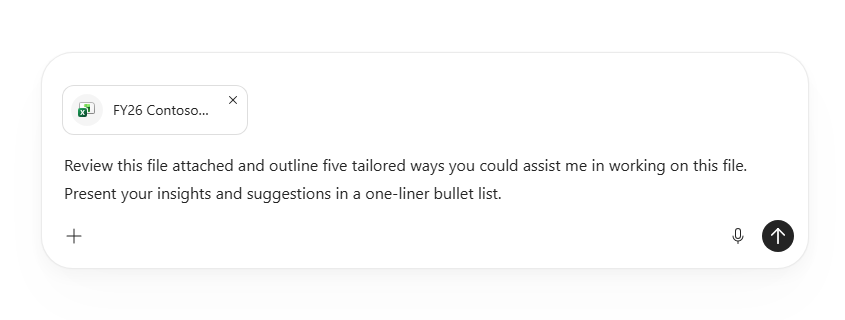
You’re set when: Copilot answers about the attached file. If Ask Copilot is missing, check that the file is in OneDrive and that you’re signed in with an eligible account.
Who is affected?
Microsoft says the change affects “users who use Copilot with OneDrive files in File Explorer.” According to Microsoft’s Copilot in OneDrive FAQ, those features need a Microsoft 365 Personal or Family subscription, or a work or school account with a Copilot license. Other Microsoft support pages also list Premium and Pro plans. If you never had these shortcuts, nothing changes for you.
For IT admins
- No action is required. Microsoft recommends telling users about the change and updating training or help desk documents that mention the retired actions.
- To turn Copilot in OneDrive off entirely, Microsoft’s FAQ says to clear Microsoft Copilot for SharePoint in the Microsoft 365 admin center under Turn apps and services on or off. That disables Copilot in both OneDrive and SharePoint.
- Home users on Microsoft 365 Personal or Family use AI credits for each Copilot action, according to the FAQ.
Is Microsoft scaling back Copilot in Windows 11?
Microsoft hasn’t tied this notice to anything beyond simplifying. It does fit a promise Windows chief Pavan Davuluri made on the Windows Insider Blog in March, after months of user feedback.
“You will see us be more intentional about how and where Copilot integrates across Windows, focusing on experiences that are genuinely useful and well‑crafted. As part of this, we are reducing unnecessary Copilot entry points, starting with apps like Snipping Tool, Photos, Widgets and Notepad.”
Pavan Davuluri, Windows Insider Blog, March 20, 2026
Windows Latest has since tracked Copilot being removed from Snipping Tool, renamed to Writing tools in Notepad and dropped from Photos. It links those changes to the “Microslop” backlash against AI features. We covered Microsoft’s quality pledge in Elevating Windows Quality for Every User.
The File Explorer change follows the same pattern: the AI features stay, but there are fewer separate buttons for them. Expect the eight actions to start disappearing in mid-November.
Source: Microsoft Support’s File Explorer guide for Copilot in OneDrive.
Discover more from Windows Mode
Subscribe to get the latest posts sent to your email.
















Add your first comment to this post