Azure Migrate, Microsoft’s free hub for planning and running a move to Azure. Screenshot from azure.microsoft.com.
Microsoft offers a set of free tools for moving to Azure: Azure Migrate to find, assess and move your servers, the Cloud Adoption Framework and landing zones to plan the setup, and Azure Advisor and Cost Management to keep it efficient afterwards. Most are built into the Azure portal.
Cloud moves usually go wrong in the same ways: costs higher than planned, security gaps, and apps that break because nobody knew what they depended on. Azure Migrate itself is free, and it maps those dependencies and estimates the cost before you move anything. Partner tools inside it may charge.
It covers servers on VMware, Hyper-V and physical machines, servers in other clouds, SQL Server databases and web apps.
Below: the main tools and which stage each one helps with, how Azure Migrate works, ways to cut the bill after you move, and a first assessment step by step. Questions? Reach out to us directly.
Why Cloud Migrations Go Wrong
Most trouble starts before the first server moves. Teams copy machines to the cloud at the same size they had on-premises, skip the security setup, or miss that one app quietly depends on another.
The result is a cloud bill bigger than the old datacenter, and outages that nobody predicted.
Microsoft’s tools tackle each of these: measure first, plan the landing spot, move in waves, then keep tuning.
New to Azure? Start with our guide to Microsoft Azure, which explains subscriptions, regions and the portal.
Azure Migrate: Find, Assess and Move
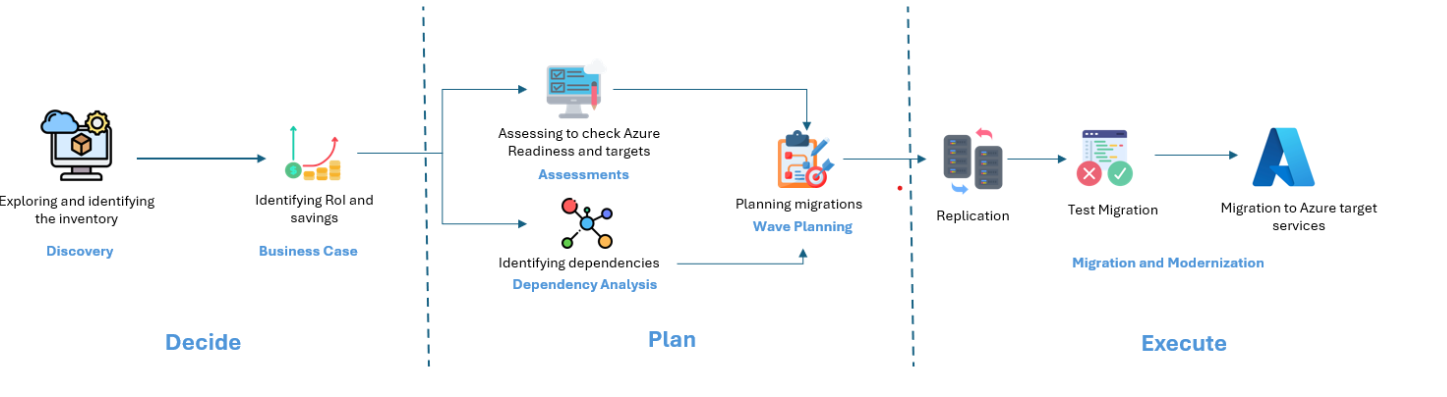
Azure Migrate is the hub for the whole move. It works in three phases: decide, plan and execute.
New: Azure Copilot migration agent. In preview, it lets you ask questions about your Azure Migrate data in plain words, compare strategies and create landing zone templates. The actual migration still runs in Azure Migrate.
Plan the Landing Spot
Cloud Adoption Framework
Microsoft’s free step-by-step guide for moving to the cloud: strategy, planning, setting up, migrating, then governing and managing. Use it as your project checklist.
Azure landing zones
Ready-made templates for a secure Azure setup: networking, identity, policies and subscriptions arranged before any workload arrives.
Azure Well-Architected Framework
Five pillars for good workloads: reliability, security, cost, operations and performance. The Well-Architected review scores a workload against them.
Azure pricing calculator
Estimate the monthly cost of a design before you build it, with no sign-in. Compare it with the Azure Migrate business case.
Keep It Efficient After the Move
Azure Advisor
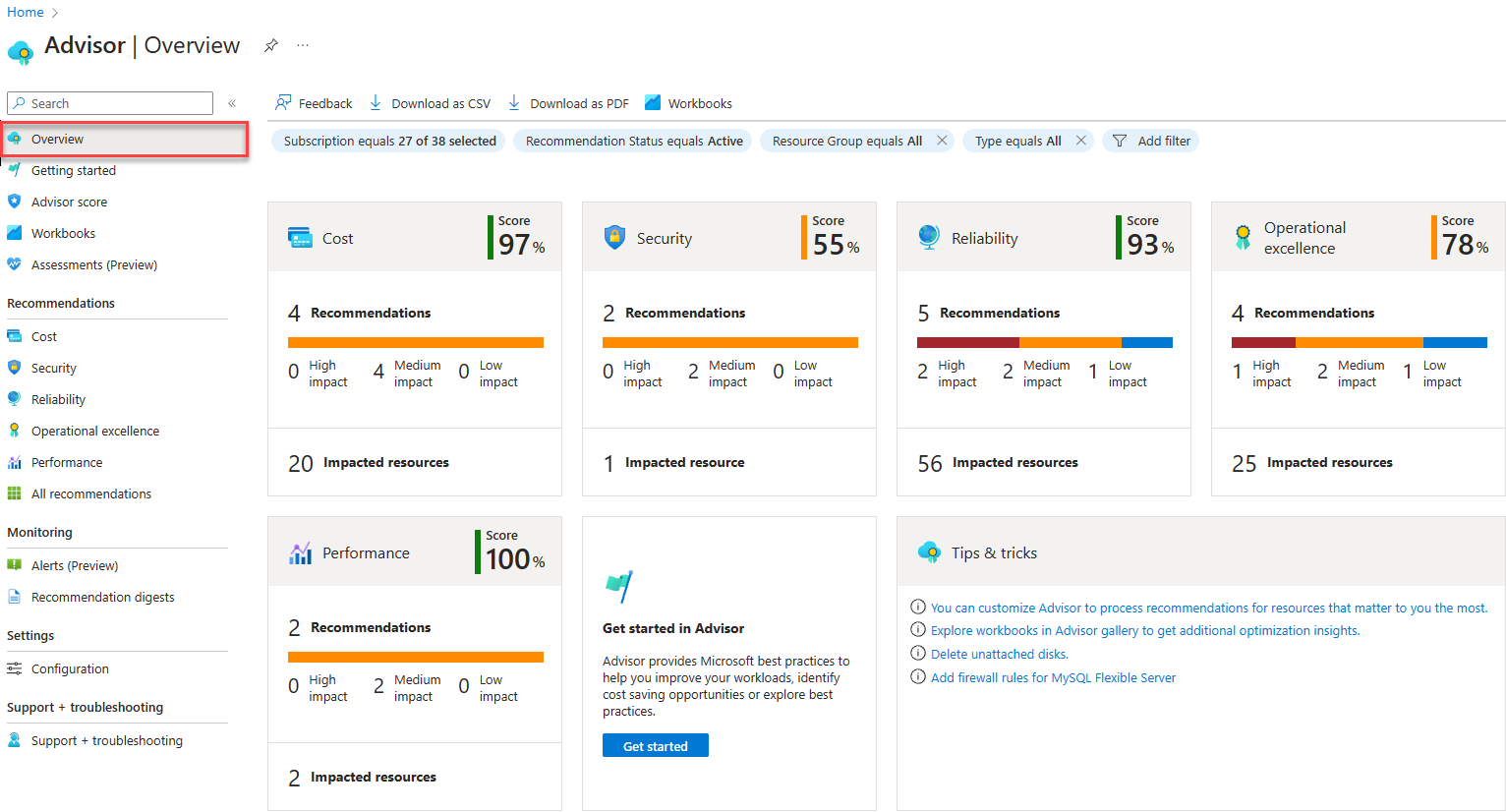
Advisor watches your new Azure resources and recommends fixes across cost, security, reliability, operations and performance, each with a score.
Right after a migration, its cost tab often finds servers that were copied over too large.
Microsoft Cost Management
Track spending, set budgets and alerts, and spot sudden jumps. Our guide to reducing Azure costs walks through it.
Azure Hybrid Benefit
Reuse Windows Server and SQL Server licenses you already own, with Software Assurance, to cut the cost of migrated servers.
Reservations and savings plans
Commit to steady usage for 1 or 3 years for big discounts: up to 72% for reservations and up to 65% for savings plans, per Microsoft.
Azure Monitor
Watch performance and set alerts on migrated servers. See our Azure Monitor guide.
Which Tool for Which Stage
Azure Accelerate: Help and Funding From Microsoft
Azure Accelerate is Microsoft’s program for helping organizations move to Azure and build on it, launched in July 2025. It brought together the older Azure Migrate and Modernize and Azure Innovate programs.
It offers access to Microsoft and partner experts and, for eligible projects, Microsoft funding. Eligibility depends on the size and type of project, so check the Azure Accelerate page or ask a Microsoft partner.
Watch: Optimizing Your Migration
Microsoft Azure’s own video walks through cost management, landing zones and the savings offers for migrated workloads.
Step by Step: Run Your First Assessment
1 Create an Azure Migrate project: in the Azure portal, search for Azure Migrate, select Create project, and pick a subscription, resource group and region. See the Azure Migrate docs for details.
2 Set up discovery: deploy the lightweight Azure Migrate appliance on a server in your datacenter, or use the collector for a quick snapshot.
3 Let it collect data: give it time to gather configuration and performance data so sizing is based on real usage.
4 Build a business case: compare the cost of staying on-premises with running in Azure.
5 Run an assessment: check readiness, recommended Azure sizes, monthly cost and dependencies, then plan your migration waves.
Frequently Asked Questions
Is Azure Migrate free?
Can Azure Migrate move servers from AWS or Google Cloud?
Does Azure Migrate need internet access from my datacenter?
What is a landing zone?
Should I move everything as is or rebuild apps for the cloud?
Support and Community
- Azure Migrate, Microsoft’s own product page.
- Azure Migrate documentation on Microsoft Learn, with tutorials for VMware, Hyper-V and physical servers.
- Cloud Adoption Framework, Microsoft’s free migration guidance.
- Microsoft Q&A for Azure Migrate, where Microsoft engineers and users answer questions.
- r/AZURE on Reddit, a large community for Azure questions and tips.
More Windows software guides: What Is Microsoft Azure? · Reducing Azure Costs · Azure Monitor · Microsoft.Data.SqlClient
Discover more from Windows Mode
Subscribe to get the latest posts sent to your email.
















Add your first comment to this post