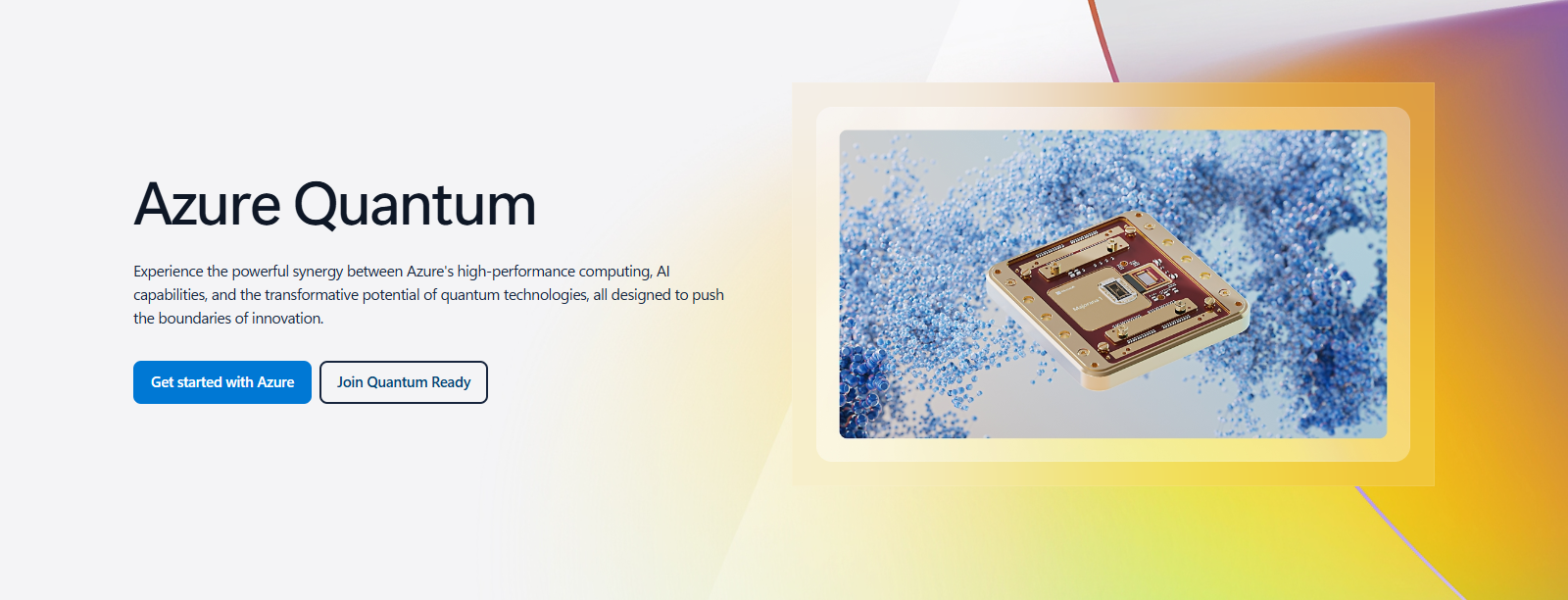
Azure Quantum, Microsoft’s cloud quantum computing service. Screenshot from azure.microsoft.com.
Azure Quantum is Microsoft’s cloud service for running programs on real quantum computers from companies such as IonQ, Quantinuum, Pasqal and Rigetti, all from one Azure account. You write the programs with Microsoft’s free Quantum Development Kit in VS Code on your Windows PC.
Quantum computers are still experimental, small and expensive to run. You can learn, write and simulate quantum programs for free, and only pay when you send a job to real hardware. Each hardware company sets its own prices.
This guide also covers Azure Quantum Elements, the chemistry and materials service Microsoft launched in 2023, and what replaced it.
Below: quantum computing in plain words, what Azure Quantum can do, the hardware choices, Q# and the free tools, costs, and how to start. Questions? Reach out to us directly.
Quantum Computing in Plain Words
A normal computer stores information as bits, each either 0 or 1. A quantum computer uses qubits, which can hold a mix of 0 and 1 at the same time. That mix is called superposition.
Qubits can also be linked so that measuring one tells you about the other, which is called entanglement. Together, these let a quantum computer explore many possible answers in ways a normal computer cannot.
The payoff is expected in a few areas: simulating molecules and materials, some optimization problems, and breaking or protecting certain kinds of encryption. For everyday tasks, a normal computer stays faster and cheaper.
Where Azure fits: quantum computers are rare and fragile, so you reach them over the cloud. Our guide to Microsoft Azure explains the cloud basics.
What You Can Do with Azure Quantum
Run on real quantum hardware
Send your program to quantum computers from several companies through one Azure Quantum workspace, and see the results in the Azure portal.
Simulate on your PC
Run quantum programs on a simulator on your own Windows PC with the QDK. No Azure account needed.
Estimate resources
Work out how many qubits and how much time an algorithm would need on future, larger quantum machines.
Hybrid quantum computing
Mix normal code and quantum steps in one program, so a classical computer and a quantum computer work together.
Chemistry and materials
Simulation workflows that combine Azure high-performance computing, AI and quantum tools for molecules and materials research.
Learn the basics
Tutorials on Microsoft Learn and the Microsoft Quantum website teach qubits, circuits and classic algorithms such as Grover’s search.
Quantum Hardware on Azure
Each company builds its qubits a different way. Azure Quantum lets you try them side by side without separate accounts.
The provider list changes. Hardware is added and retired over time, so check the current quantum computing target list before you plan a project.
Q# and the Quantum Development Kit
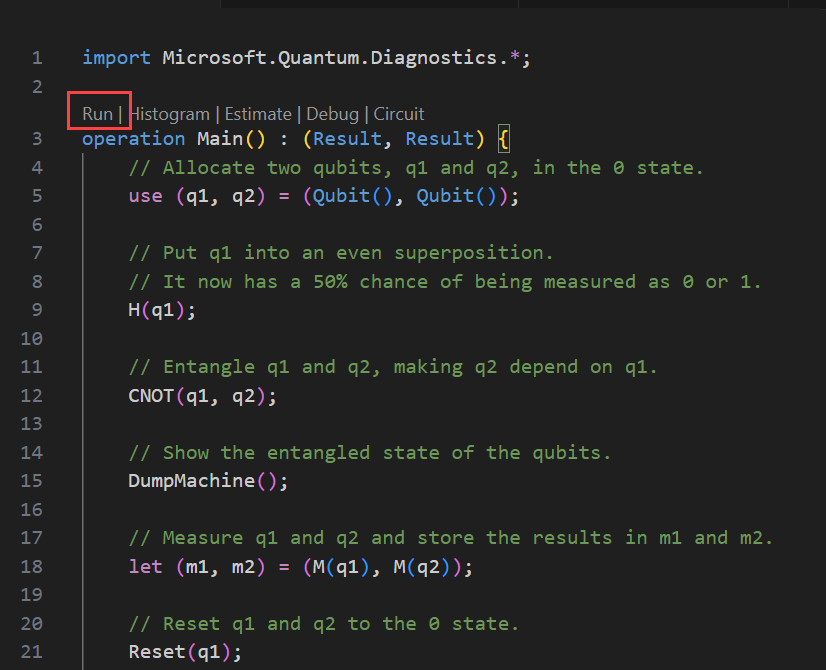
Microsoft’s free tools run on your own PC. These screenshots come from Microsoft Learn.
Write quantum programs in VS Code
The Quantum Development Kit (QDK) is free and open source. Install it as an extension in VS Code, or as a Python package. It supports Microsoft’s Q# language, and also Qiskit, Cirq and OpenQASM.
Above each program you get Run, Histogram, Estimate, Debug and Circuit commands, so you can test everything locally before using real hardware.
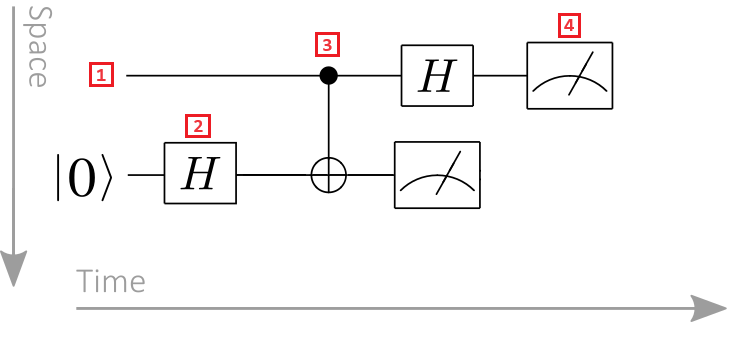
See your program as a circuit
The QDK can draw a program as a circuit diagram: one line per qubit, with boxes for each operation and a meter symbol where the qubit is measured.
Circuit diagrams are the common language of quantum computing, so this view helps when you read tutorials and papers.
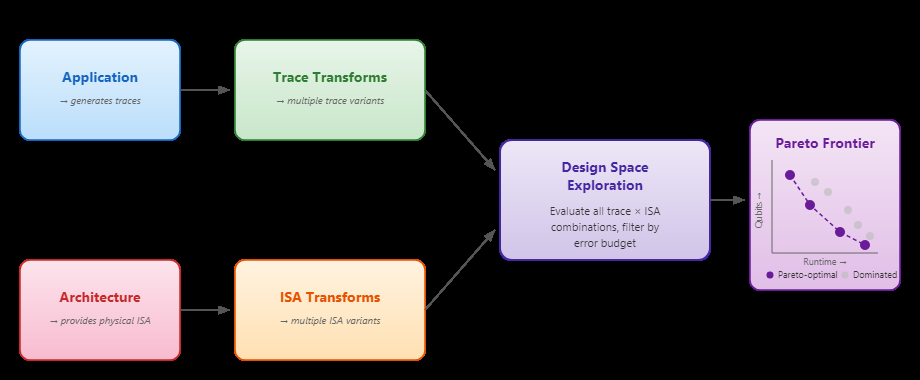
Microsoft Quantum resource estimator
The resource estimator predicts how many physical qubits and how much run time an algorithm would need on a future, error-corrected quantum computer.
Researchers use it to judge which problems are worth solving on quantum hardware, for example how hard it would be to break a given type of encryption.
What Happened to Azure Quantum Elements?
Azure Quantum Elements was a service Microsoft launched in June 2023 for chemistry and materials research. It combined high-performance computing, AI models and quantum tools to help scientists screen molecules and materials faster.
Microsoft’s Azure Quantum Elements page now redirects to Microsoft Discovery, an AI platform for research and development that Microsoft announced at its Build conference in 2025. Discovery uses teams of AI agents to help scientists run research workflows on Azure.
Doing chemistry simulations? Microsoft’s Azure Quantum docs still cover chemistry workflows with the QDK and Azure high-performance computing. For agent-based research, start with Microsoft Discovery.
Microsoft’s Own Quantum Hardware
Microsoft is also building its own quantum computer, using a different kind of qubit called a topological qubit, which is designed to be more stable and less prone to errors.
In February 2025, Microsoft announced Majorana 1, its first chip built on this design, which is the chip pictured on the Azure Quantum page. It is a research step toward a larger machine and is not something you can rent on Azure Quantum.
How Much Does Azure Quantum Cost?
A single job on real hardware can cost real money. Test on simulators first, and check the price shown in your workspace before you submit. Microsoft keeps current rates on its Azure Quantum pricing page.
Step by Step: Write Your First Quantum Program
1 Install VS Code from code.visualstudio.com if you do not have it.
2 Add the Quantum Development Kit extension from the Extensions view in VS Code. Search for QDK.
3 Create a new Q# file and paste a sample from Microsoft Learn, such as the program that entangles two qubits.
4 Select Run above the code to simulate it on your PC, then Histogram to see how often each result appears.
5 When you are ready for hardware, create an Azure Quantum workspace in the Azure portal and connect to it from VS Code.
Frequently Asked Questions
Do I need an Azure account to learn quantum programming?
Can a quantum computer replace my PC?
Is Q# the only language I can use?
Is Azure Quantum Elements still available?
Can students use Azure Quantum for free?
Support and Community
- Azure Quantum, Microsoft’s own product page.
- Microsoft Quantum, Microsoft’s quantum website with news, learning and research.
- Azure Quantum documentation on Microsoft Learn, with tutorials and the Q# reference.
- Microsoft Q&A for Azure Quantum, where Microsoft engineers and users answer questions.
- r/QuantumComputing on Reddit, a large community for quantum computing questions.
More Windows software guides: What Is Microsoft Azure? · Azure Machine Learning · Azure AI Search · Azure Monitor
Discover more from Windows Mode
Subscribe to get the latest posts sent to your email.















Add your first comment to this post