Readers like you help support this site. When you make a purchase using links on our site, we may earn an affiliate commission. All opinions remain our own.
Crunchyroll is the largest anime streaming service for PC, available on Windows through a free app from the Microsoft Store or directly in your browser.
A subscription unlocks thousands of subbed and dubbed anime titles, simulcast episodes that release hours after they air in Japan, and Crunchyroll Originals you won’t find anywhere else.
What catches a lot of new subscribers off guard is offline viewing. Downloading episodes to watch without an internet connection only works on the mobile apps, never on Windows. The Windows app and browser both stream live every time, even on the most expensive plan.
This guide covers how to install the app or use the browser, what each plan actually gets you, and features that only show up once you know where to look, like Crunchyroll Game Vault and keyboard shortcuts for the player.
Already a subscriber? Jump to the install steps below. Got questions about plans or quality before you sign up? Reach out to us directly.
What You Need to Know
- The Crunchyroll app is free to install, but a paid subscription is required to watch anything beyond a few trailers. The free ad-supported tier no longer exists.
- Every plan streams in standard HD. There is no 4K option on Crunchyroll, on Windows or any other platform.
- Offline downloads are mobile and Switch only. Neither the Windows app nor the browser lets you save episodes to watch without an internet connection.
Price
Free app, subscription to stream
Developer
Crunchyroll, LLC
Windows Versions
Windows 10/11
Also On
Mac, Mobile, TV, Consoles
Who Should Use the Crunchyroll App on Windows?
- Use it if you watch anime regularly and want simulcast episodes, dubs, and Originals in one app instead of hunting across multiple sites.
- Skip it if you only watch occasionally and don’t care about simulcasts. A browser tab plays the same catalog with no install.
- Be careful if you were hoping to download episodes for offline viewing on your PC. That feature only exists on mobile and Switch, not on Windows in any form.
How to Get Crunchyroll on PC
- Step 1. Open the Start menu and search for “Microsoft Store.”
- Step 2. Search for “Crunchyroll” inside the Store and select the official app from Crunchyroll, LLC.
- Step 3. Click Get or Install. The app itself is free.
- Step 4. Open Crunchyroll from the Start menu once installed.
- Step 5. Sign in with your Crunchyroll account email and password, or create a new account.
- Step 6. Pick a show from your watchlist or browse simulcasts, and start watching.
Prefer a browser instead? Go to crunchyroll.com, sign in, and press play. No install needed, and the catalog is identical either way. Picture quality is the same standard HD on both the app and a browser tab, so neither option has a quality edge here.
What Is Crunchyroll?
Crunchyroll is a video streaming service built around anime. It carries thousands of subbed and dubbed titles, including simulcast episodes that go live within hours of their original Japanese broadcast.
The Windows version is not a separate product. It streams the same catalog as the phone, TV, and web versions, with your watchlist and watch progress synced across every device you use. Content availability can vary by region, so a few titles shown in the app may not be playable depending on where you’re signed in.
Crunchyroll also publishes its own Originals, runs a manga reading section, and includes Crunchyroll Game Vault, a library of anime-themed mobile games, for subscribers on its two higher plans.
Key Features
Simulcast Episodes
New episodes of currently airing anime go up within hours of their Japanese broadcast, often with subtitles ready the same day.
Subbed and Dubbed Library
Most popular titles offer both Japanese audio with subtitles and an English dub, switchable from the player without restarting the episode.
Crunchylists
Build your own custom watchlists to organize shows you’re following, want to start, or have already finished.
Crunchyroll Originals
Exclusive anime series and films produced or co-produced by Crunchyroll that you won’t find streaming anywhere else.
Crunchyroll Game Vault
A catalog of anime-themed mobile games included at no extra cost on the two higher subscription tiers, with no ads or in-app purchases.
Manga Library
A built-in manga reader covering many of the same series available to stream, accessible from the same account.
System Requirements
| Requirement | Minimum |
| Operating System | Windows 10 or higher |
| Browser (if not using the app) | Microsoft Edge, Google Chrome, or Firefox, latest version |
| Internet Connection | Broadband, since Crunchyroll has no offline mode on Windows |
| Maximum Picture Quality | Standard HD on every plan. No 4K tier exists on any platform. |
| Account | Crunchyroll account with an active paid subscription |
Plans and Pricing
Crunchyroll offers three paid tiers: Fan, Mega Fan, and Ultimate Fan. The free ad-supported tier has been discontinued, so a subscription is required to watch beyond a small selection of trailers.
| Plan | Offline Downloads | Simultaneous Streams | Game Vault |
| Fan | Yes, on mobile only | 1 device | No |
| Mega Fan | Yes, on mobile only | Up to 4 devices | Yes |
| Ultimate Fan | Yes, on mobile only | Up to 6 devices | Yes |
Offline downloads on every tier work only through the official mobile apps, never on Windows. Mega Fan and Ultimate Fan also add quarterly store discounts, and Ultimate Fan adds free shipping and exclusive merchandise after a full year subscribed. Crunchyroll changes plan prices often enough that printing exact figures here would go stale fast. Check the official Crunchyroll plans page for current prices in your country before you sign up.
Crunchyroll Keyboard Shortcuts
These shortcuts work the same way in a browser and in the Windows app, since both use the same player. Sourced from Crunchyroll’s own help center.
| Key | Action |
| Space K | Play or pause |
| J | Rewind 10 seconds |
| L | Fast-forward 10 seconds |
| ← → | Rewind or fast-forward 5 seconds |
| 1 through 9 | Jump to 10 percent through 90 percent of the episode |
| ↑ ↓ | Increase or decrease volume |
| M | Mute or unmute |
| F | Enter full screen |
| Esc | Exit full screen |
| C | Turn subtitles or captions on or off |
| Shift N | Play the next episode |
Common Issues and Compatibility Notes
Can’t find a download button anywhere
Offline downloads only exist on the iOS, Android, and Nintendo Switch apps. Neither the Windows app nor the browser version supports it, and that’s true on every subscription tier.
No watch party button in the app
Crunchyroll doesn’t build a watch party feature into its own app or site. Browser extensions like Crunchyroll Party or Teleparty can sync playback across separate browser tabs, but they’re third-party tools, not something Crunchyroll runs or supports.
Picture looks the same in 4K mode I expected
That’s expected, since Crunchyroll caps out at standard HD on every device and plan. There’s no 4K setting hiding anywhere in the app.
App won’t sign in or keeps logging out
Make sure the Microsoft Store and the app are both fully updated. Signing out and back in on crunchyroll.com first can also clear up account sync issues.
Tips for Getting Started
Build a Crunchylist before you start browsing
Add shows to a custom list as soon as you spot them. It keeps your queue organized once you’re following more than a couple of simulcasts at once.
Check the audio menu before assuming a dub doesn’t exist
Some titles add English dub episodes a few weeks after the subtitled version airs. The audio option may simply not have unlocked yet.
Use the J and L keys to skip recap and credits faster
Ten-second jumps clear most opening recaps and end credits in two or three presses, faster than dragging the progress bar.
Check Game Vault if you’re on Mega Fan or Ultimate Fan
It’s easy to forget this is included. Open the Crunchyroll mobile app and look for the games section before paying for a separate mobile game.
Install the mobile app too if you travel
Since Windows has no offline mode, download episodes on your phone before a flight or commute where you won’t have signal.
Crunchyroll App Screenshots
These screenshots show Crunchyroll running in the Windows app, from browsing the home screen to playback and the simulcast schedule.
-
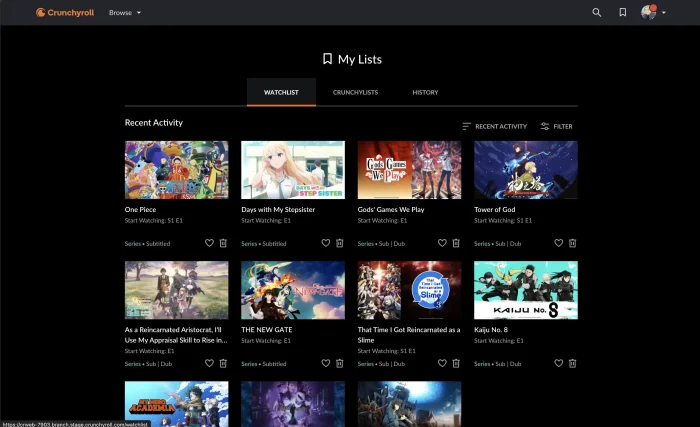
- Custom list from Crunchyroll for Windows: Setup, Plans & Streaming Guide
-
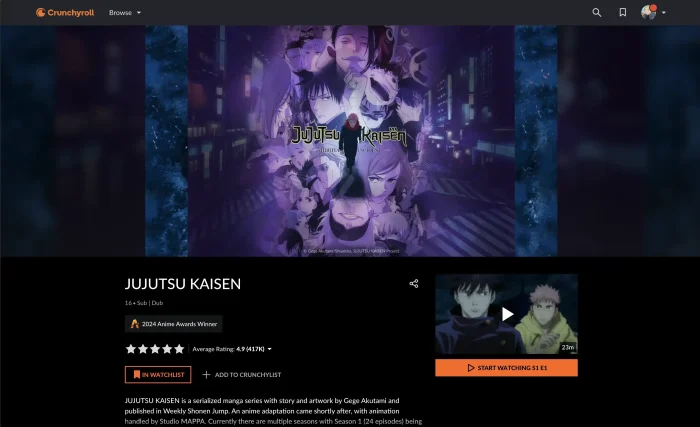
- Jujutsu kaisen on crunchyroll screenshot from Crunchyroll for Windows: Setup, Plans & Streaming Guide
-
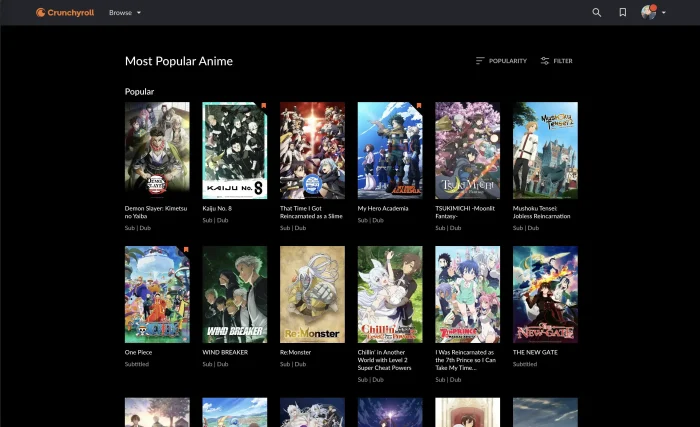
- Most popular anime crunchyroll from Crunchyroll for Windows: Setup, Plans & Streaming Guide
-
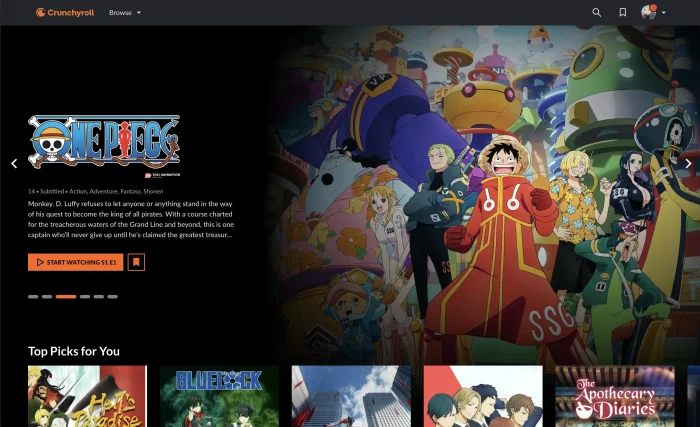
- One piece homepage crunchyroll from Crunchyroll for Windows: Setup, Plans & Streaming Guide
Frequently Asked Questions
Can I download Crunchyroll episodes to watch offline on Windows?
No. Offline downloads on Crunchyroll only work on the official mobile apps for iOS and Android, and on the Nintendo Switch app. The Windows app and the browser version both need an internet connection every time you watch, even on a paid plan that includes offline viewing on other devices.
Does Crunchyroll support 4K on a Windows PC?
No. Crunchyroll streams in standard HD on every device, including Windows. There is no 4K tier or setting, and Crunchyroll has not confirmed Dolby Atmos support on any platform.
Does Crunchyroll have a Watch Party feature?
Not officially. Crunchyroll does not build a watch party tool into its own app or website. Fans use third-party browser extensions like Crunchyroll Party or Teleparty to sync playback with friends, but these are not made or supported by Crunchyroll.
What is the Crunchyroll Game Vault?
It’s a library of anime-themed mobile games included at no extra cost with the two higher subscription tiers. Games run ad-free with no in-app purchases and are played through the Crunchyroll mobile app, not the Windows app.
How many profiles can I create on a Crunchyroll account?
Crunchyroll does not use separate viewer profiles the way some other streaming apps do. Your account has one watchlist and one history, though parental controls can restrict mature content account-wide.
Is there still a free version of Crunchyroll?
No. Crunchyroll closed its free ad-supported tier, so a paid plan is required to watch anything beyond a small selection of trailers.
What are the system requirements for the Crunchyroll app on Windows?
Windows 10 or later, with the Microsoft Store kept up to date, plus a broadband internet connection for streaming. Full details are in the System Requirements section above.
Support and Community
Stuck on something this guide didn’t cover? Crunchyroll’s official help center covers app-specific troubleshooting, account, and billing questions. The r/Crunchyroll subreddit is also active and useful for real-world troubleshooting from other users.
More Windows software guides: Netflix for Windows · Disney+ for Windows · Prime Video for Windows · Best Anime Games on PC
Discover more from Windows Mode
Subscribe to get the latest posts sent to your email.













Add your first comment to this post