Key takeaways
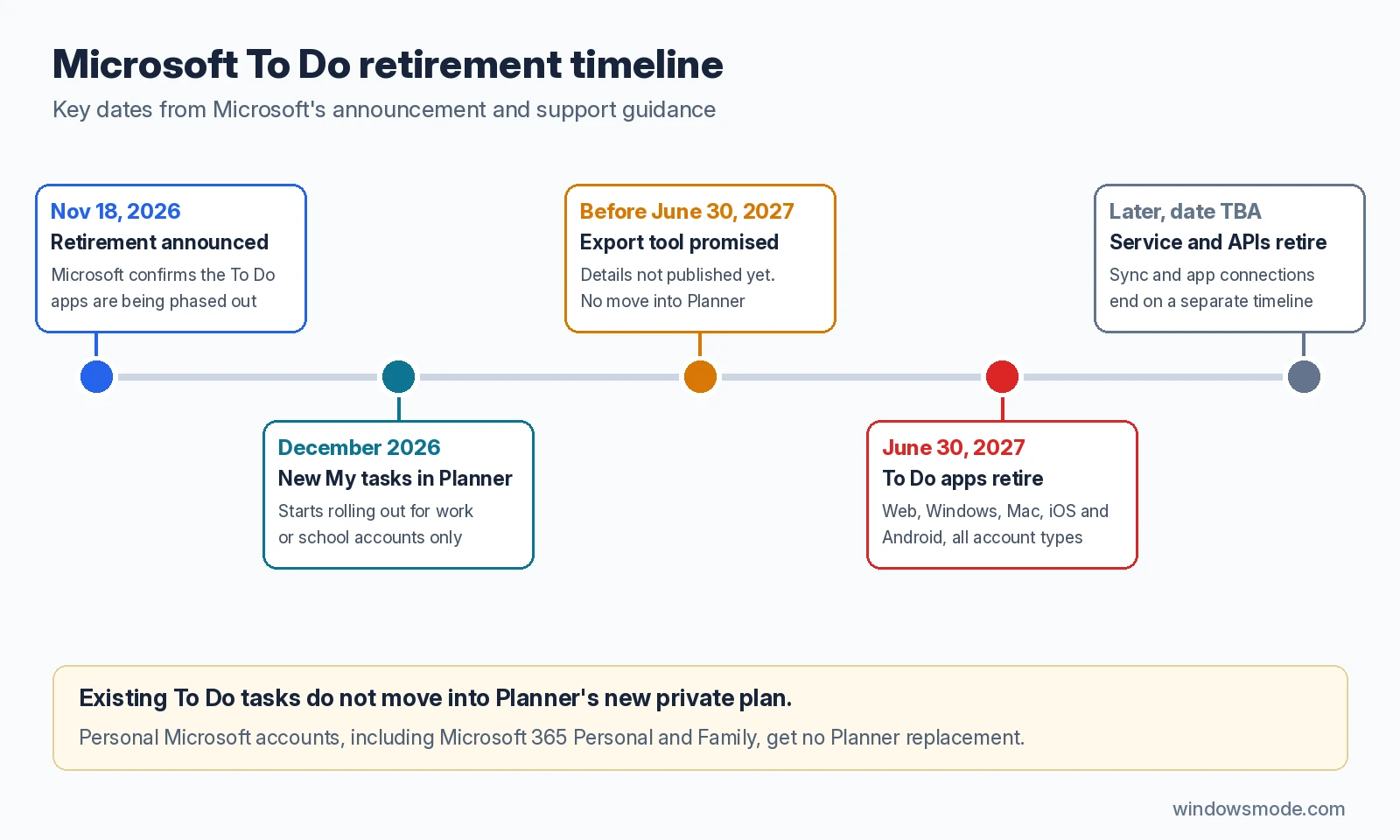
- The Microsoft To Do apps retire on June 30, 2027 on the web, Windows, Mac, iPhone and Android.
- It affects work or school accounts and personal Microsoft accounts, including Microsoft 365 Personal and Family.
- Work and school users move to Microsoft Planner. Personal account users get no Microsoft replacement and need another app.
- Existing tasks won’t be moved for you. Microsoft says an export option will arrive before the apps retire.
Do you keep your shopping lists, reminders or chores in Microsoft To Do? You have about seven months left with it. Microsoft announced on November 18 that it is folding personal task management into Planner, and the To Do apps go away on June 30, 2027.
For people with a work or school account, Planner takes over. For everyone signed in with a personal Microsoft account, Microsoft’s own advice is to pick another task app. Here is what changes, what happens to your lists, and what you can do now.
What Microsoft announced
In its announcement on the Microsoft Community Hub, Microsoft says it will “phase out To Do” as it brings personal tasks into Planner. Its To Do to Planner support page spells out the details:
- The To Do apps retire on June 30, 2027. That covers To Do on the web, Windows, Mac, iOS and Android.
- The underlying To Do service, its APIs and sync support retire later, on dates Microsoft hasn’t announced yet.
- Existing To Do tasks and lists will not migrate to Planner.
- Shared lists, their members and assignments won’t transfer either.
Who is affected
Personal Microsoft account
- This includes free Outlook.com accounts and Microsoft 365 Personal and Family subscribers.
- Planner isn’t available for these accounts, so there is no Microsoft app to move to.
- Microsoft’s advice is to choose another task app and keep an eye out for the export instructions.
Work or school account
- Planner becomes the place for your own tasks and the work assigned to you.
- A redesigned My tasks view starts rolling out in December 2026.
- Old To Do tasks stay visible in Planner until June 30, 2027, then you can no longer view or manage them there.
If you use both kinds of account, Microsoft suggests going through the lists in each one separately, since they are handled differently.
What to do now if you use a personal account
There is no rush to leave today. The apps keep working until June 30, 2027, and Microsoft says the retirement doesn’t, by itself, schedule your task data for deletion. Still, a few steps now will make the move easier.
Go through your lists
Delete lists you no longer use and finish or clear old tasks. A shorter list is much easier to rebuild in another app, especially since there is no automatic transfer.
Keep a copy of the lists that matter
Until the export tool arrives, the simplest backup is the one built into To Do. Open a list, select the three-dot list options menu and choose Email list or Print list. Printing to PDF gives you a file you can keep. Microsoft says equivalent print and email-list features aren’t currently planned for the replacement, so use them while you can.
Note what you rely on
Reminders, repeating tasks, shared family lists and steps inside tasks are the features people miss first. Write down the ones you use, then check that your next app handles them before you move everything over.
Pick a new app and wait for the export
Microsoft says it will publish export instructions on its support page before the apps retire. It also warns that an export doesn’t mean another app can import it, so a manual rebuild may still be needed for some lists.
Shared lists
If you share a grocery or family list in To Do, everyone on it will need to move. Shared-list members and assignments don’t carry over, so agree on a new app together before the deadline.
Popular alternatives
Microsoft doesn’t recommend a specific app. Commonly used options include Todoist and TickTick, which both run on Windows, phones and the web, and Google Tasks if you already live in Gmail and Google Calendar. If you’d rather see tasks as cards on a board, our Trello for Windows guide covers its free plan and personal Inbox. Try a couple with your real lists before you commit.
What changes for work and school accounts
Planner already shows your To Do tasks today. From December 2026, a new list-first My tasks view starts rolling out, where new private tasks are stored in a private Planner plan. Your old To Do tasks won’t move into that plan.
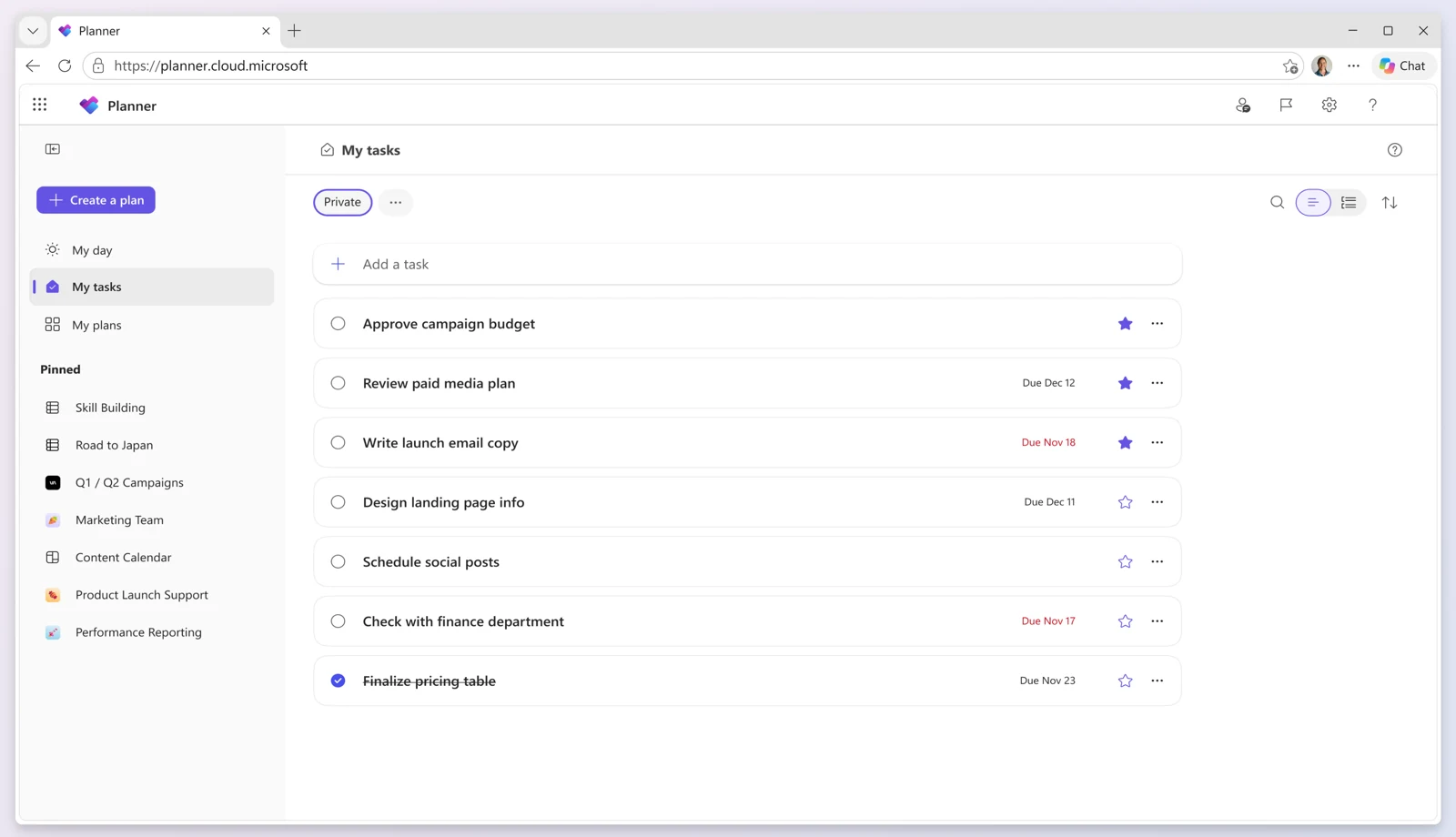
Planner works differently from To Do in a few ways worth knowing:
- No new desktop app. Planner runs on the web and in Teams. Microsoft isn’t planning native Planner apps for Windows or Mac, and the web and Teams versions don’t match To Do’s offline use.
- Reminders work differently. Planner uses due-date notifications rather than per-task reminders.
- No file attachments on tasks in the new private plan for now, and To Do’s list groups have no direct equivalent.
Check with your IT department that Planner is turned on for your account, and follow its guidance for the move.
What about tasks in Outlook?
Tasks in classic Outlook are separate from To Do. Microsoft says they will keep working and syncing with Exchange. To Do features built into other Microsoft 365 apps, including the To Do experience inside the new Outlook for Windows, will be updated, but Microsoft hasn’t shared the details yet.
Frequently asked questions
Will my Microsoft To Do tasks be deleted on June 30, 2027?
Not automatically, according to Microsoft. The date ends the To Do apps and access to old To Do tasks through Planner, but it doesn’t by itself schedule your data for deletion. Keep your own copy anyway, since you won’t be able to open it in To Do after that date.
Can personal Microsoft accounts use Planner instead?
No. Planner isn’t available for personal Microsoft accounts, including Microsoft 365 Personal and Family. Microsoft says personal account users need to choose another task app.
Source: The Verge.
Discover more from Windows Mode
Subscribe to get the latest posts sent to your email.












Add your first comment to this post