Readers like you help support this site. When you make a purchase using links on our site, we may earn an affiliate commission. All opinions remain our own.

Google Antigravity, Google’s agent-first coding app for Windows, macOS and Linux.
Google Antigravity is a free AI coding app from Google, available for Windows from the official Antigravity website. You tell an AI agent what you want built, and it writes the code, runs it, and checks the result in a browser.
It has changed a lot since launch. What started as a VS Code style editor is now a standalone desktop app built around agents, with a command line tool and the original editor next to it. Google’s two newest models came close together: Gemini 4 Argon in October 2026, then Gemini 4 Carbon, its strongest model, on November 10, 2026.
This guide covers what the app does today, who can use Carbon and Argon, the plans and limits, how to install it on Windows 10 and 11, and screenshots we took on our own PC.
What Is Google Antigravity?
Antigravity is Google’s tool for agent-first coding: you describe a task, and an AI agent plans it, edits the files, runs commands in the terminal, and tests the result. You review what it did instead of typing every line yourself.
Google now ships it in three forms, and it helps to know which one you are installing:
Antigravity app
A standalone desktop app. Projects and conversations sit in a sidebar, and each conversation is an agent working on a task. This is the main product now, and the one in our screenshots.
Antigravity CLI
The same agents in a terminal window, through a command called agy. It suits people who already live in PowerShell.
Antigravity IDE
The original code editor from launch, built on VS Code, with agent panels inside it. It is still available, but it does not get Gemini 4 Argon.
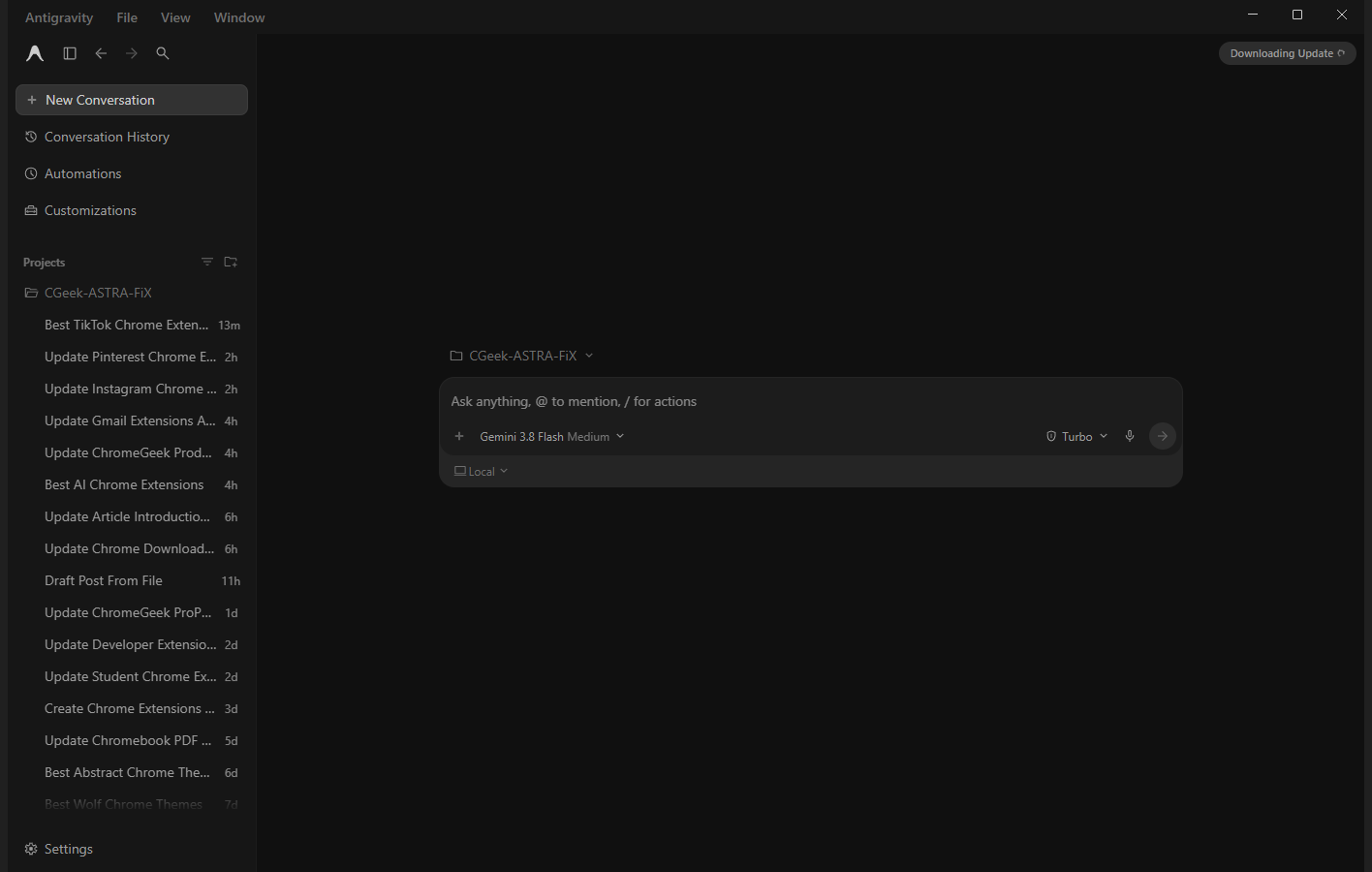
A new conversation in the Antigravity app on Windows 11. Projects and past agent tasks sit in the sidebar on the left.
Gemini 4 Carbon and Argon in Antigravity
Gemini 4 Carbon is Google’s strongest model. It reached Antigravity on November 10, 2026, for Google AI Ultra subscribers, in the app, the CLI and Antigravity’s extensions for other code editors. Google says Argon is still the right pick for most coding work. Carbon is for the hardest jobs, because it reasons longer, checks its work more, and uses more of your limits.
Gemini 4 Argon came first, on October 13, 2026, built for long, complex software work. Google calls it the model where the agent-first experience “truly comes to life”.
Argon works on Google AI Ultra and on paid Google AI Pro plans, plus eligible Gemini Enterprise plans and developers using the Gemini API. Pro trials do not include it, according to Google’s model list. On our paid Pro account, Argon is ready to use and has its own weekly limit, separate from the other Gemini models. Carbon is listed too, but marked Unavailable.
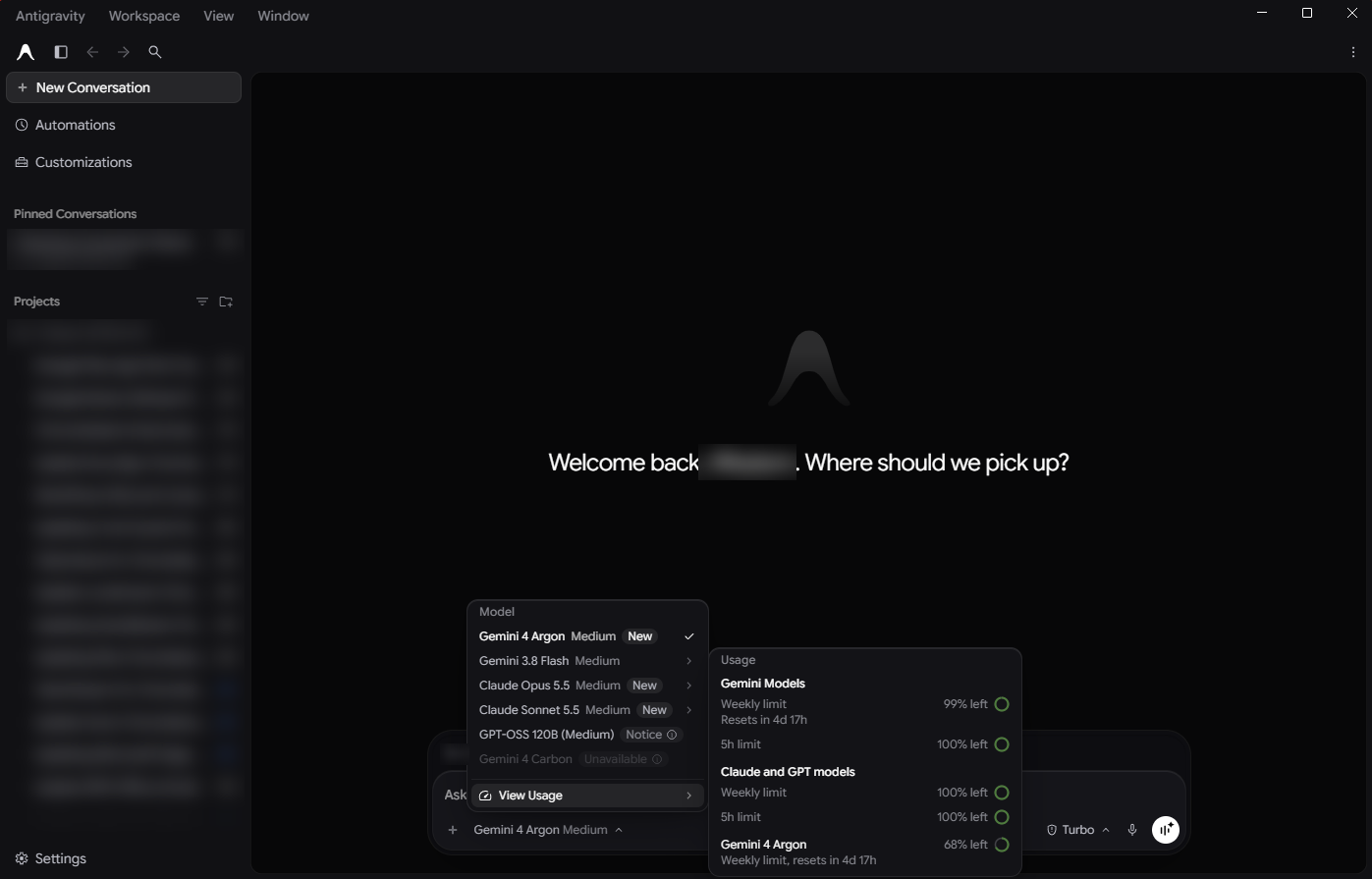
The model picker on our Google AI Pro account: Argon, Gemini Flash and the Claude models are ready to use, Carbon is locked, and the usage panel shows Argon’s own weekly limit.
Google has shared its own numbers from using Argon inside the company. Over four weeks, it reported 35 percent more code written by agents and 30 percent fewer rollbacks (changes that had to be undone after they shipped). These are Google’s internal figures, not independent tests.
Not seeing Carbon or Argon? Update the app first, since Google rolls models out through updates. Then check your plan: Carbon needs Ultra, and Argon needs Ultra or a paid Pro plan. If you use the original Antigravity IDE, switch to the app or the CLI, which is where Google launches its new models.
Key Features
These are the parts of the app that change how you work, compared with a normal code editor.
Several agents at once
Each conversation is its own agent. You can run several in parallel, one fixing a bug while another writes tests, and group them by project in the sidebar.
A browser agent
The agent can open a browser, click through your site and check that a change looks right, not just that the code runs. The /browser command starts it on demand.
Pick your model
Gemini is the default, but Claude models from Anthropic are built in on paid plans, with no extra extension or API key. They run on their own usage limits.
Work in a copy of your code
Under the message box you choose Local or a new worktree (a separate copy of your project), so an agent can try something risky without touching your main files.
A team of agents with /swarm
Type /swarm and one prompt becomes a coordinated team: a lead agent splits the job, workers build in separate copies of your code, and checker agents test every change. It is a preview, and it uses your limits much faster than one chat.
Voice mode
Click Start Voice mode in the message box and talk to the agent like a teammate on a call. You can give it a task, steer it while it works, and answer its permission questions without clicking.
Inside the Antigravity App
Here are three screens from the app on our PC that show where the newer features live.
Slash commands
Type / in the message box to see shortcuts. /plan makes the agent think before it acts, /goal keeps it running until a goal is done, and /teamwork-preview hands a large job to a team of agents.
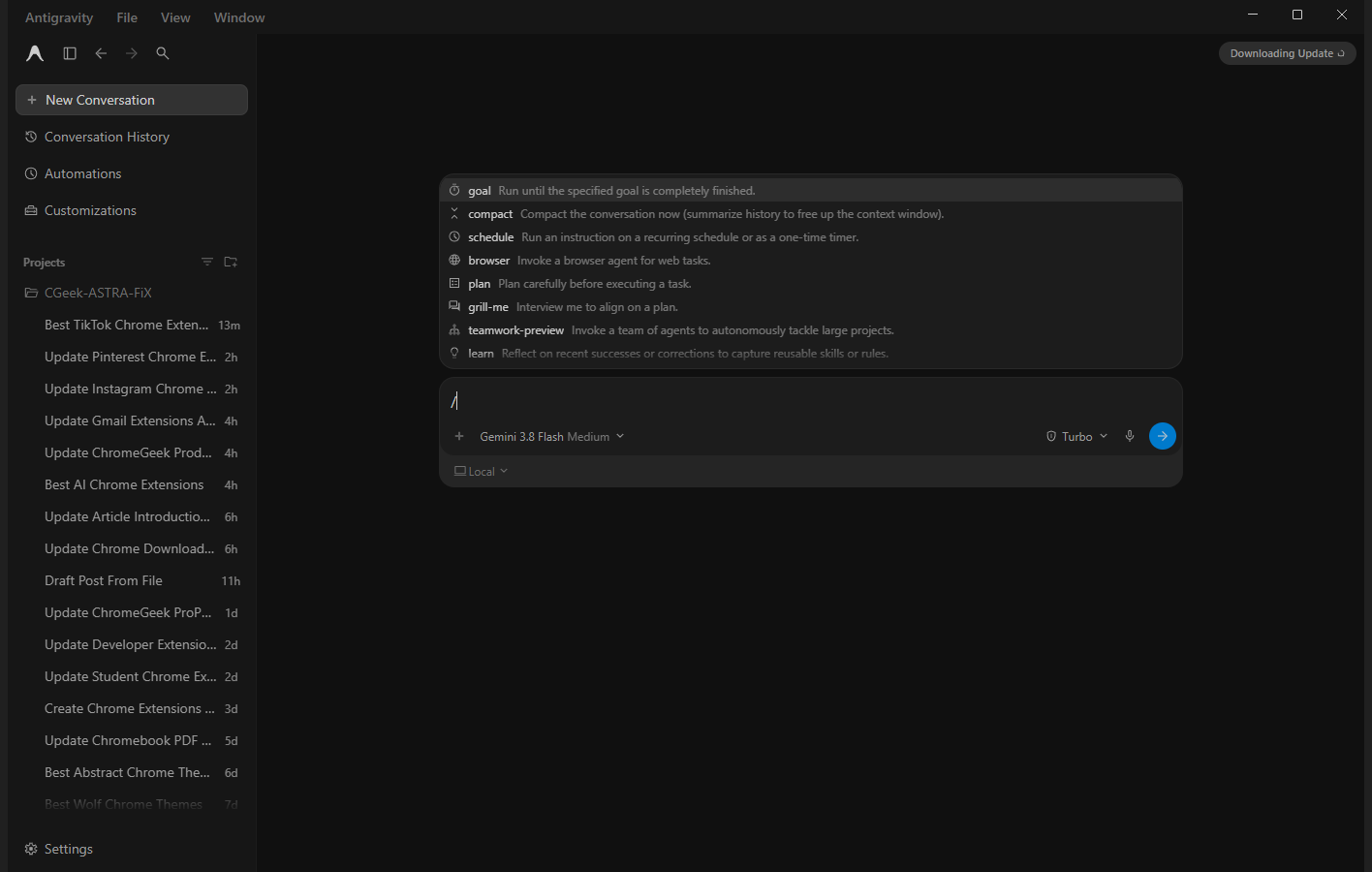
The slash command menu. Each command has a one-line description, so you do not need to memorize them.
Automations
Automations run an agent on a schedule, for example a daily check of your project for broken links or failing tests. You give it a name, a schedule and a prompt.
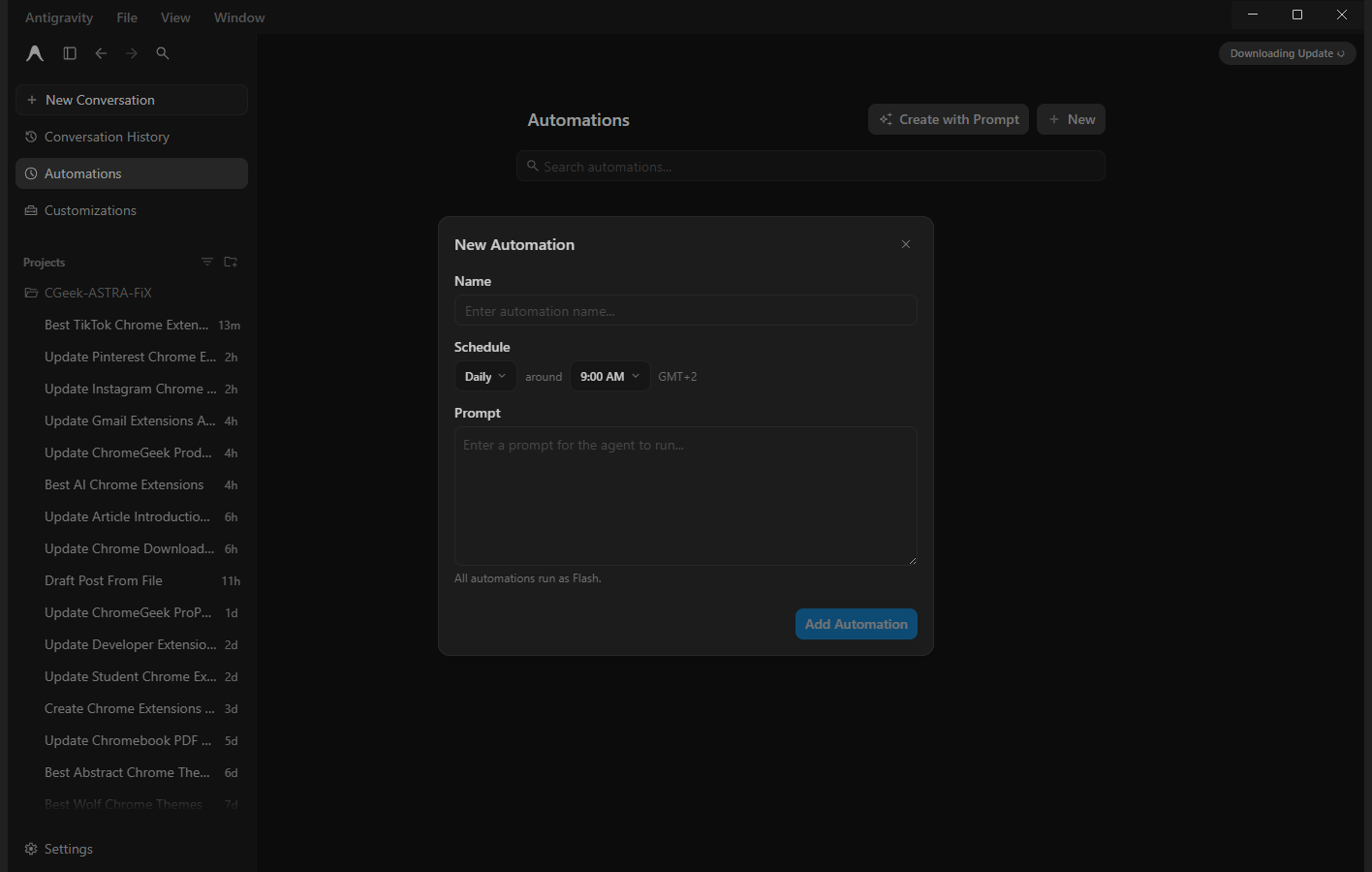
Setting up a new automation: a name, how often and at what time it runs, and the prompt the agent gets.
Customizations
The Customizations marketplace adds skills and connections, such as Google Docs, Sheets and Drive, Chrome DevTools, Firebase and Android tools. Each one gives the agent new things it can read or do.
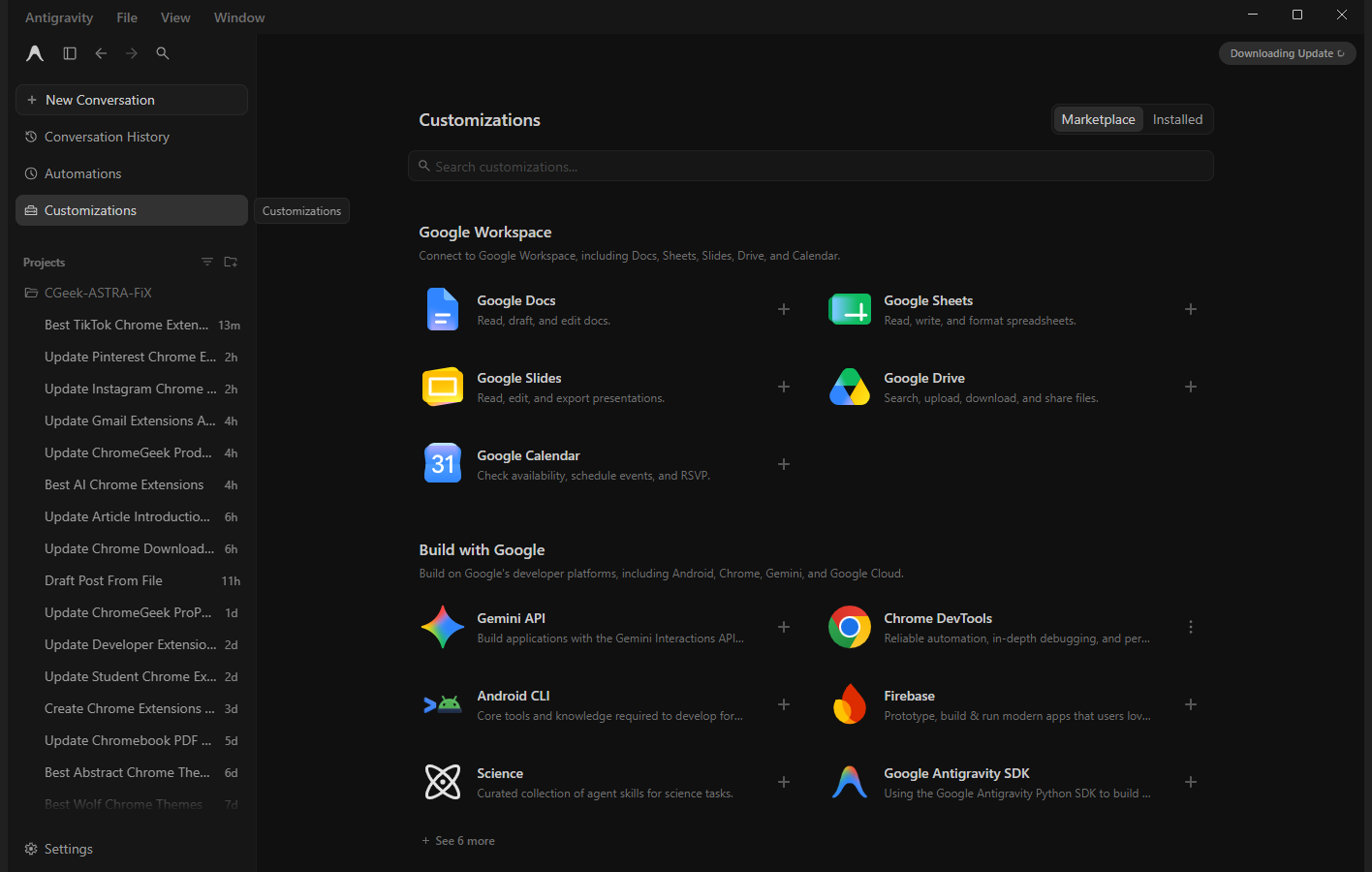
The Customizations marketplace, with Google Workspace and Google developer add-ons at the top.
How to Get Antigravity on Windows
The app installs like any Windows program. You need 64-bit Windows 10 or 11 and a Google account.
Step 1
Open the download page on the official Antigravity website.
Step 2
Pick the Windows installer that matches your PC: x64 for most PCs, ARM64 for Snapdragon laptops.
Step 3
Run the installer and open Antigravity from the Start menu.
Step 4
Sign in with Google and add a project folder.
Prefer the terminal? Install the Antigravity CLI from PowerShell with this command from Google’s download page:
irm https://antigravity.google/cli/install.ps1 | iex
Sign-in stuck on “Setting up your account”? Close the app fully, set Chrome as your default browser for the sign-in, then try again. Some users found that other browsers left the sign-in hanging.
Plans and Usage Limits
Antigravity has a free plan, and paid Google AI subscriptions raise how much you can use it. The limits reset on a weekly and a five hour clock, and you can see both in Settings.
Check current prices on the Antigravity pricing page. Your own usage lives under Settings, Models:
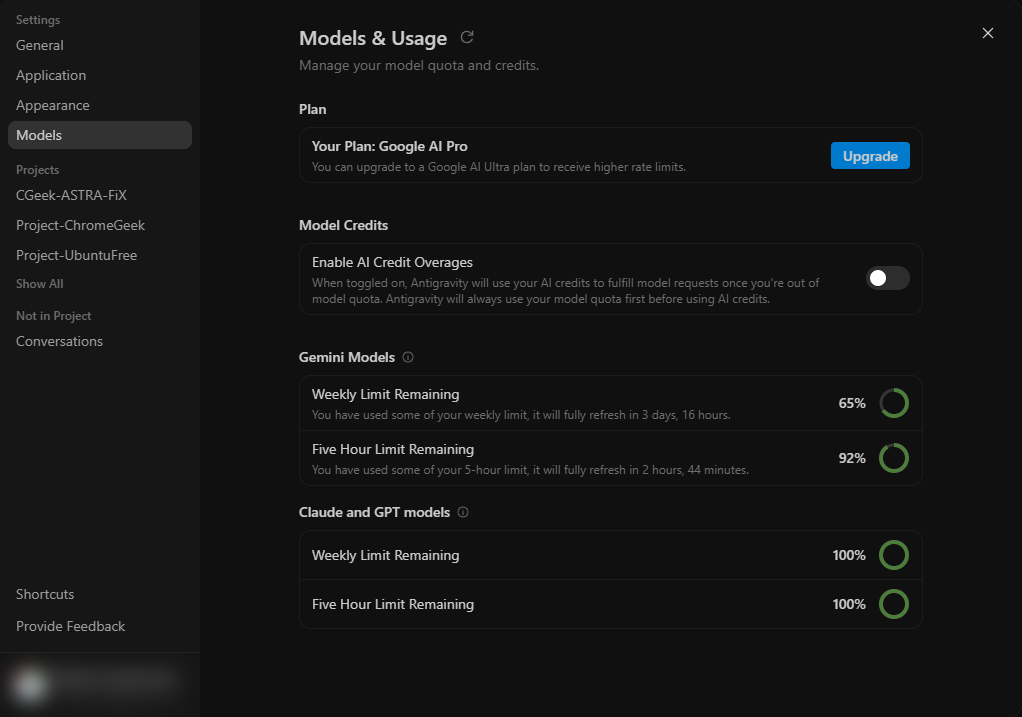
Models and Usage on a Pro plan. Gemini and the Claude and GPT models each get their own weekly and five hour limit.
Antigravity vs Cursor and Other AI Editors
If you already use an AI code editor, this is how Antigravity’s approach compares.
Tips for Getting Started
Start big tasks with /plan. The agent writes out its plan first, so you can fix a wrong idea before it touches any files.
Use a worktree for risky changes. Switch from Local to a new worktree under the message box, and the agent works on a copy of your project.
Check the permission picker. The setting next to the model name decides how much the agent may do without asking. Keep it cautious until you trust a project.
Use Flash for small jobs. Quick edits rarely need the biggest model, and Flash saves your weekly limit for the hard tasks.
Tell it you are on Windows. If the agent tries Linux commands, add a project rule such as “Use PowerShell for terminal commands”.
Screenshots From the Original IDE
These are the screenshots we took of the Antigravity IDE at launch in November 2025, including our first test project, “Project Obito”. The IDE is still available if you prefer an editor layout.


FAQ
Is Google Antigravity free?
Which plans get Gemini 4 Carbon and Argon in Antigravity?
What is the difference between the Antigravity app and the Antigravity IDE?
Does Antigravity run on Windows on ARM?
Can I use Claude or GPT models in Antigravity?
Support and Community
Where to get help, read the docs and follow changes:
- Google Antigravity, the official site from Google.
- Antigravity docs, for setup on the app, CLI and IDE.
- Antigravity blog, where Google announces new models and features.
- Google AI Developers Forum, for bug reports and questions answered by other users.
More Windows software guides: Gemini for Windows · Cursor · Claude for Windows · Best AI Code Editors · Google App for Windows
Discover more from Windows Mode
Subscribe to get the latest posts sent to your email.













better than cursor or vscode!
Amazing and ironically this has forced all the major Ai’s to release their next versions way faster, including Grok 4.1 is now out and even ChatGPT 5.1 🤣
Gemini 3 Pro is something else. I think this will force the other guys to step up their game for the next release.
I agree, this release was not expected and I think it’s exactly what the AI industry needed. Google is not playing around.