If your team already protects Windows PCs with Microsoft Defender for Endpoint, you can now bring your Linux desktops into the same console. Microsoft has added Linux workstation support in public preview, and every Linux distribution already supported on servers is also supported on desktops. For IT teams whose developers and engineers run Ubuntu, Fedora, or RHEL laptops, this removes a common blind spot.
What Microsoft Announced
The News
The change appears in the September 2026 section of Microsoft’s New features in Microsoft Defender for Endpoint page. It is listed as “Microsoft Defender support for Linux Desktops” with a Preview status. Microsoft writes that “deployment methods and security capabilities remain consistent across both Linux servers and desktops.”
In plain terms: there is no separate desktop product. The Defender on Linux agent that already protects servers now runs on workstations, and those workstations show up in the same Microsoft Defender portal.
What This Means for Windows Admins
Admin View
- One portal: Linux desktops are managed in the same Microsoft Defender portal you already use for Windows PCs. Alerts, incidents, the device timeline, and advanced hunting work across both.
- Familiar tools: antivirus settings, including exclusions, can be managed centrally from the Defender or Intune portal.
- Separate device type: Defender tells servers and workstations apart and shows that in device inventory and security workflows.
Licensing: What You Need
Licensing
The Linux prerequisites page now separates server and desktop licenses:
- Desktops: Microsoft Defender for Endpoint P2, also available with Microsoft 365 E5 and Microsoft 365 E7.
- Servers: Defender for Servers Plan 1 or Plan 2, Defender for Endpoint for servers, or Defender for Business servers (small and medium businesses only).
Good news if you already have E5 or E7: Defender for Endpoint P2 comes with those plans, so you shouldn’t need a new license for Linux desktops. Plan 1 is not listed as an option for desktops, so check your licensing before you roll this out.
Supported Distributions
Compatibility
Microsoft says support “is based on the underlying distribution and kernel version, irrespective of the desktop environment.” Here is the current list from the prerequisites page:
Mariner 2 is also listed. Distros that aren’t listed are unsupported, and the minimum kernel is 3.10.0-327.
What’s Included
Features
Because it is the same agent, desktops get the Linux feature set Microsoft documents on its Defender for Endpoint on Linux page:
- Next-generation protection: real-time, behavior-based, and cloud-delivered antivirus, plus scheduled and on-demand scans. A passive mode lets it run alongside another antivirus product.
- Endpoint detection and response (EDR): MITRE ATT&CK-aligned detections, alert correlation into incidents, the device timeline, and advanced hunting.
- Response actions: live response, device isolation, file indicators, investigation package collection, and remote scans.
- Vulnerability management: vulnerability assessment, security recommendations, remediation tracking, and Secure Score.
How to Onboard Linux Desktops
How-To
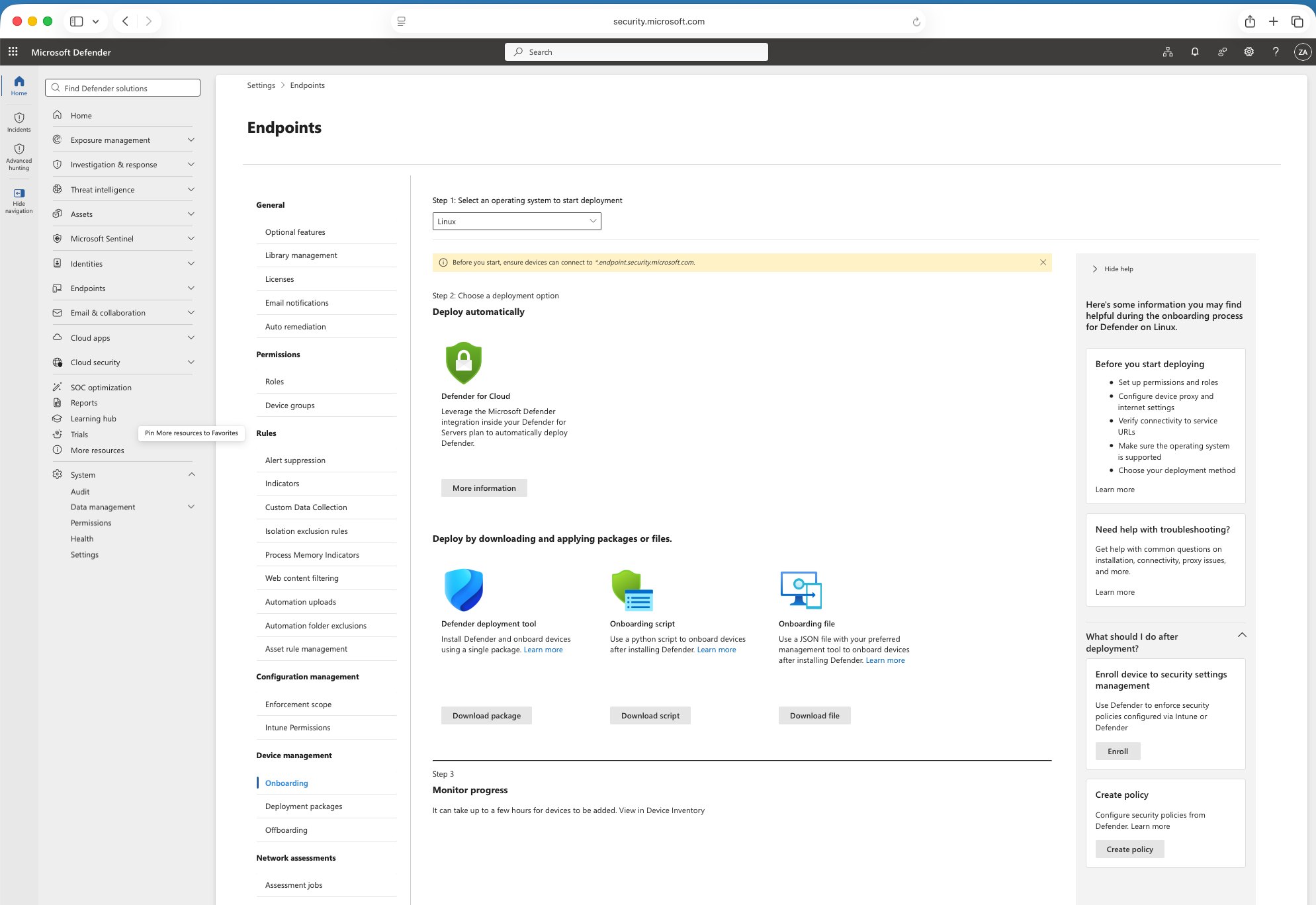
Microsoft says all deployment methods work for both servers and desktops. A typical rollout looks like this:
- Check licensing and prerequisites: confirm Defender for Endpoint P2 (or E5/E7), a supported distro, systemd, and network access to the Defender URLs.
- Get the Defender Deployment Tool from the Defender portal. Microsoft recommends it because it handles installation, onboarding, upgrades, and removal in one workflow.
- Run it on a pilot group with administrative privileges. At scale, you can use the installer script, Ansible, Chef, Puppet, SaltStack, or golden images instead.
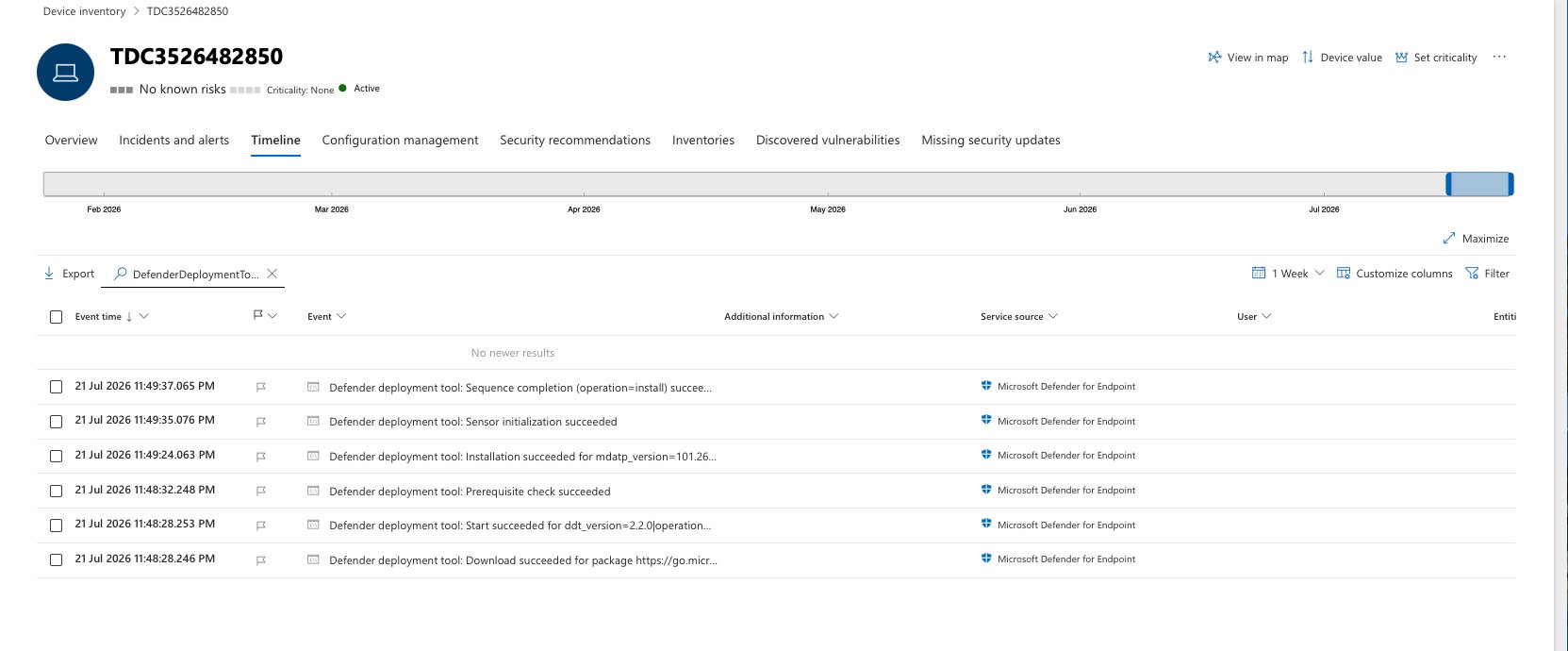
- Check device inventory to make sure each machine shows up as a workstation.
Why step 4 matters: Defender looks at signals such as OS metadata, licensing details, Ubuntu Pro contracts, and virtual desktop indicators. If those signals don’t clearly point to a workstation, the device is classified as a server by default.
Requirements and Known Limits
Limits
- Hardware minimums: one CPU core, 2 GB disk space, and 1 GB RAM.
- systemd is required. Device isolation needs
iptables/ip6tablesor their nft versions. - Proxies: PAC, WPAD, and authenticated proxies aren’t supported, and neither is SSL inspection. Use static or transparent proxies.
- Other security tools: running alongside other Fanotify-based solutions isn’t supported and can cause system hangs. Use passive mode in that case. FAPolicyD on RHEL and Fedora is an exception.
Preview status: preview features can change before general availability, so start with a pilot group.
Why It Matters
Verdict
Developer Linux laptops often hold source code, cloud credentials, and SSH keys, yet many Windows-first IT teams have had little visibility into them. This preview lets you cover those machines with the same tools, alerts, and response actions you already use on Windows. If your team also handles Windows-side protection, our guide to fixing SmartScreen blocking downloads is worth bookmarking. For more on how Microsoft is locking down developer workloads, see our look at Microsoft Execution Containers.
Source: Microsoft Learn: New features in Microsoft Defender for Endpoint and Prerequisites for Defender for Endpoint on Linux.
Discover more from Windows Mode
Subscribe to get the latest posts sent to your email.
















Add your first comment to this post