What is changing in these builds
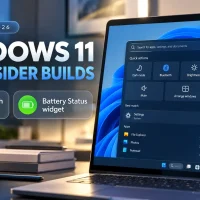
Windows Insiders testing the Experimental channel have access to a redesigned Windows Search experience built directly on WinUI 3. The overhaul focuses on speed, interface clarity, and functional controls right inside search results.
Instead of acting only as a launcher, the updated search box lets you execute quick toggles on the fly. You can switch Dark Mode on or off, manage Bluetooth connections, tweak screen brightness, mute audio, and change window snap layouts without opening the Settings app. Microsoft has also upgraded the search backend with smarter typo tolerance and synonym matching to pull up tools faster.
Alongside the search enhancements, Microsoft added a dedicated Battery Status widget to the Widgets board. Found under the “Add widgets” menu, this card displays real-time battery percentages for your PC as well as connected Bluetooth peripherals, such as mice, styluses, and keyboards.
Feature overview and availability
Why it matters
For day-to-day productivity, these changes tackle minor points of friction in the Windows shell. Adjusting basic hardware toggles normally requires drilling into the Action Center or opening separate menus in Settings. Embedding these toggles directly into the search bar reduces clicks and keeps your workflow moving.
The Battery Status widget solves a similar issue for peripheral management. Rather than navigating to Settings > Bluetooth & devices to find out if your wireless mouse or headphones need a charge, the widget gives you a glanceable battery breakdown in one spot.
Availability is currently limited to Windows Insiders running Experimental builds 26340.9616 and 28120.3181. Microsoft is testing these updates with small cohorts first, so wider availability across Beta and general release channels will take time.
Have you tried out the new inline search toggles or the Battery widget yet? Let us know how they run in the comments below.
Discover more from Windows Mode
Subscribe to get the latest posts sent to your email.















Add your first comment to this post