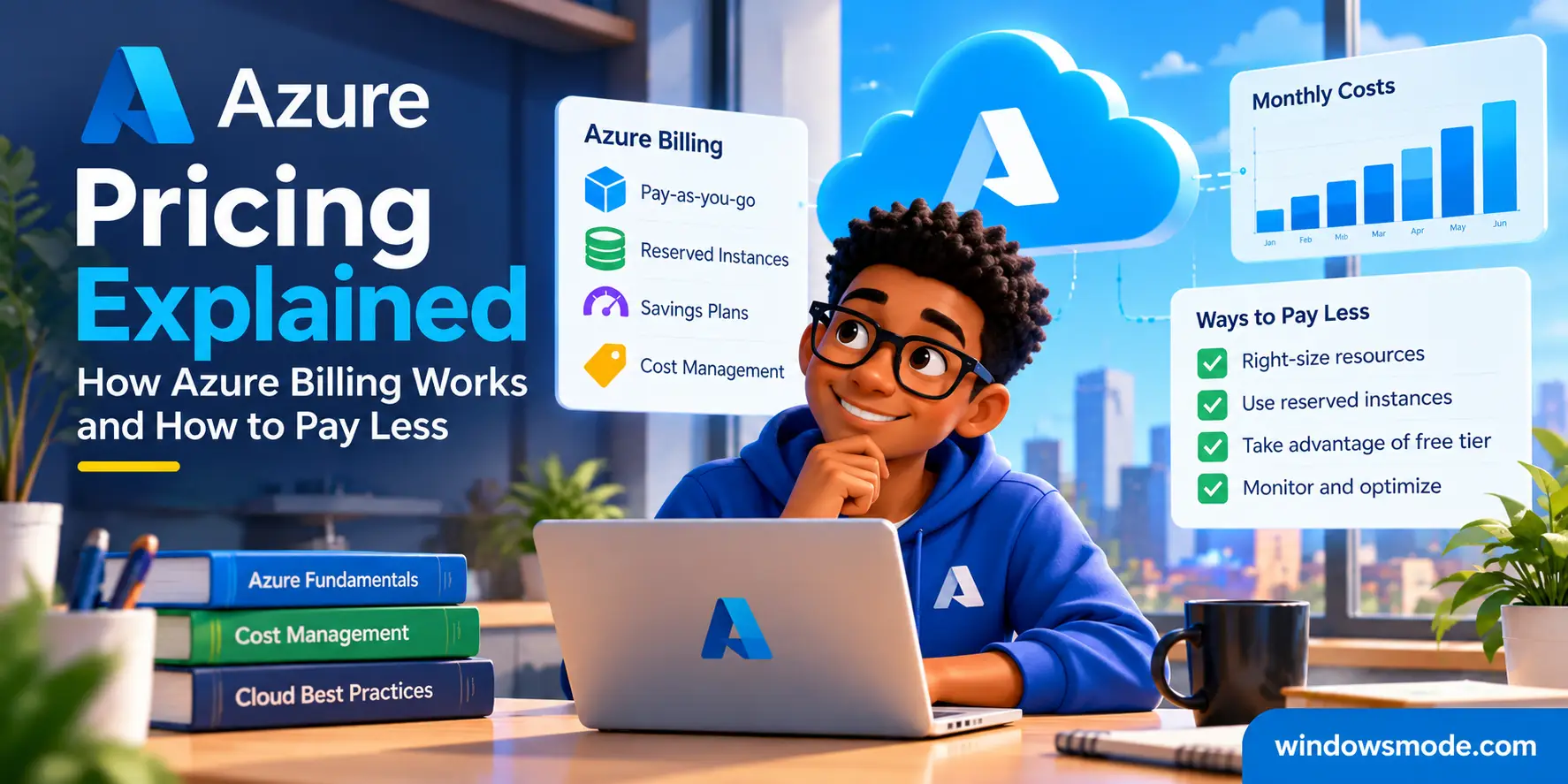
How Azure bills you, what drives the price, and the ways to pay less.
Azure pricing is pay-as-you-go: you pay for each resource by how long it runs or how much it stores, moves or processes, and nothing else. There is no monthly fee for having an account. Microsoft publishes every rate on its Azure pricing pages and in a free price list anyone can query.
The hard part is that one service can have several meters, and each meter has its own price. A single virtual machine bills for its computing time, its disk, its public IP address and the data it sends out, each on its own line. Once you know the meters, the bill stops being a surprise.
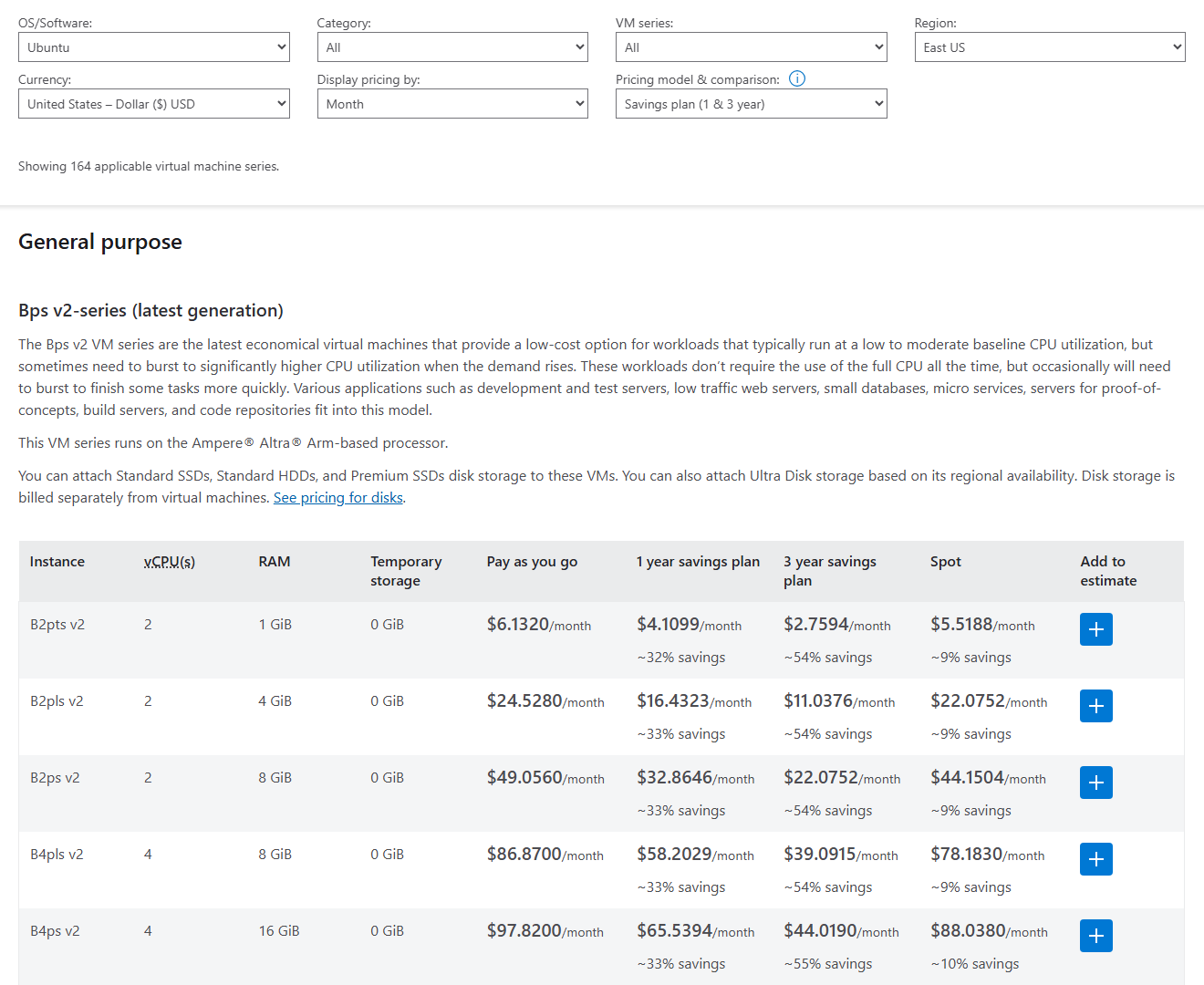
Prices change by region, operating system, size and pricing model. Discounts of up to 72% for reservations, 65% for savings plans and 90% for Spot machines are on the table for the right kind of work.
Below: how billing works, what drives the price, a worked example in the pricing calculator, how to look prices up yourself, and how to read your bill. Got a pricing question we did not answer? Reach out to us directly.
How Azure Pricing Works
Azure charges by the meter. A meter is one thing Azure counts and puts a price on: hours a virtual machine (VM, a computer you rent in the cloud) runs, gigabytes stored in a month, gigabytes sent out to the internet, or a number of operations. Every resource you create switches on one or more meters.
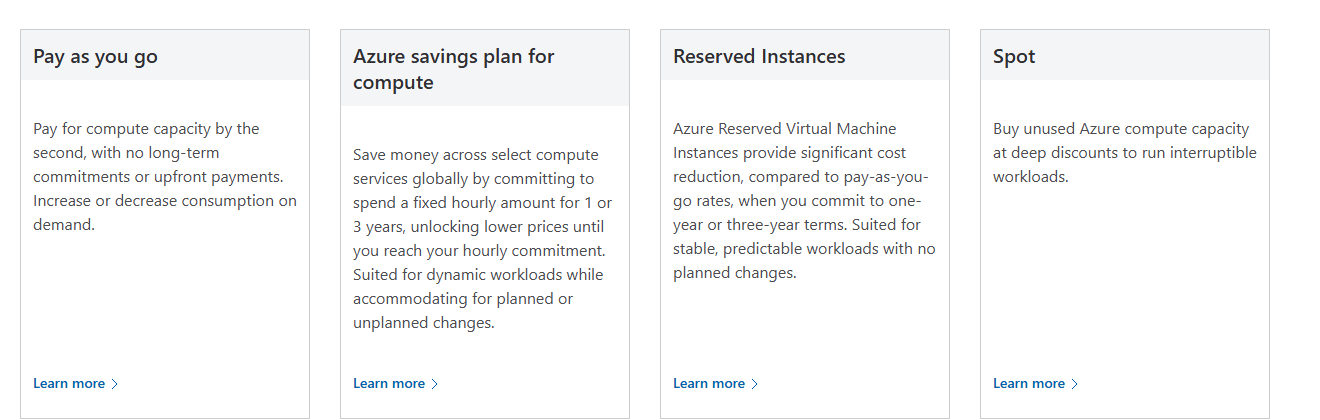
Pay-as-you-go is the default. Microsoft’s VM pricing page puts it plainly: you pay for compute capacity by the second, with no long-term commitments or upfront payments. Prices are listed per hour or per month, but you are charged for what actually ran, so a VM you switch off after two hours costs two hours.
Usage adds up over a monthly billing period, and you get one invoice for it. On an individual account, that bill goes to the card on file. Larger customers pay by invoice under an Enterprise Agreement or a Microsoft Customer Agreement, sometimes at negotiated prices.
Prices are set in US dollars
Microsoft sets Azure prices in US dollars worldwide. If you pay in another currency, your monthly cost is worked out in dollars first, then converted. Microsoft uses London closing spot exchange rates taken just before the end of the previous month, and that one rate applies to the whole month.
Your region changes the price
Azure runs in many regions (groups of datacenters in one area). The same VM can cost more in one region than another, because power, land and taxes differ. Pick the region near your users first, then compare a neighbor if price matters.
What Changes the Price of an Azure Service
Four choices decide what a meter costs. Microsoft’s pricing pages let you set each one as a filter, so you see the exact rate.
Size or tier
Bigger VMs, faster disks and higher service tiers cost more. Most services have a small, cheap tier for testing and larger tiers for real work. Start small; you can usually resize later.
Operating system and licenses
A Windows Server VM costs more than the same size running Linux, because the Windows license is built into the hourly rate. SQL Server works the same way. This is where Azure Hybrid Benefit can help (see below).
Region
Rates differ between regions for the same service, and a few services are not offered in every region. Data moving between regions is billed too.
Pricing model
Pay-as-you-go, a 1 or 3 year commitment, or Spot. The same VM can carry four different prices depending on how you agree to pay for it.
The Main Things You Pay For
Most Azure bills come down to four groups of meters. Compute is usually the biggest line, but networking and storage are where the surprises hide.
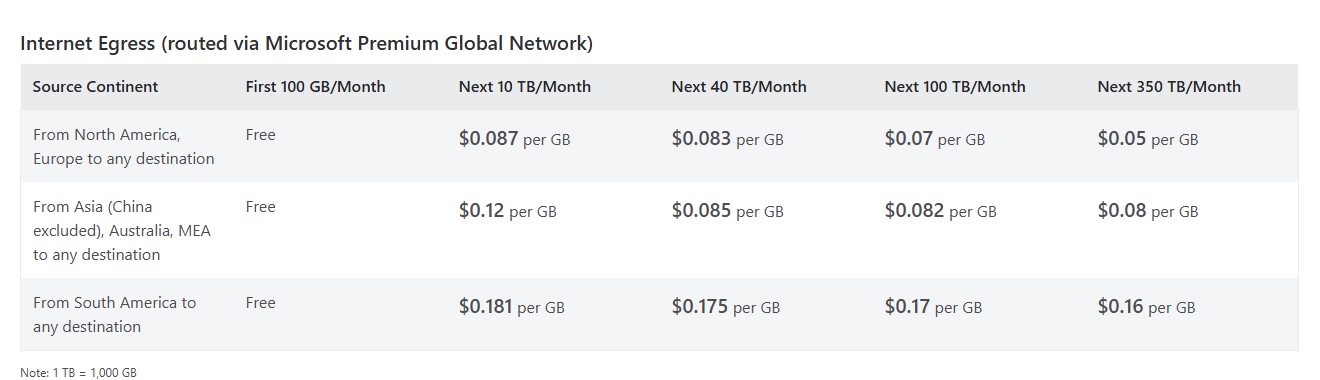
Data out of Azure has a free monthly amount
Microsoft’s bandwidth page lists data transfer into Azure as free. The first 100 GB a month sent out to the internet is free too, then you pay per GB, at a rate that depends on the continent the data leaves from and drops as volume grows.
Traffic between two Azure regions is billed separately, so a setup split across regions can cost more to run than the same setup in one region.
Stopped is not the same as deallocated. Microsoft’s VM pricing FAQ is clear: only a VM that shows Stopped (deallocated) in the portal is free of compute charges. Shut it down from inside Windows and it stays allocated, and you keep paying for its cores. Use the Stop button in the portal instead. Its disk still bills either way.
Free Amounts and the Azure Free Account
Many services include a free monthly amount on every account, not only on trials. Azure Functions, for example, includes a monthly allowance of free requests, and egress includes its first 100 GB. Free amounts reset each month and do not carry over.
New customers can also start with the Azure free account: a starting credit to spend in the first 30 days, 12 months of free amounts on popular services, and a spending limit that stops services instead of charging your card when the credit runs out. Our Azure free account guide covers what you get, who qualifies and how to sign up.
Free does not mean every tier is free. Only named sizes and tiers carry the free amount. Pick a bigger VM size or a premium tier and the full rate applies from the first hour.
Ways to Pay Less for Azure
Azure has five main discount programs. Here is what each one is for. Our cost guide goes deeper on choosing between them.
Savings plans come in two kinds: one for compute and one for databases. Reservations and savings plans are billing discounts only; they never change how your resources run. If you stop using the resource, you still pay the commitment.
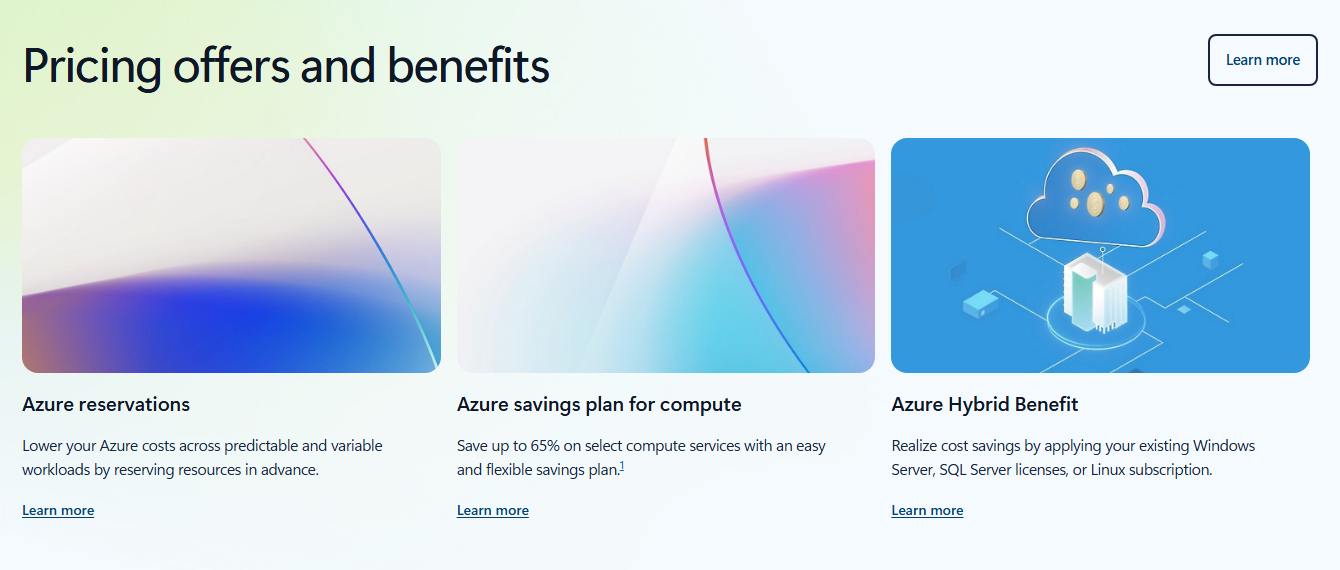
Which discount fits you? Our guide to reducing Azure costs compares them in detail, and our Azure migration tools guide shows how Hybrid Benefit fits into a move from your own servers.
How to Estimate Costs With the Azure Pricing Calculator
The Azure pricing calculator is free and needs no account. You add the services you plan to use, set the region, size and hours, and it adds up a monthly estimate. Sign in and it can show your own negotiated prices instead of list prices.
1 Open the pricing calculator at azure.microsoft.com/pricing/calculator.
2 Add a product, such as Virtual Machines, from the product cards or the search box. It appears in your estimate below.
3 Set the region, operating system and size in the product’s card. Leave the hours at 730, which is Azure’s standard month of running all the time.
4 Pick a savings option to compare pay-as-you-go with a 1 or 3 year commitment, side by side.
5 Add the extras the VM needs: a managed disk, a public IP address and bandwidth. These are separate products in the calculator.
6 Export or share the estimate when it looks right, so you can compare it with your first real bill.
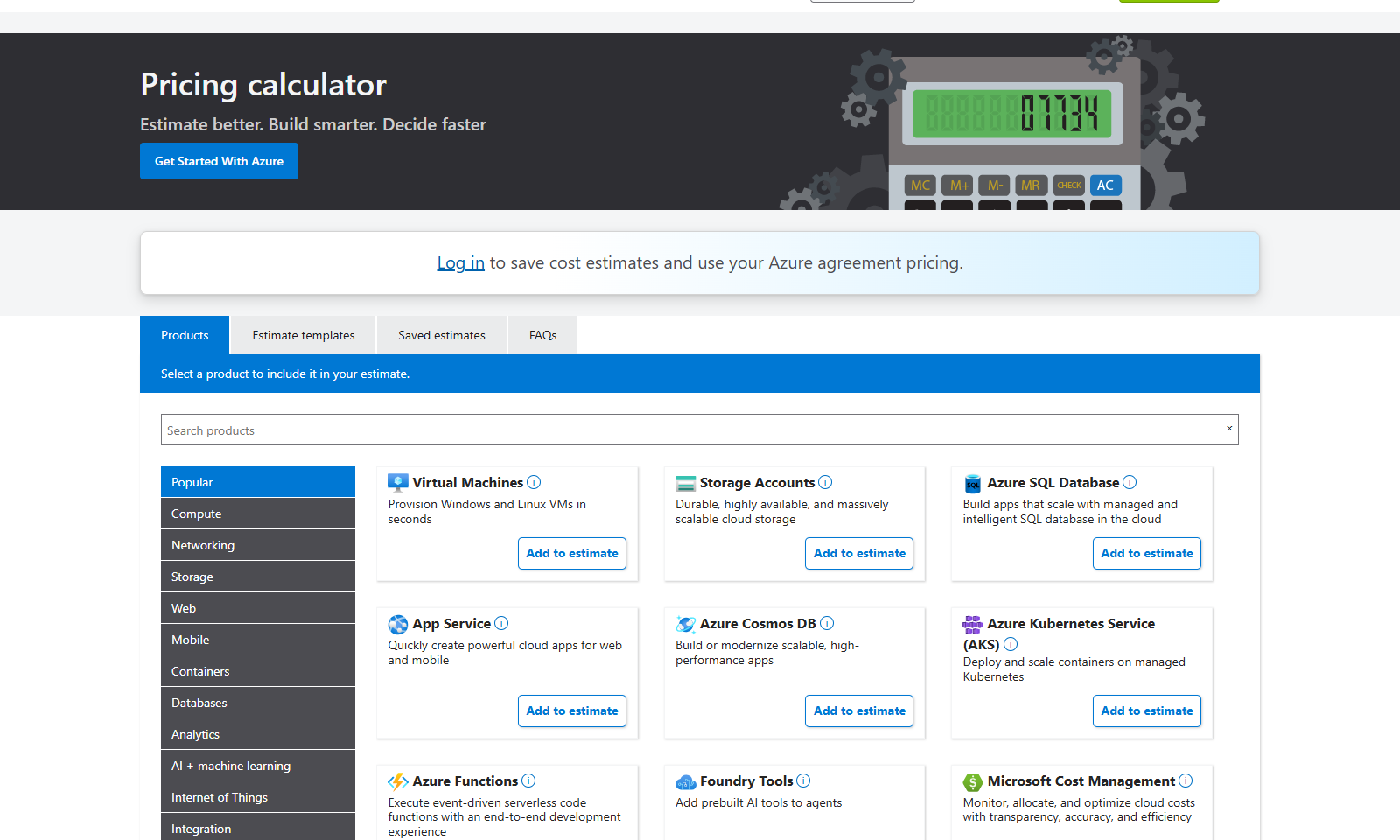
Change one choice and the total moves. The same B2s with Linux costs about $30 a month for compute, because there is no Windows license in the price. The Windows VM in West Europe comes to about $41. Run it only during working hours and compute drops by more than half.
An estimate is not a quote. Microsoft says calculator prices are estimates only. Your bill depends on real usage, your agreement, taxes and the exchange rate if you do not pay in dollars.
How to Look Up Azure Prices Yourself
Microsoft runs a free Azure Retail Prices API that returns the list price of every meter, in every region. It needs no Azure account and no sign-in. It is handy for comparing regions or sizes quickly, or for keeping a price list up to date in a spreadsheet.
From PowerShell on Windows
Asks for the pay-as-you-go price of a B2s VM in East US. Change the size or region in the filter to compare.
$filter = "serviceName eq 'Virtual Machines' and armRegionName eq 'eastus' and armSkuName eq 'Standard_B2s' and priceType eq 'Consumption'"
$prices = Invoke-RestMethod "https://prices.azure.com/api/retail/prices?`$filter=$filter"
$prices.Items | Select-Object productName, retailPrice, unitOfMeasure
What comes back
One row per meter: the Linux price and the Windows price, each per hour, in US dollars. Add currencyCode=’EUR’ (or another currency) to the address to see a converted price.
productName                        retailPrice unitOfMeasure
-----------                        ----------- -------------
Virtual Machines BS Series              0.0416 1 Hour
Virtual Machines BS Series Windows      0.0496 1 Hour
Filter values are case sensitive: Virtual Machines works, virtual machines does not. Savings plan prices show up only when you add the preview API version to the address, as Microsoft’s API page explains. If you already use the Azure CLI on Windows, it is the place to check what you are running; the price list itself comes from this API.
List price, not your price. The API shows Microsoft’s retail prices. Discounts from an agreement, a reservation or a savings plan are not in it. Non-dollar prices are for reference only.
How to Read Your Azure Bill
Your invoice lists every meter you used in the billing period: the service, the resource, the region, how much you used, the rate and the total. If a line on the bill confuses you, the meter name tells you what it was.
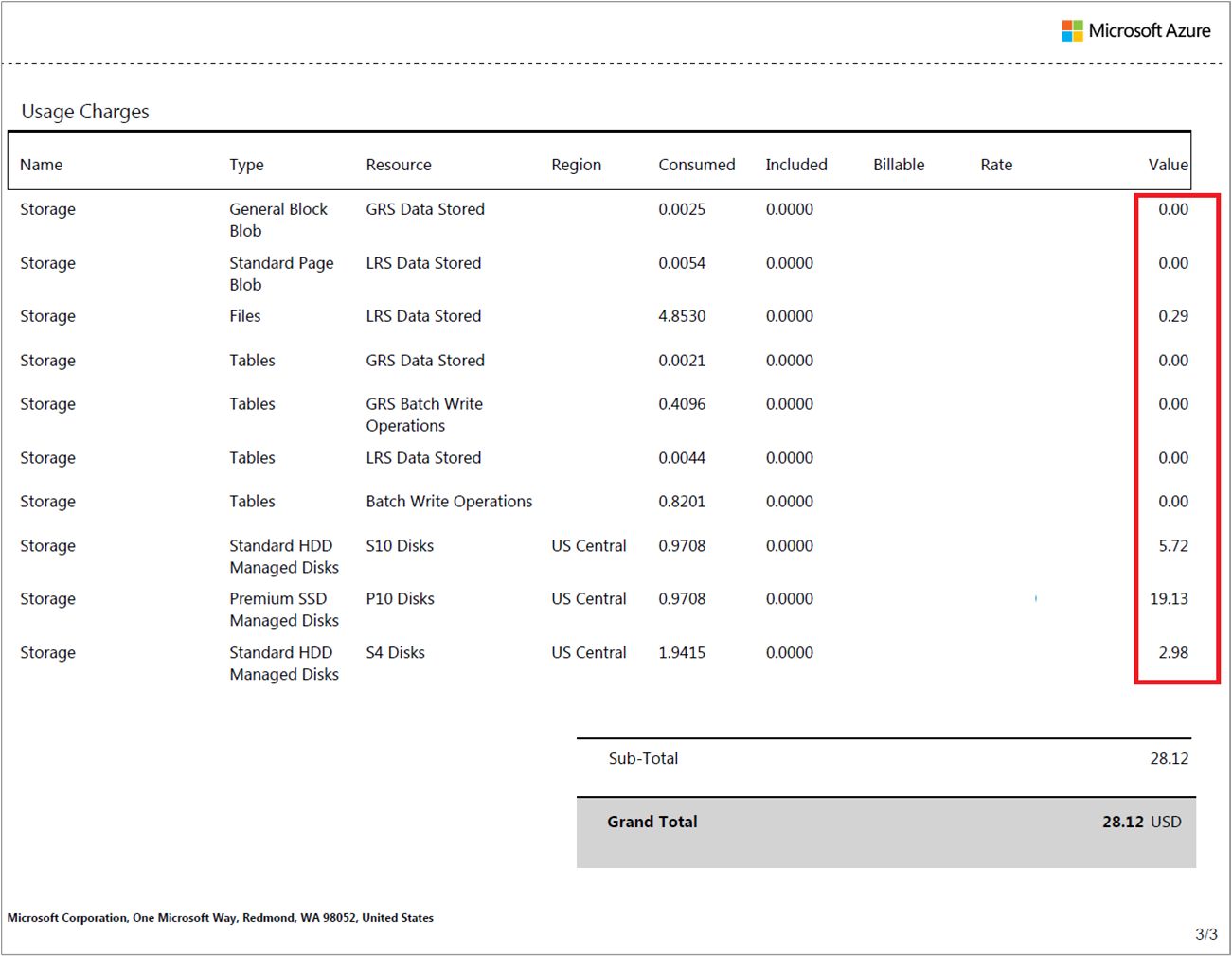
1 Search the portal for Subscriptions and open your subscription.
2 Under Billing, select Invoices. Pick the billing period and select the download symbol.
3 Download the invoice and the usage file. The usage file is a CSV (a spreadsheet file) with charges by day and by resource. It has no tax lines, and it is usually ready within 72 hours of the invoice.
See costs by service, resource and day
Cost analysis in Microsoft Cost Management shows where the money goes before the invoice arrives: by service, resource group, region or day, with a forecast for the rest of the month.
On pay-as-you-go, new costs can take up to 72 hours to appear, and the month’s numbers are estimates until the billing period closes. Microsoft’s cost data guide explains the timings.
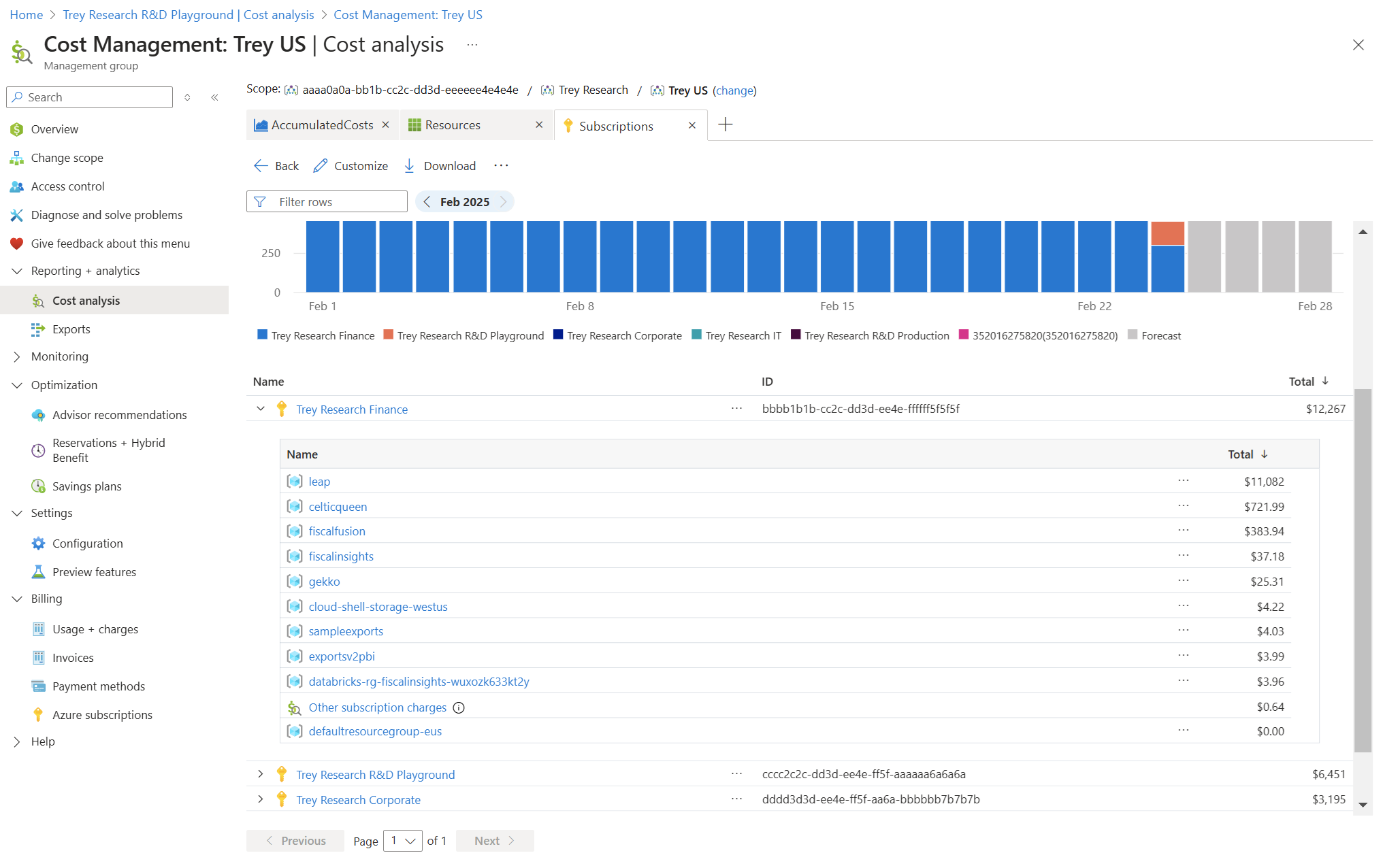
Set a budget on day one. Budgets send an email when spending crosses a level you pick. They warn you but never stop anything. Our Azure cost guide shows how to set one up.
Azure Support Plans and What They Cost
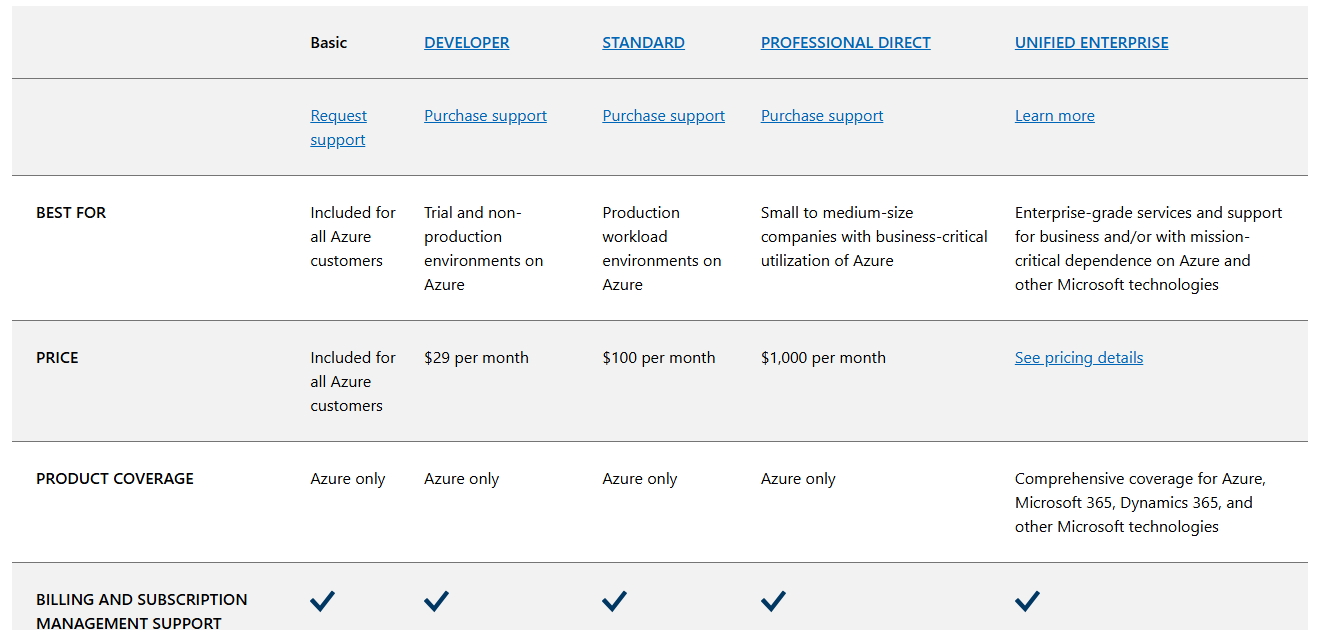
Every Azure customer gets Basic support for free: billing and subscription help, documentation, Microsoft Q&A and Azure Advisor. Technical support from Microsoft engineers is a paid monthly plan, billed on top of your usage.
Common Azure Pricing Surprises
The charges people most often do not expect, and how to avoid each one.
The VM that never stopped
Shutting down from inside Windows leaves the VM allocated, and billing. Stop it from the portal, or set auto-shutdown on test VMs so they turn off each evening.
Leftovers after a delete
Deleting a VM can leave its disk, public IP address and network card behind, each with its own meter. Put each project in one resource group and delete the whole group when you are done.
Data going out
A website that serves large files, or a backup copied to another region, adds per-GB charges once the free monthly amount is used up.
Logs piling up
Monitoring tools charge for log data collected and kept. Turning on detailed logs everywhere can cost more than the thing being watched. Our Azure Monitor guide explains what is free.
Marketplace software
Third-party images and services from Azure Marketplace bill separately, sometimes on top of the VM price, and they are not covered by Azure credits.
A commitment you stopped using
Reservations and savings plans bill for the term you signed up for, whether you use them or not. Commit only to what has run steadily for months.
Frequently Asked Questions
Is there a monthly fee just for having an Azure account?
Does Azure charge sales tax or VAT?
Can I set a hard spending cap on a pay-as-you-go subscription?
Why is my Azure bill different from the pricing calculator estimate?
Are Azure prices the same in every country?
How often do Azure prices change?
Support and Community
- Azure pricing on Microsoft’s site, with prices by product, offers and the pricing FAQ.
- Microsoft Cost Management documentation on Microsoft Learn, covering bills, budgets and cost analysis.
- Microsoft Q&A for Azure, where Microsoft engineers and other users answer questions.
- r/AZURE on Reddit, a large community for Azure questions and tips.
More Windows software guides: What Is Microsoft Azure? · Azure Free Account · Reducing Azure Costs · Azure CLI for Windows · Azure Migration Tools · Azure Monitor
Discover more from Windows Mode
Subscribe to get the latest posts sent to your email.
















Add your first comment to this post