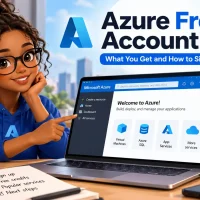
Sign up, use the free credit, try the popular free services, then plan your next steps.
The Azure free account is Microsoft’s way to try its cloud without paying: you get a starting credit for 30 days, free monthly amounts of popular services for 12 months, and services that stay free for good. You sign up on Microsoft’s Azure website with a Microsoft or GitHub account.
Microsoft asks for a card, which puts many people off. The card only checks who you are, and it is not charged unless you choose to upgrade. When the credit or the 30 days run out, your services stop instead of sending you a bill.
It is open to new Azure customers, one account each. Full-time university students can pick Azure for Students instead, which needs no card at all.
Below: what you get, how to sign up step by step, how to avoid surprise charges, and what to build first. Stuck on a step? Reach out to us directly.
What Is the Azure Free Account?
An Azure free account is a normal Azure subscription with a free trial attached. A subscription is the billing container that holds everything you build in Azure. Yours gets a credit to spend on almost any service, plus free monthly amounts of a set list of services.
It is built for trying things out: learning the portal, testing an idea, or practicing for a certification. Microsoft calls it best for “proof of concept and exploring”. Nothing stops you from running something real on it, but the free amounts are small and the credit is short.
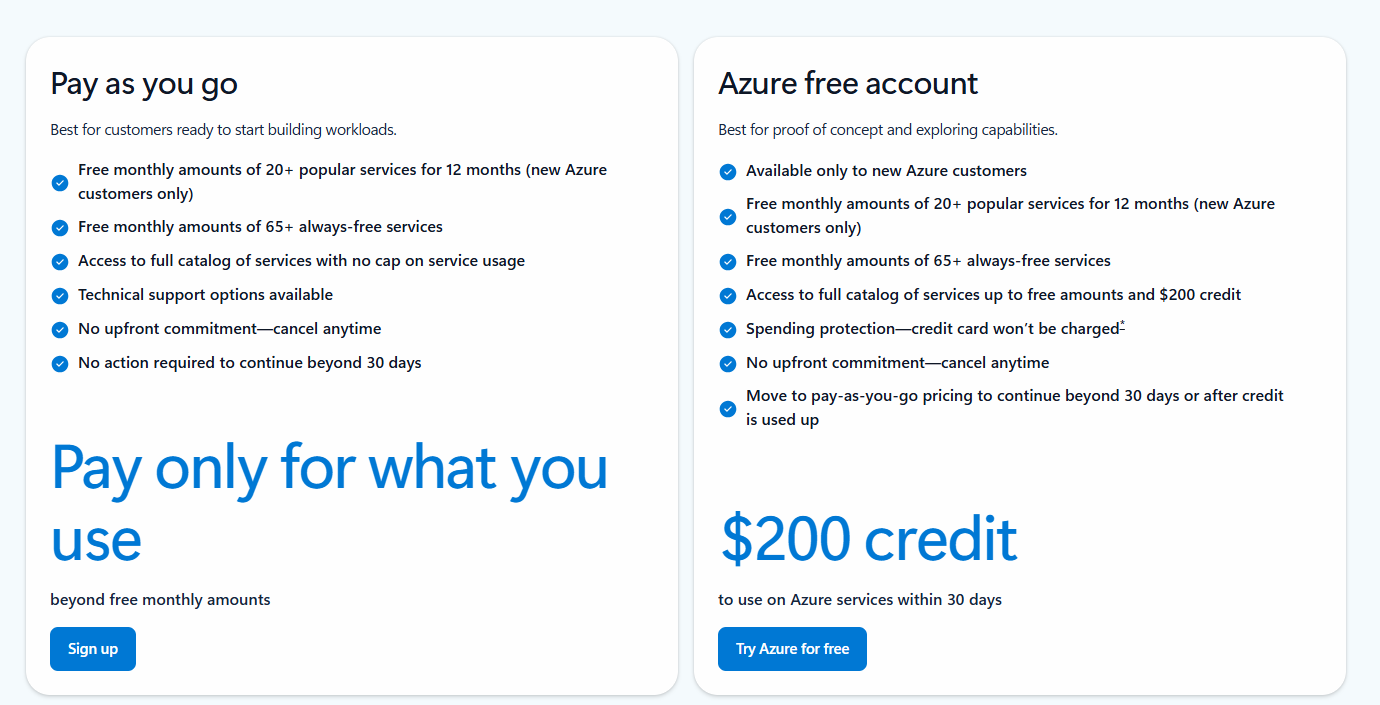
The free account and pay-as-you-go are the two ways in. Pay-as-you-go gets the same free monthly amounts but no credit, and it bills your card for anything above them.
New to Azure itself? Our beginner’s guide to Microsoft Azure explains subscriptions, resource groups and the portal in plain words.
What You Get With an Azure Free Account
Three separate benefits, each with its own clock. Mixing them up is where most surprise bills come from.
The credit: 30 days
A $200 credit (or the same amount in your billing currency) to spend on Azure services within 30 days of signing up. Use it on services outside the free list, or on usage above the free amounts. Whatever is left after 30 days is gone.
Popular services: 12 months
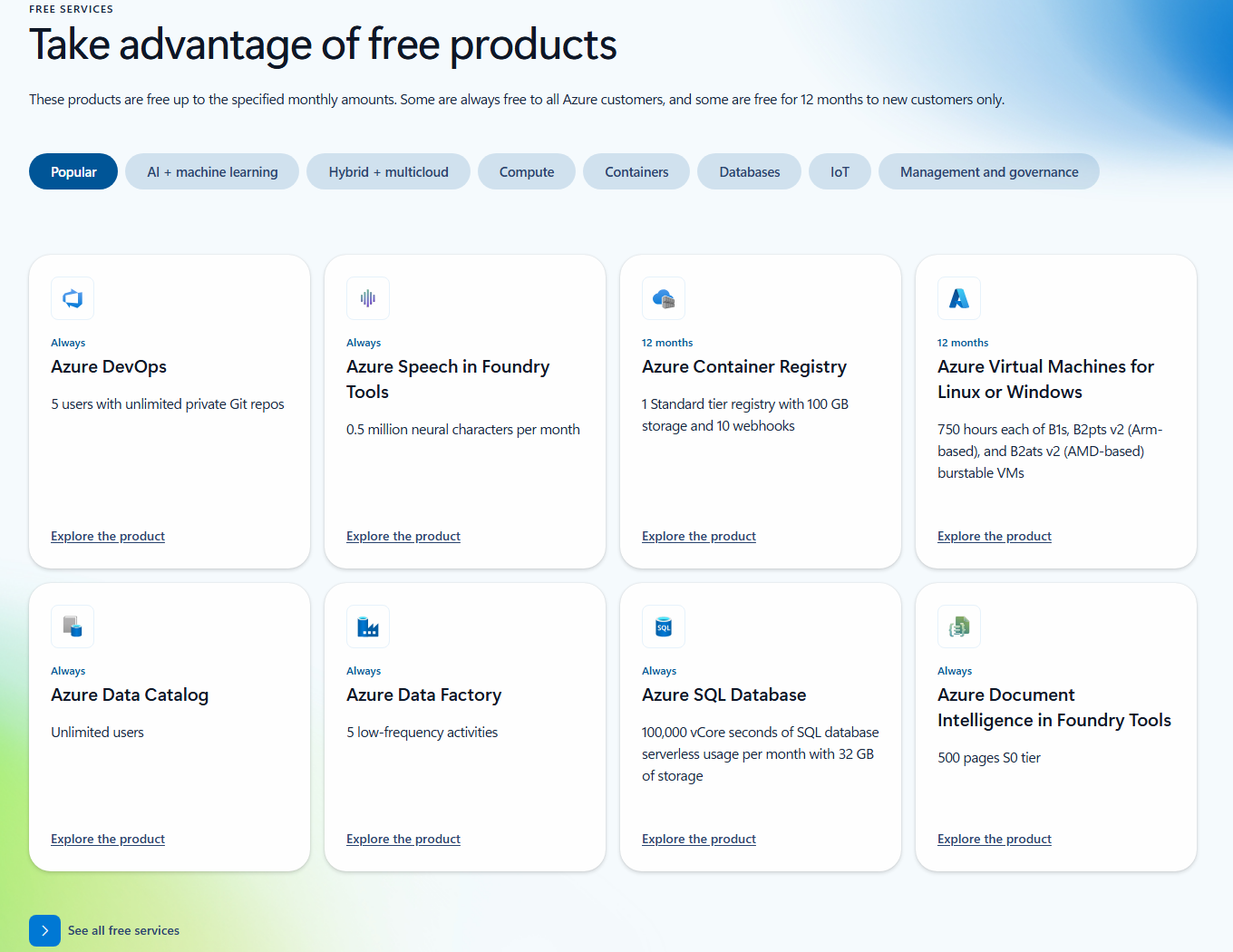
Free monthly amounts of popular services for your first 12 months, such as burstable virtual machines (small VMs that run cheaply at low load), managed PostgreSQL and MySQL databases, and a container registry. These keep going after you upgrade.
Always-free services
A long list of services with a free monthly amount that never expires, for new and existing customers alike: Azure Functions, Azure DevOps, Cosmos DB, a serverless Azure SQL Database allowance, Container Apps and more.
Spending protection
The account has a spending limit equal to the credit. When the credit runs out, Azure stops your services instead of charging your card. You only pay once you choose to upgrade.
Free amounts reset every month and do not roll over. If you get 5 GB of file storage and use 2 GB, the other 3 GB is lost at the end of the month, not saved for later. Only certain tiers of a service are free, too: the VM sizes above are free, a bigger size is not.
What Happens When the Credit or 30 Days Run Out
The trial ends at whichever comes first: the credit is used up, or 30 days pass. Azure then emails you and asks you to choose: move to pay-as-you-go, or let the account be disabled.
You upgrade to pay-as-you-go
You keep the 12 months of free services and the always-free amounts, and you pay normal rates only for use above them (our guide to Azure pricing explained shows how those rates work). Upgrade early and you still keep the leftover credit until the 30 days from sign-up are up.
You do nothing
Your subscription and services are disabled. Virtual machines are stopped and deallocated (released, so they cost nothing), and data in storage accounts turns read-only. To use them again, you have to upgrade.
Clean up before you upgrade
If the account was disabled with paid resources still in it, upgrading switches them back on, and from that moment they bill your card. Microsoft warns about this on its upgrade page. Delete anything you no longer need first.
Where the upgrade button lives
Search the portal for Subscriptions, open the subscription from your free sign-up, and select Upgrade subscription in the bar at the top, or the upgrade banner if the button is missing.
You name the subscription, pick a support plan, and select Upgrade. The card on file becomes your payment method.

Not coming back? You can cancel the subscription instead. Microsoft’s cancel guide covers it. Microsoft keeps your data for 30 to 90 days after you cancel, then deletes it for good, so download anything you want to keep first.
Who Can Sign Up and What You Need
The free account is for new Azure customers only, and each customer gets one. If you have had any other Azure subscription before, the free trial will not activate. You can still sign up for pay-as-you-go, which keeps the free monthly amounts.
A Microsoft or GitHub account
Use an existing Outlook, Hotmail or other Microsoft account, or create one during sign-up. Signing in with GitHub shares your profile and email so Microsoft can find or create a matching Microsoft account; it gets no access to your code.
A phone that can get a text or call
Azure sends a code by text or phone call. Internet-based (VoIP) numbers do not work, and the phone has to receive messages from a US number.
A credit or debit card
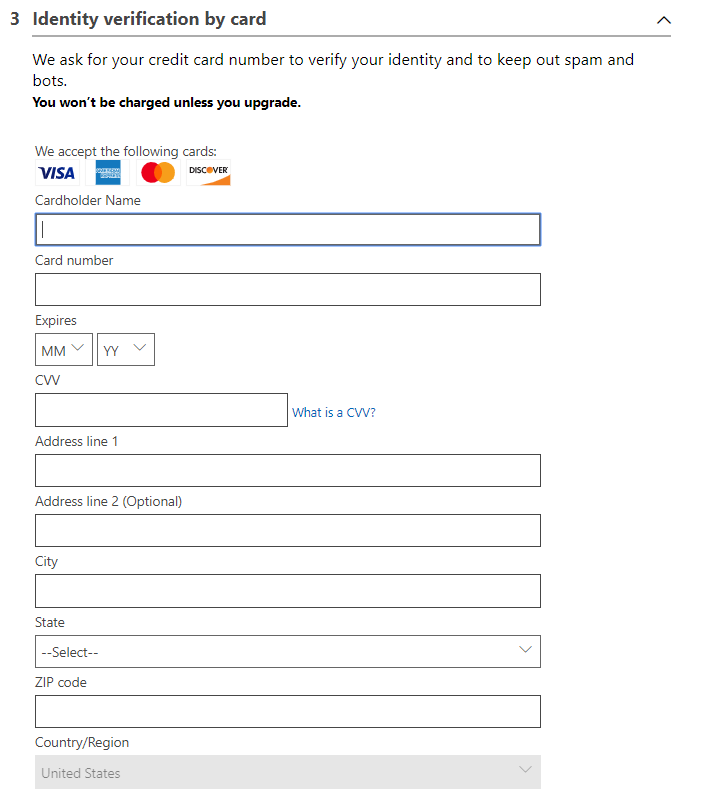
Used to check your identity, not to charge you. Prepaid and virtual cards are refused. In Hong Kong and Brazil, only credit cards work. You may see a small temporary hold, about one dollar, which disappears within a few days.
A matching country
The country you pick has to match your card’s billing address. If your country is not in the list, the offer is not available there. The free account does not cover Azure Government, Azure China or other sovereign clouds.
How to Sign Up for an Azure Free Account
Sign-up takes about ten minutes. Have your phone and card next to you, and use a browser that allows third-party cookies for the card step.
1 Open Microsoft’s Azure account page at azure.microsoft.com/free and select Try Azure for free.
2 Sign in with your Microsoft or GitHub account, or create a Microsoft account if you do not have one.
3 Fill in About you: your country or region, name, email address and phone number.
4 Verify your phone. Choose Text me or Call me, then type in the code. It can take up to four minutes to arrive.
5 Verify your card. Enter the card details and billing address. Azure shows a reminder that you will not be charged unless you upgrade.
6 Accept the agreement and finish. Azure takes you to the portal, where your new subscription is ready to use.
Turn on MFA straight away. Azure requires multifactor authentication (a second check, such as an Authenticator app prompt) to create or change resources, free accounts included. Our guide to Azure mandatory MFA shows how.
Azure for Students: The No-Card Option
If you are a full-time university student, Azure for Students is usually the better start: a $100 credit that lasts 12 months, and no card. You prove you are a student with your school email address.
Azure for Students
It is for students at an accredited, degree-granting university or college (two- to four-year programs). Online courses (MOOCs) and paid training from companies do not count.
You can renew it every year while you are still a student. It includes the same free monthly amounts, plus free developer tools from the Azure Education Hub. If the credit runs out, you can upgrade to pay-as-you-go; if you do not, the subscription is canceled.

Check your student credit in the Azure Sponsorships portal, not on the usual billing pages. The Education Hub FAQ covers renewals and invoices, which show usage that the credit already paid for.
How to Avoid Surprise Charges
During the 30 days, the spending limit protects you. After an upgrade, these habits do.
Watch your free service usage
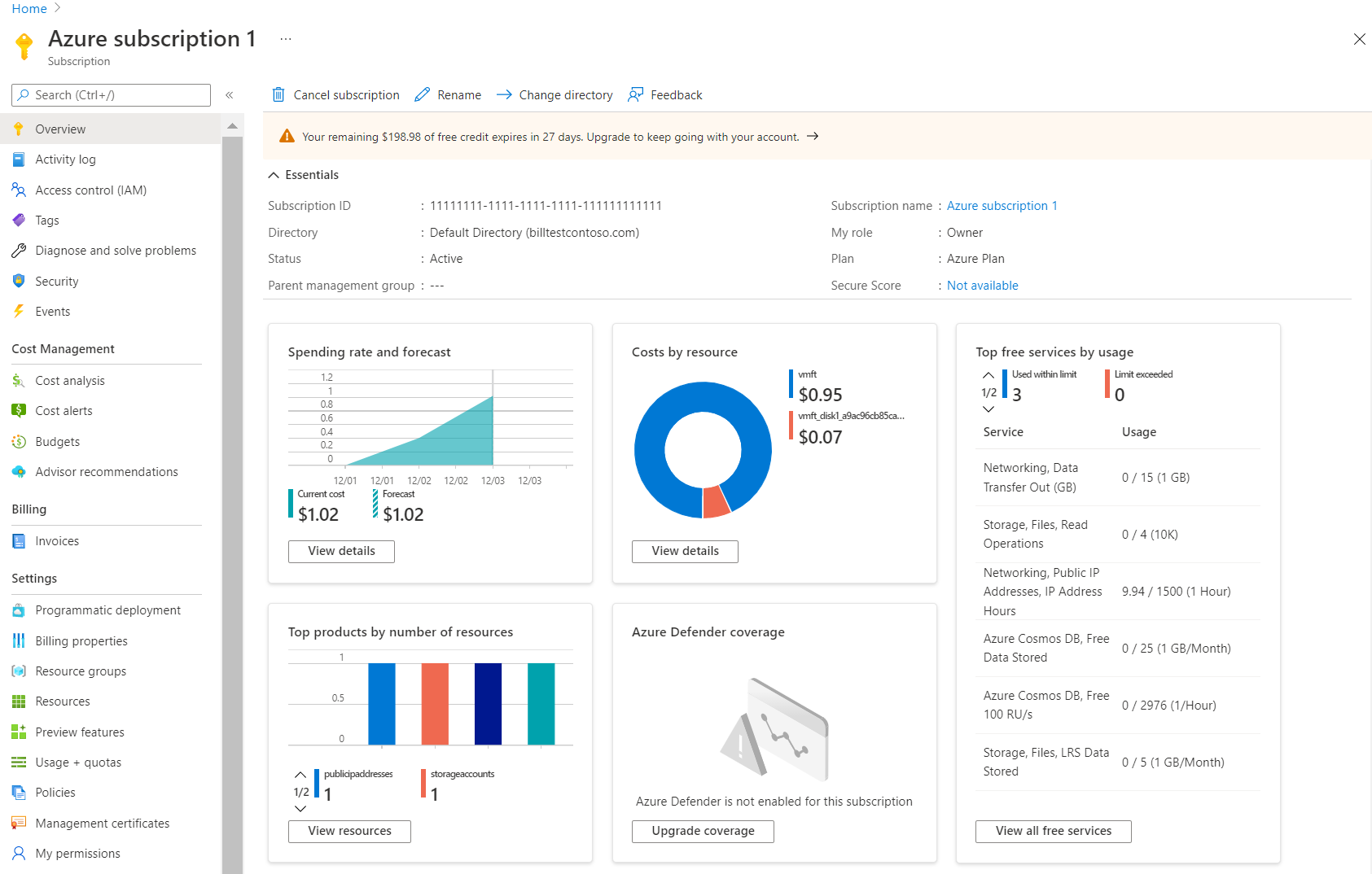
Search the portal for Subscriptions and open the one from your free sign-up. The overview shows your remaining credit, a Top free services by usage tile, and costs by resource.
Usage shows up one to two days after you use something, so a quiet page on day one does not mean nothing is running.
Spot a service about to go over
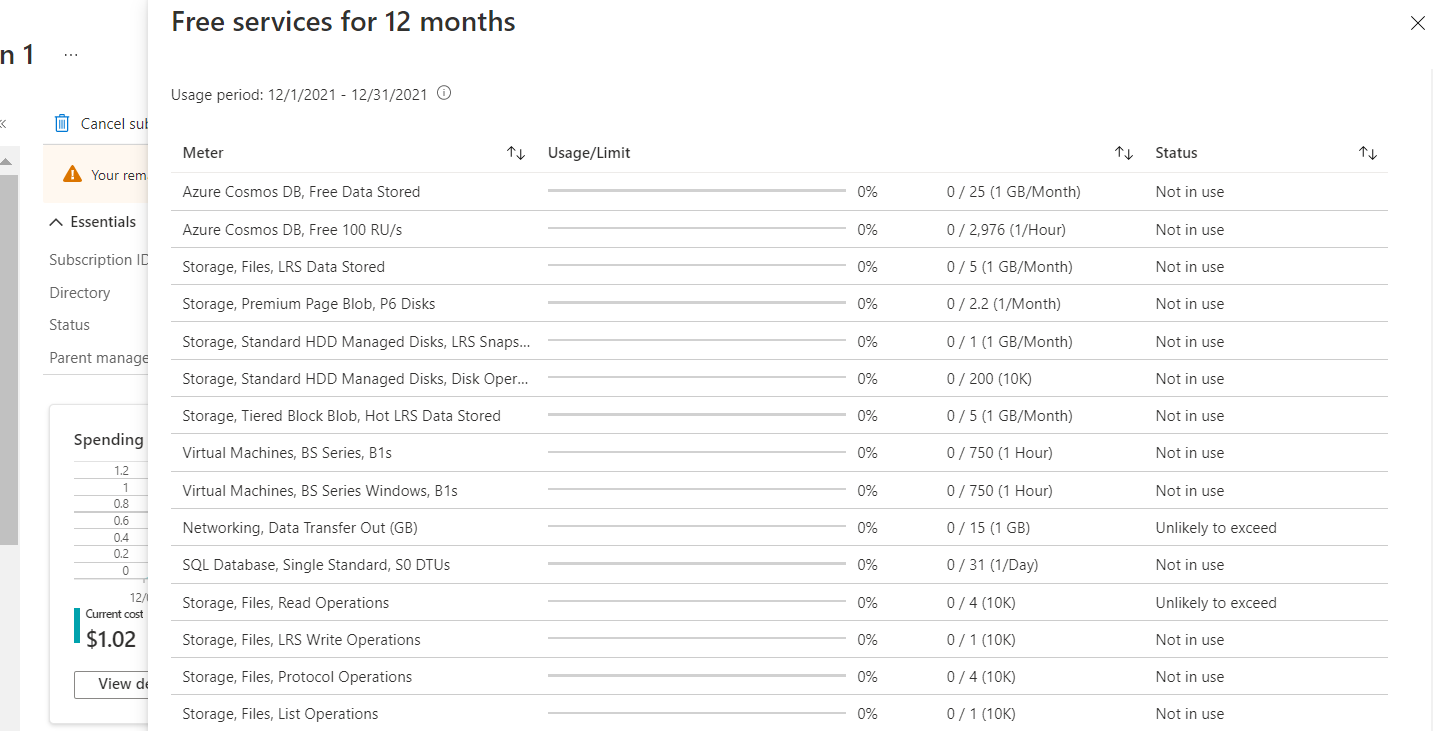
Select View all free services to open the full table. The Status column warns you before a meter goes over, with values such as Exceeds on (a date) or Exceeded on (a date).
The tooltip on the top left of that grid also tells you when your 12 months of free services end.
Set a budget with an email alert
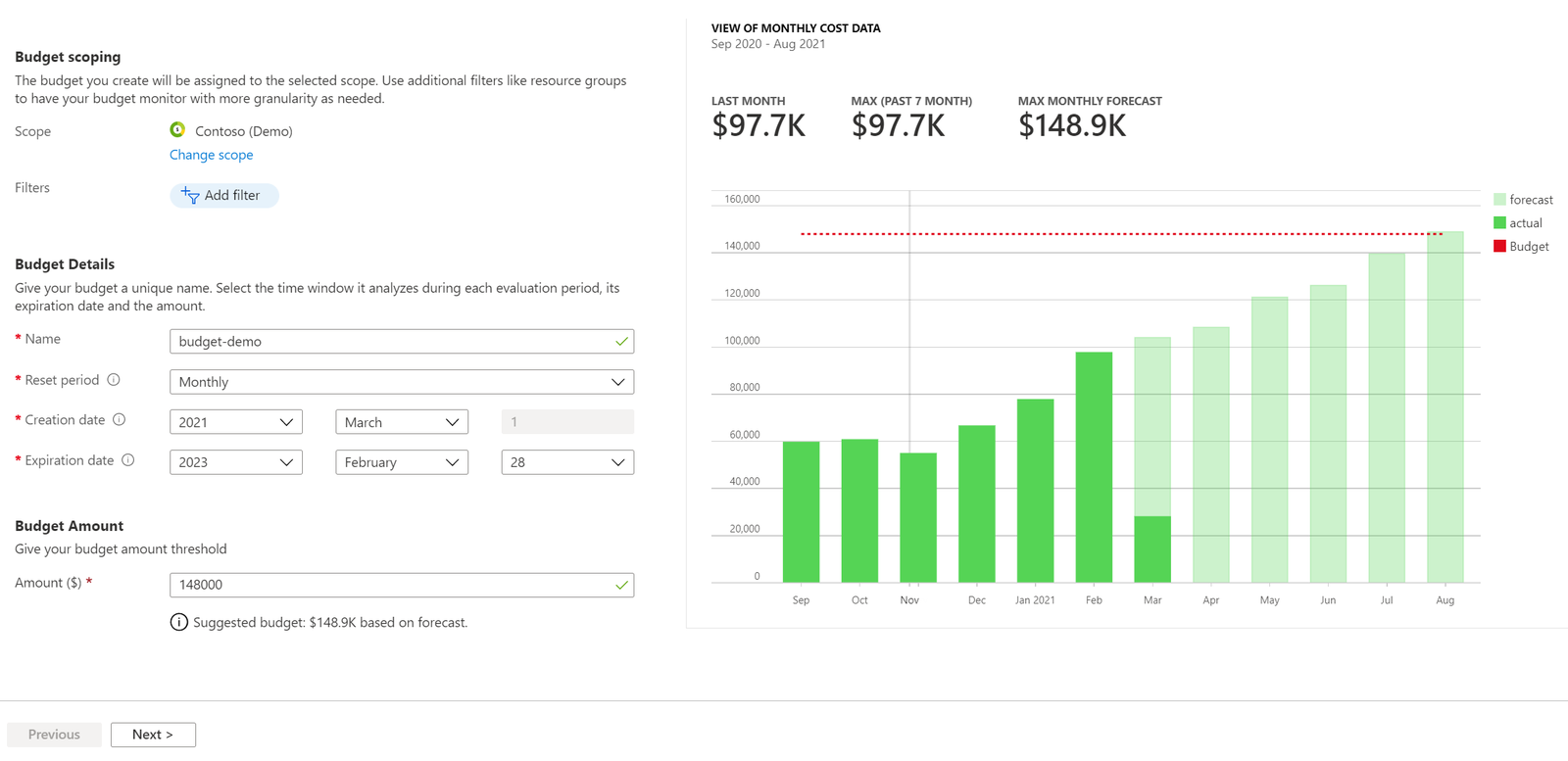
In the subscription, select Budgets, then Add. Pick a monthly amount, then add alerts at, say, 50% and 90% of it, and your email address.
A budget only warns you; it never stops anything. On a brand new subscription, budgets can take up to 48 hours to become available.
Delete what you are done with. The simplest habit is to put each experiment in its own resource group (a folder for related resources), then delete the whole group when you finish. With the Azure CLI on Windows, that is two commands:
az group list --output table
az group delete --name rg-test --yesMind the extras
A free VM still comes with a disk, a public IP address and network traffic, each with its own meter and free amount. Check them on the usage page after your first day.
Marketplace is billed apart
Azure Marketplace items, support plans and most third-party services are not paid by the credit, and can charge your card even with the spending limit on. Azure shows a warning before you create one.
Going further? Our guide to reducing Azure costs covers cost analysis, Advisor tips and discounts once you pay for real work.
What to Try First on Your Free Account
Start with something that stays inside the always-free amounts, so the credit is there for the things that are not free. These are safe first projects:
Click around the portal
Create a resource group in the portal, open it, then delete it. It costs nothing and teaches the layout every other service uses.
A small virtual machine
Create a Linux or Windows VM in the B1s size, which the free account covers for 750 hours a month for 12 months, about one VM running all month. Stop it from the portal when you are not using it.
A serverless function
Azure Functions runs a small piece of code when something happens, such as a web request. The first million requests a month are always free.
A free SQL database
Azure SQL Database has a free serverless allowance each month. Create it with Start free in the Azure SQL hub, and by default it pauses until next month instead of charging once the allowance is used.
Prefer typing to clicking? Install the Azure CLI or Azure PowerShell, sign in, and check you are on the free subscription before you create anything:
Sign in and check the subscription
Shows the subscription your commands will use. Look for the one from your free sign-up.
az login
az account show --output table
A practice resource group
Create a group, list it, and delete it again. An empty group is free.
az group create --name rg-test --location eastus
az group list --output table
az group delete --name rg-test --yes
Want to see what your resources are doing? Our beginner’s guide to Azure Monitor explains the metrics and alerts that come free with most services.
Common Azure Sign-Up Problems and Fixes
From Microsoft’s own sign-up troubleshooting guide, in plain words.
Free trial isn’t available
You have had an Azure subscription before, of any kind. The free trial is for people new to Azure. Sign up for pay-as-you-go instead, which still includes the free monthly amounts.
Card declined
Prepaid and virtual cards are refused. Check the number, expiry date and billing address, and make sure the address matches the country you picked. Microsoft’s declined card guide lists other causes.
No verification code
Wait up to four minutes. Check the country code, try Call me instead of a text, or use another phone. VoIP numbers never work.
Card step hangs
The card check needs third-party cookies. Allow them in your browser settings for the sign-up, refresh the page, or restart the browser and try again.
You are not eligible for an Azure subscription
Usually a mismatch: check your profile email, address and phone, and your card details. You may already have a Microsoft account with the same details.
We cannot proceed with sign-up
Sign in at account.microsoft.com, open Your info, and fill in valid billing and shipping details. Then try again, or in a different or InPrivate browser window.
Your current account type is not supported? Your email may belong to an unmanaged work directory, or to a Microsoft 365 Developer Program account. Sign up with a different account. Details are in Microsoft’s sign-up troubleshooting guide.
Frequently Asked Questions
Can I use Azure free account credit on Azure Marketplace or Spot VMs?
Can I sign up for Azure with a GitHub account?
Do unused free amounts carry over to next month?
Can I run a real website or app on the Azure free account?
How do I cancel an Azure free account?
Does the Azure free account include Azure Government or Azure China?
Support and Community
- Azure free account FAQ on Microsoft’s Azure site, with the offer terms and the full list of free services.
- Avoid charges with your Azure free account on Microsoft Learn, plus the guide to checking free service usage.
- Microsoft Q&A for Azure, where Microsoft engineers and other users answer questions.
- r/AZURE on Reddit, a large community for Azure questions and tips.
More Windows software guides: What Is Microsoft Azure? · Azure CLI for Windows · Azure PowerShell · Azure Mandatory MFA · Reducing Azure Costs · Azure Monitor
Discover more from Windows Mode
Subscribe to get the latest posts sent to your email.














Add your first comment to this post