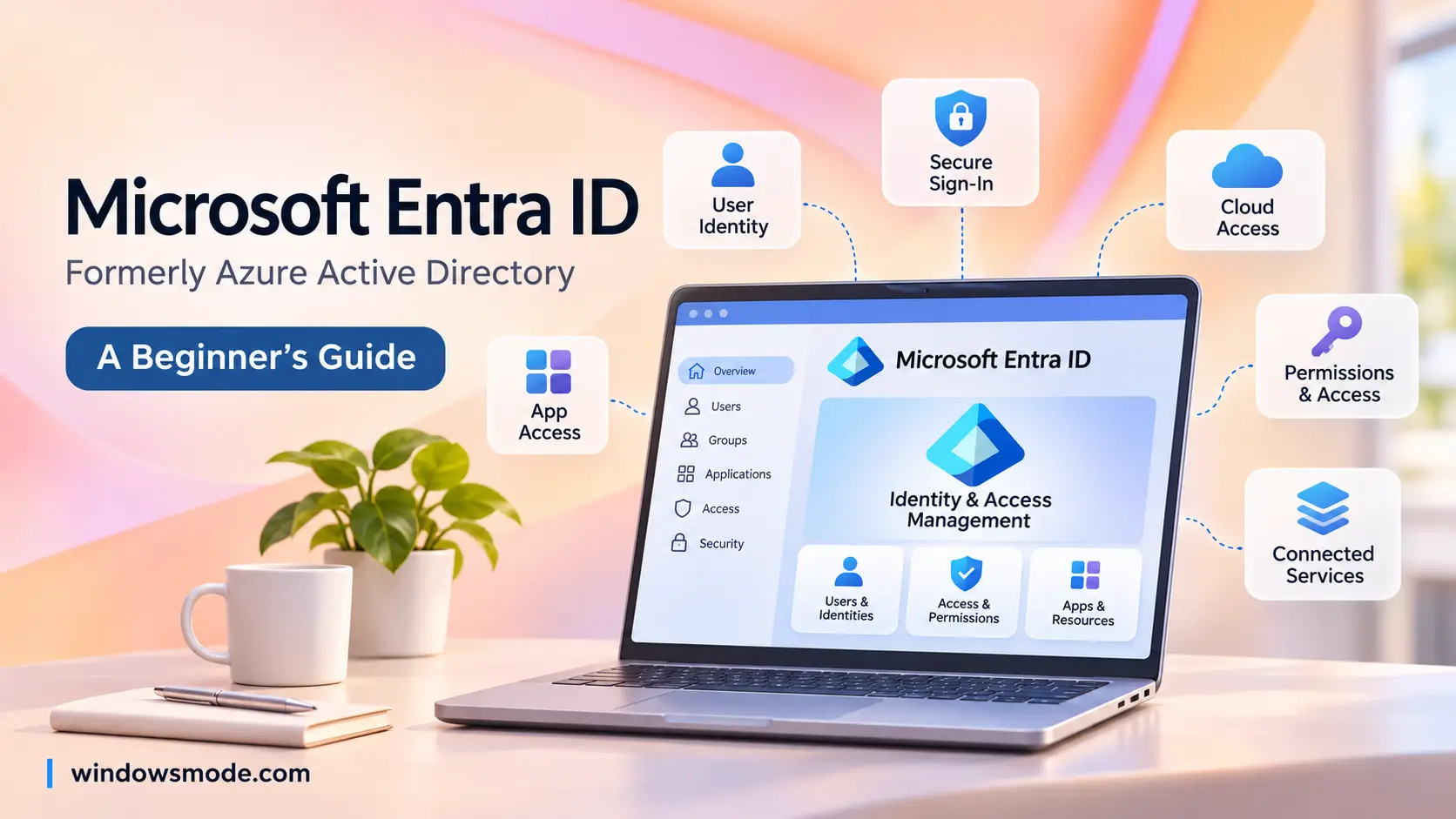
Microsoft Entra ID is the sign-in system behind every work or school Microsoft account.
Microsoft Entra ID is Microsoft’s cloud sign-in and access service, the product that was called Azure Active Directory (Azure AD) until 2023. It checks who you are when you sign in to Microsoft 365, Azure, a work PC or thousands of other apps. Then it decides what you are allowed to open.
If you have ever signed in with a work or school email at a Microsoft page, you have used it. Every Microsoft 365 and Azure customer already has an Entra ID directory, whether they set one up on purpose or not. The free tier comes with those subscriptions, and paid tiers add more control.
Only the name changed in the rename. Sign-in pages, licenses, prices and admin tools kept working as before.
Below: what Entra ID is, the old and new names, how it works with Windows 11, its main features, the plans and prices, how it differs from classic Active Directory, and how to add your first user and lock down a new tenant. Got a question we did not answer? Reach out to us directly.
What Is Microsoft Entra ID?
Think of Entra ID as the front desk of a company building. It holds the list of everyone who works there, checks their badge at the door, and decides which rooms each badge opens. The building is your company’s apps and data: Outlook, Teams, SharePoint, Azure, and outside apps such as Salesforce or Zoom.
Microsoft describes it as a cloud-based identity and access management service. Identity means proving who you are. Access management means deciding what you can do once you are in. Entra ID handles both for users, devices and apps.
What Entra ID does every day
- Signs people in with a password, a phone app approval, a passkey or a fingerprint.
- Opens many apps with one sign-in (single sign-on, or SSO), so staff do not juggle a password per app.
- Blocks risky sign-ins, such as one from an unknown country or an unmanaged laptop.
- Connects work PCs so people sign in to Windows with their work account.
- Lets outside partners in as guests, using their own email accounts.
Entra is a family, Entra ID is one product in it. The Microsoft Entra brand also covers Entra ID Governance, Entra External ID, Entra Domain Services, Entra Private Access and more. When people say “Entra” on its own, they usually mean Entra ID.
From Azure Active Directory to Microsoft Entra ID
Microsoft announced the new name on July 11, 2023 and rolled it out across its products from August 2023. The goal was to stop people mixing it up with Windows Server Active Directory, the older on-premises system that shared its name but works very differently. Older tutorials, scripts and job ads still say Azure AD, so here is how the names line up.
Microsoft says sign-in URLs, APIs, PowerShell commands, licenses, prices and service terms all stayed the same. Windows Server Active Directory and AD FS kept their names too, because they are separate products.
Reading an old guide? Swap “Azure AD” for “Entra ID” in your head and most of it still applies. The bigger change is where things sit: the admin menus moved to the Microsoft Entra admin center at entra.microsoft.com.
Tenants, Users, Groups and Roles Explained
Four words come up in every Entra ID guide. Learn these and the admin center starts to make sense.
Tenant
Your organization’s own private copy of Entra ID. It gets a starting domain such as contoso.onmicrosoft.com, and you can add your real domain later. Each tenant is walled off from every other tenant.
Users
One account per person, with a sign-in name that looks like an email address. Members are your own staff. Guests are outside people invited to work with you.
Groups
A named set of users, such as Sales or Laptops-Finance. You give access to the group once, and everyone in it gets it. New hires just join the group.
Roles
Admin powers inside Entra ID. Global Administrator can change anything; User Administrator can manage accounts; Security Reader can only look. Give people the smallest role that does the job.
Entra roles are not Azure roles. Entra roles control the directory (users, groups, settings). Azure roles such as Owner or Contributor control Azure resources like virtual machines. The same person can hold both, but they are granted separately. Our Microsoft Azure beginner guide explains how subscriptions fit in.
Entra ID and Windows: Joining PCs and Work Accounts
This is where Entra ID touches most Windows users. A work PC can be connected to Entra ID in one of three ways, and the choice decides how people sign in and how IT manages the device.
Microsoft calls hybrid join an interim step on the road to Microsoft Entra join. Hybrid joined devices also need to reach your own domain controllers from time to time, or they stop working properly.
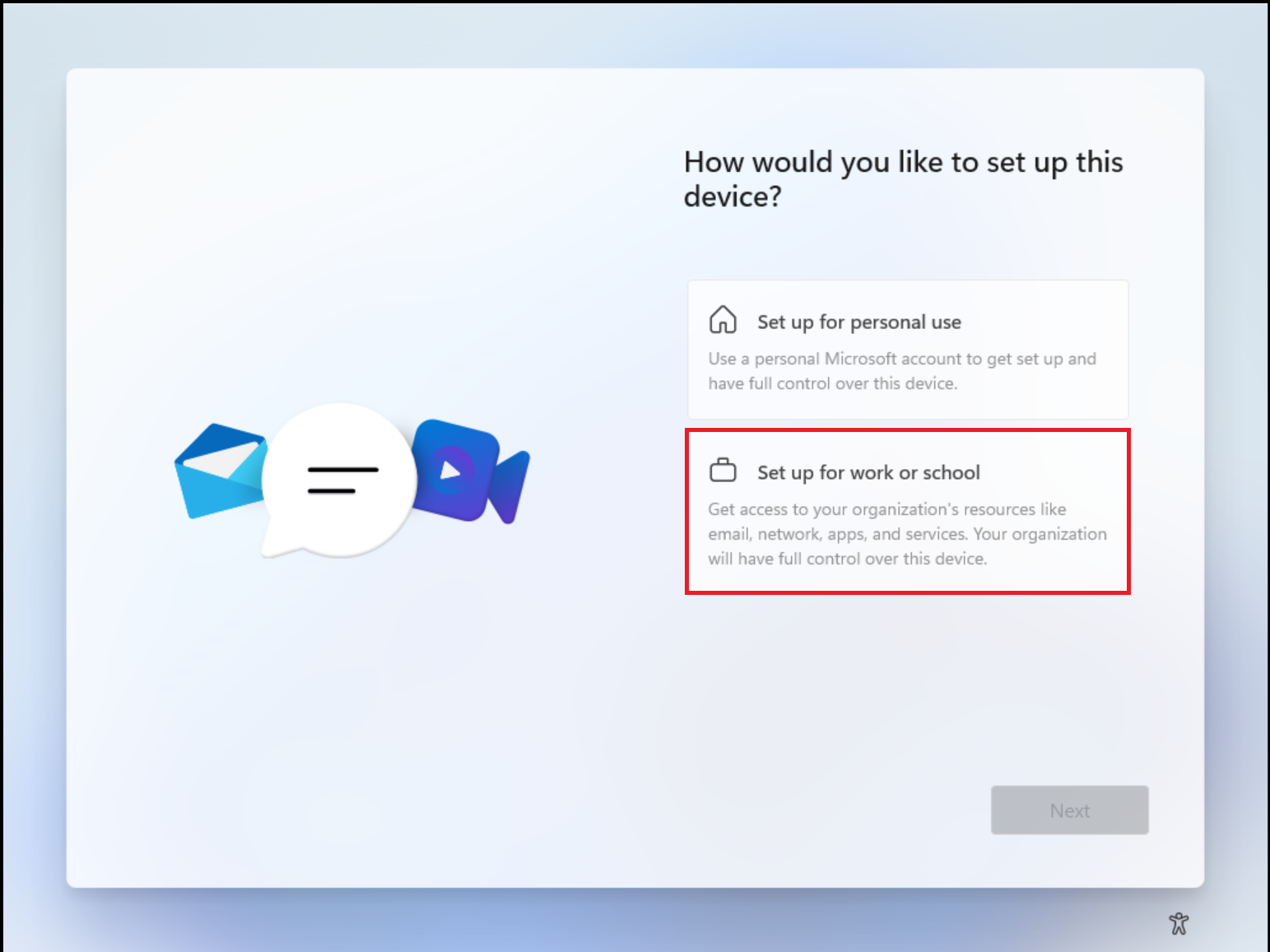
Joining a new Windows 11 PC during setup
On a fresh Windows 11 Pro, Enterprise or Education PC, choose Set up for work or school when setup asks how you want to use the device. Sign in with your work account, and Windows joins Entra ID and enrolls in device management if your company uses it.
The person who joins the PC becomes its primary user and a local administrator by default. Windows 11 Home cannot join, but it can still be registered. Microsoft’s setup guide has the full steps.
Checking or connecting an existing PC
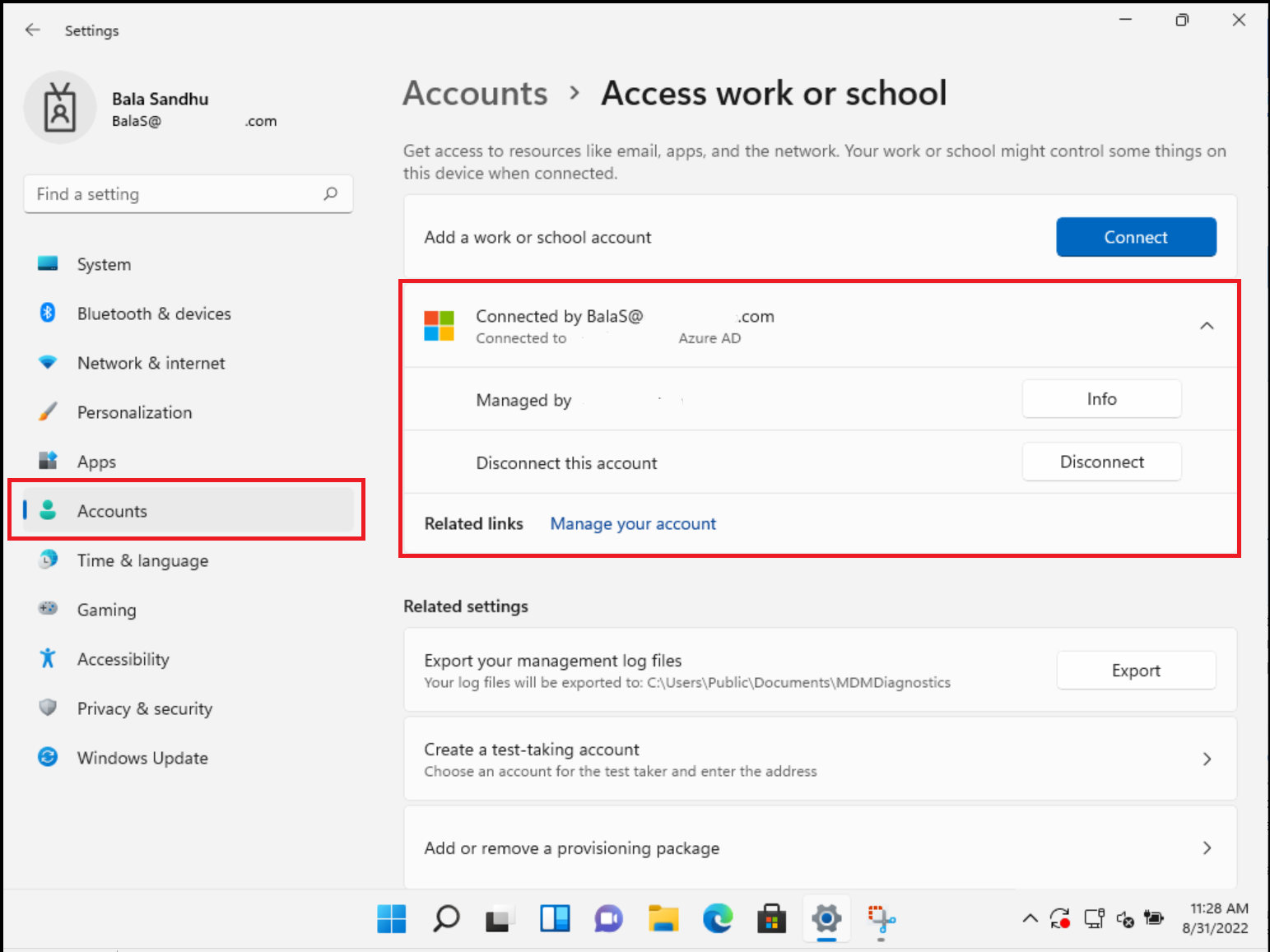
Open Settings > Accounts > Access work or school. This page shows whether the PC is connected to an organization’s Entra ID, and the Connect button starts a new connection.
If the page lists your company and says the device is connected to its Entra ID, you are joined. This is also the place IT staff check first when work apps refuse to sign in.
Windows Hello for Business
The work version of the Windows Hello PIN and face or fingerprint sign-in. Microsoft describes Windows Hello for Business as an extension of Windows Hello that ties the credential to your Entra ID or Active Directory account. Your PIN only works on that one PC, and biometric data stays on the device.
Home edition limits
Windows 11 Home cannot join Entra ID or use Windows Hello for Business. It can be registered, which is enough to use work apps on a personal PC. For a company laptop, Pro or higher is the minimum.
Key Features of Microsoft Entra ID
These five features are what most companies switch on first. Some are free, some need a paid plan, as noted in each card.
Multifactor authentication and passkeys
Multifactor authentication (MFA) asks for a second proof after your password, such as approving a prompt in the Microsoft Authenticator app. Microsoft says MFA cuts the risk of account takeover by more than 99 percent.
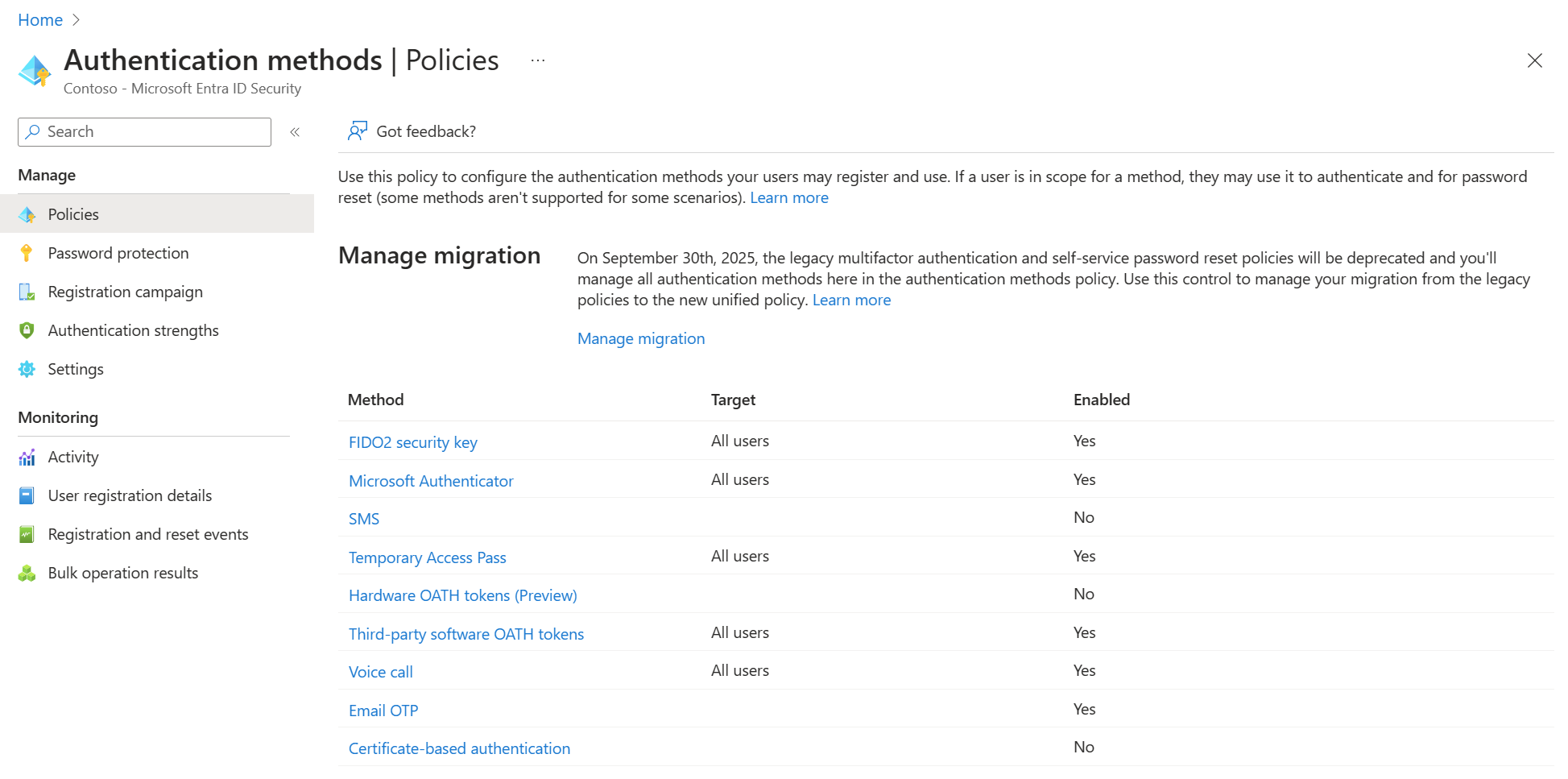
Passkeys go further and replace the password altogether. A passkey lives on a security key, in Authenticator, or in a synced password manager, and unlocks with your face, fingerprint or PIN. Admins choose which methods are allowed in the authentication methods policy.
Conditional Access
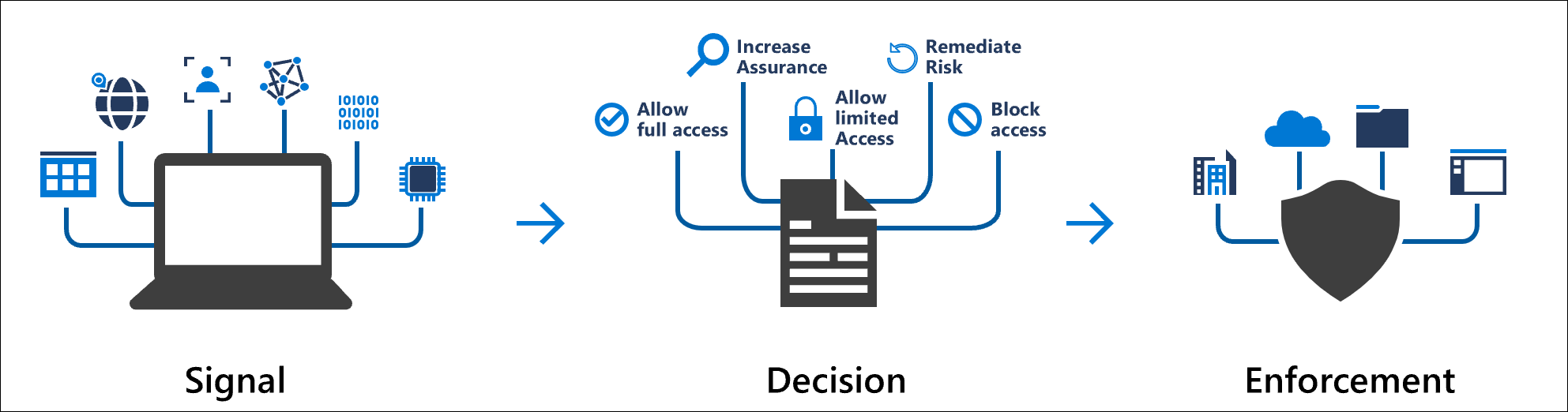
Conditional Access is a set of if-then rules for sign-ins. If someone opens Microsoft 365 from outside the office, then require MFA. If the laptop is not managed by IT, then block downloads.
It looks at signals such as the user, location, device, app and risk level before deciding to allow, ask for more proof, or block. It needs Entra ID P1, which Microsoft 365 Business Premium includes.
Single sign-on and the My Apps portal
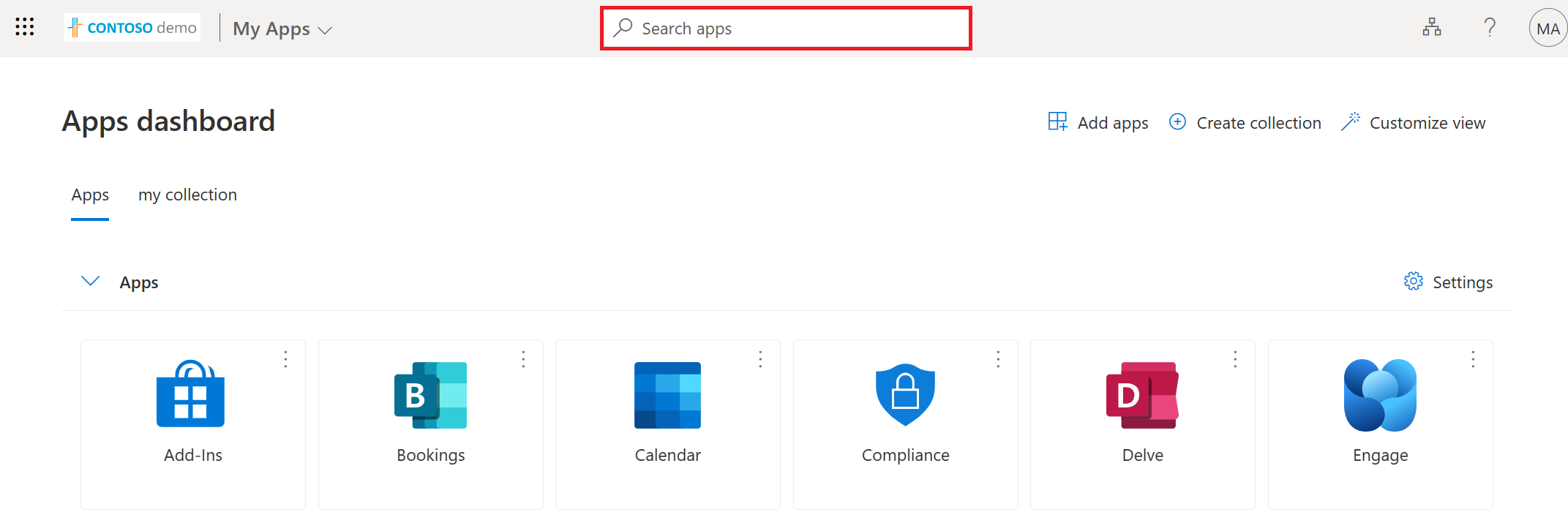
Single sign-on means one Entra ID sign-in opens every connected app, from Outlook to outside apps the company adds. The Free tier includes unlimited SSO apps.
Staff find their apps in one place at myapps.microsoft.com. Microsoft’s My Apps portal shows every app assigned to you, lets you request new ones, and lets you group them into your own collections.
Self-service password reset
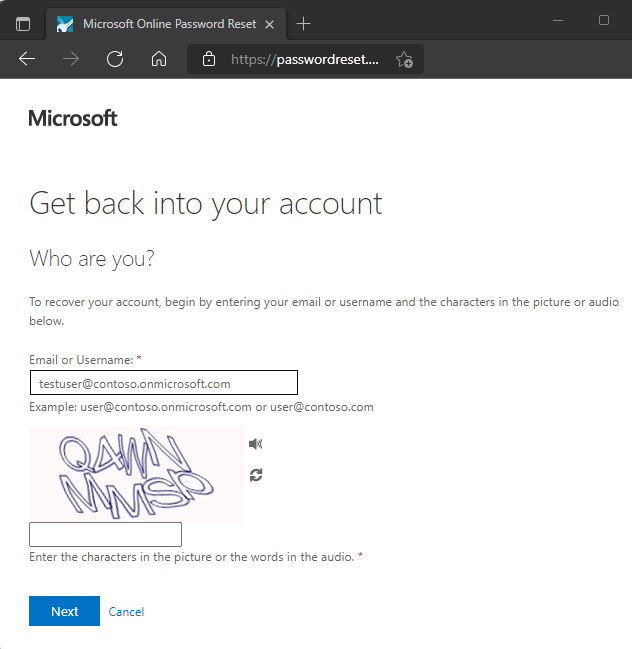
With self-service password reset, a locked-out user proves who they are with a phone or email code and sets a new password without calling the help desk.
Reset for cloud accounts is listed on every tier, including Free. Writing the new password back to on-premises Active Directory (password writeback) needs P1 or P2. Admins turn it on for a group first in the SSPR settings.
Guest users and outside partners
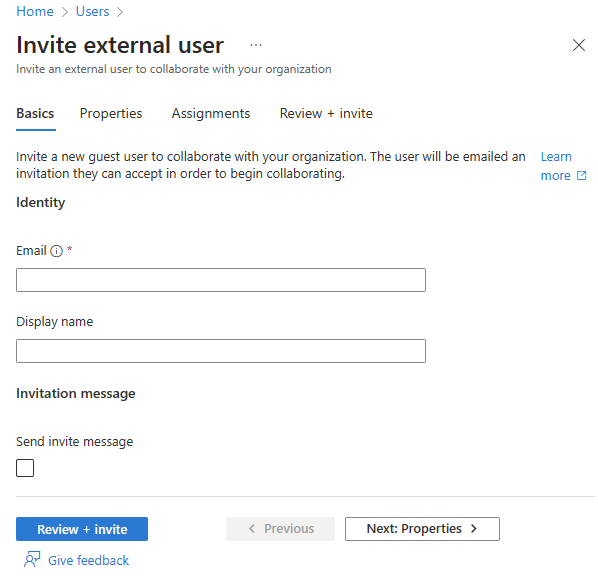
B2B collaboration lets you invite people from other companies as guests. They sign in with their own work, school or personal account, so you never manage their passwords.
Guests show up in your user list marked as Guest, and you control what they can open. Microsoft bills outside users through Entra External ID by monthly active users, with the first 50,000 a month free.
Admins of Azure must use MFA anyway. Microsoft now requires multifactor sign-in for the Azure portal, Azure CLI and Azure PowerShell. Our Azure mandatory MFA guide covers what that means and how to get ready.
Microsoft Entra ID Plans and Pricing
Entra ID comes in a free tier and two paid tiers, plus a bigger suite on top. Paid plans are billed per user, per month, on a yearly subscription. These are the US list prices on Microsoft’s Entra pricing page when we checked in November 2026; your price can differ by country and agreement.
Many companies never buy Entra ID on its own, because Microsoft 365 plans include it. According to Microsoft’s licensing guide:
Plans that include P1
Microsoft 365 Business Premium, Microsoft 365 E3, Microsoft 365 F1 and F3, and Enterprise Mobility + Security E3.
Plans that include P2
Microsoft 365 E5, Microsoft 365 E7, Enterprise Mobility + Security E5, and the Microsoft Defender Suite (formerly Microsoft 365 E5 Security).
Just trying it out? A free Azure account gives you an Entra ID tenant with the Free tier to practice in. Our Azure free account guide shows how to sign up, and our Azure pricing guide covers how Azure bills work.
Entra ID vs Active Directory vs Entra Domain Services
Three Microsoft products have “directory” in their DNA, and they do different jobs. Entra ID is not Active Directory in the cloud. It speaks web sign-in languages, while classic Active Directory speaks the older network protocols that file servers and Group Policy use.
Most companies with a long history run two of these side by side: Active Directory on site for older systems, Entra ID for the cloud, joined together by a sync tool. That is what the next section covers.
Syncing Active Directory to Entra ID
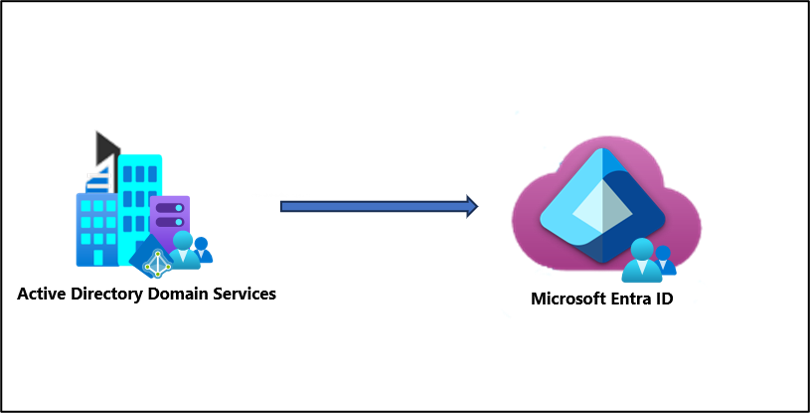
If your company already has Active Directory, you do not want two sets of accounts. A sync tool copies your users and groups up to Entra ID, so people keep one name and password for both. Microsoft offers two tools, and both are free with your subscription.
Microsoft Entra Cloud Sync
Cloud Sync uses a small agent installed on a server in your network. The agent only makes outgoing connections, and the sync rules live in the cloud, so there is no big sync server to maintain. Changes sync every two minutes.
Microsoft calls Cloud Sync the future of its sync tools, and it handles several disconnected forests and failover with more than one agent.
Microsoft Entra Connect Sync
Connect Sync, formerly Azure AD Connect, is the older tool: a full application on a Windows server in your network. It covers a few advanced setups that Cloud Sync does not, so Microsoft’s advice is to check its decision guide and keep Connect Sync only if your setup needs it.
How passwords are checked
With password hash sync, a protected copy of the password check data goes to Entra ID, and Entra ID checks passwords itself. Pass-through authentication and federation keep the password check on your own servers instead.
How to Add a User in the Microsoft Entra Admin Center
Creating an account takes about two minutes. You need at least the User Administrator role. These steps follow Microsoft’s own guide.
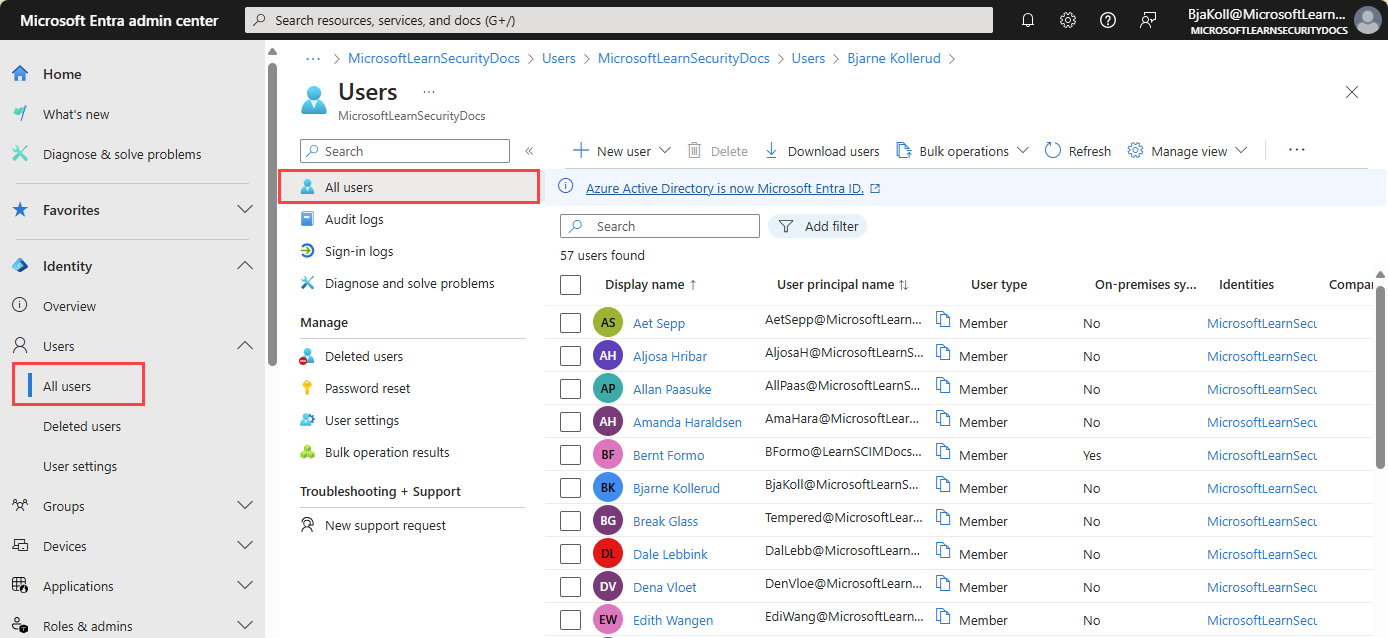
1 Sign in to the admin center. Go to entra.microsoft.com and sign in with an admin account.
2 Open the user list. In the left menu, select Entra ID > Users, then All users.
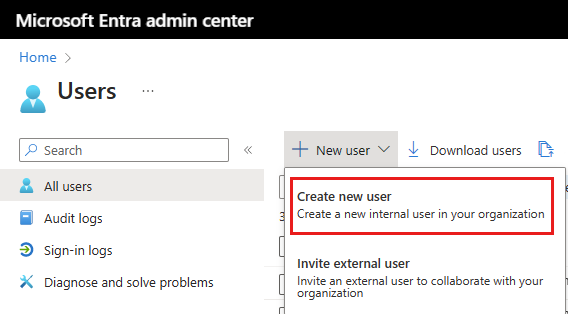
3 Start a new user. Select New user, then Create new user. Pick Invite external user instead for a guest.
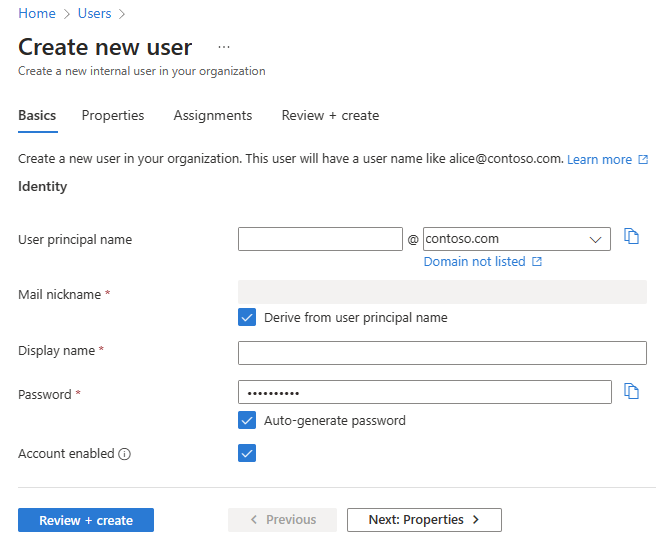
4 Fill in the Basics tab. Enter the user principal name (the sign-in name), a display name, and either keep the auto-generated password or type one. Leave Account enabled checked.
5 Add details if you want. The Properties tab holds job title, department and contact details. You can fill these in later.
6 Assign groups and roles. On the Assignments tab, add the user to groups. Skip admin roles unless the person really needs one.
7 Create the account. Select Review + create, check the details, then Create. Send the sign-in name and temporary password to the person through a safe channel.
Prefer the command line? The same job works from Windows with Microsoft Graph PowerShell or the Azure CLI. Our guides to installing Azure PowerShell and the Azure CLI for Windows get the tools set up. Deleted users wait 30 days in Deleted users before they are gone for good.
Security Basics for a New Entra ID Tenant
Most account break-ins start with a stolen or guessed password. A few settings stop most of them, and the first one is free.
Turn on security defaults
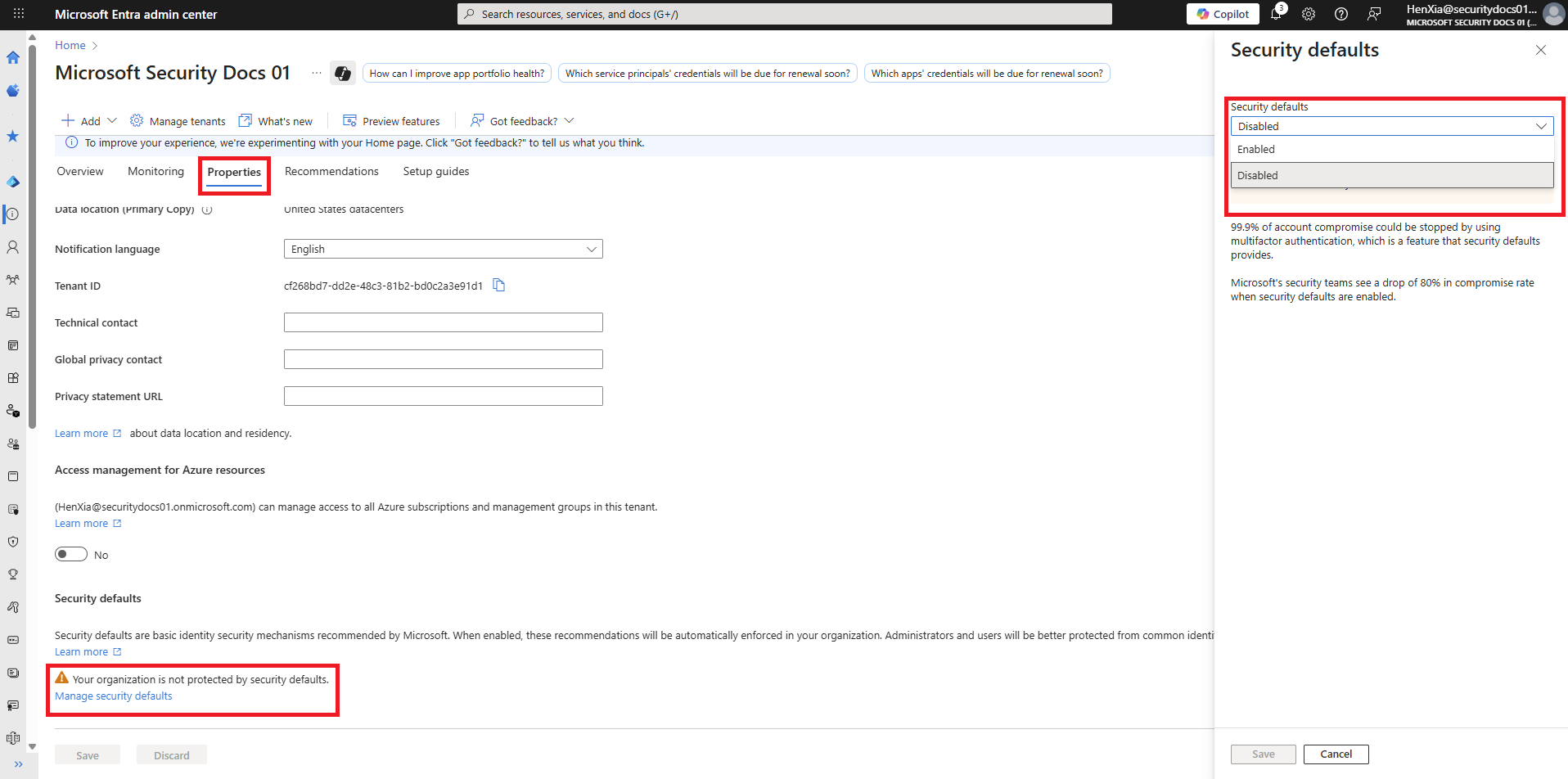
Security defaults are Microsoft’s free starter protection. They make every user register for MFA, require MFA for admins and for Azure management, and block old sign-in methods that cannot do MFA.
Many tenants created since October 22, 2019 have them on already. To check, open the admin center, go to Overview > Properties, and select Manage security defaults. Once you build Conditional Access policies (P1), you turn security defaults off and let your policies take over.
Keep two emergency access accounts
Microsoft advises at least two emergency access accounts: cloud-only Global Administrator accounts on your onmicrosoft.com domain, not tied to any one person. Protect them with a passkey or a certificate, keep them out of blocking Conditional Access rules, alert on every use, and test them every 90 days.
Use fewer Global Administrators
Every Global Administrator is a key to everything. Give people narrower roles such as User Administrator or Helpdesk Administrator. With P2, Privileged Identity Management hands out admin rights only when needed, for a set time.
Move people toward passkeys
Phone app approvals are a big step up from passwords alone, but passkeys and Windows Hello for Business resist fake sign-in pages too. Start with admins, then roll out to everyone.
Review guests and old accounts
Guests from a finished project and accounts of people who left are easy targets. Look through your user list every few months, or use access reviews (P2) to make owners confirm who still needs access.
Frequently Asked Questions
Is Azure Active Directory the same as Microsoft Entra ID?
Is Microsoft Entra ID free?
Do I have Entra ID if I use Microsoft 365?
Can a personal Microsoft account join Entra ID?
Can Windows 11 Home join Microsoft Entra ID?
Does Microsoft Entra ID replace on-premises Active Directory?
Support and Community
- Microsoft Entra ID, Microsoft’s official product site, with plan details and free trials.
- Microsoft Entra documentation on Microsoft Learn, the full set of guides and tutorials.
- Microsoft Entra admin center, where admins manage users, groups and settings.
- Microsoft Q&A for Entra ID, where Microsoft engineers and other admins answer questions.
- r/entra on Reddit, a community focused on Entra ID, sign-in and identity questions.
- r/AZURE on Reddit, a larger community for Azure questions, including identity.
More Windows software guides: What Is Microsoft Azure? · Azure Mandatory MFA · Azure Free Account · Azure CLI for Windows · Microsoft Foundry · Azure vs AWS vs Google Cloud
Discover more from Windows Mode
Subscribe to get the latest posts sent to your email.












Add your first comment to this post